Fifth post in the HPE Morpheus VM Essentials track. ask-a-better-question-than-is-it-as-good-as-esxi compared the hypervisors; this covers the conversation that usually decides the outcome.
I’m not going to print prices. Both HPE’s and Broadcom’s commercial terms have moved recently, discounting varies enormously by deal, and any number I published would be wrong by the time you read it — and worse, someone would quote it in a business case. What I can do is explain the mechanics of the licence model precisely, because those are documented and stable, and give you a TCO framework whose categories are right even when the numbers are yours to fill in.
Get the mechanics right and the arithmetic is straightforward. Get them wrong and you’ll build a comparison that falls apart the moment procurement asks a follow-up question.
Mechanic one: one image, two tiers
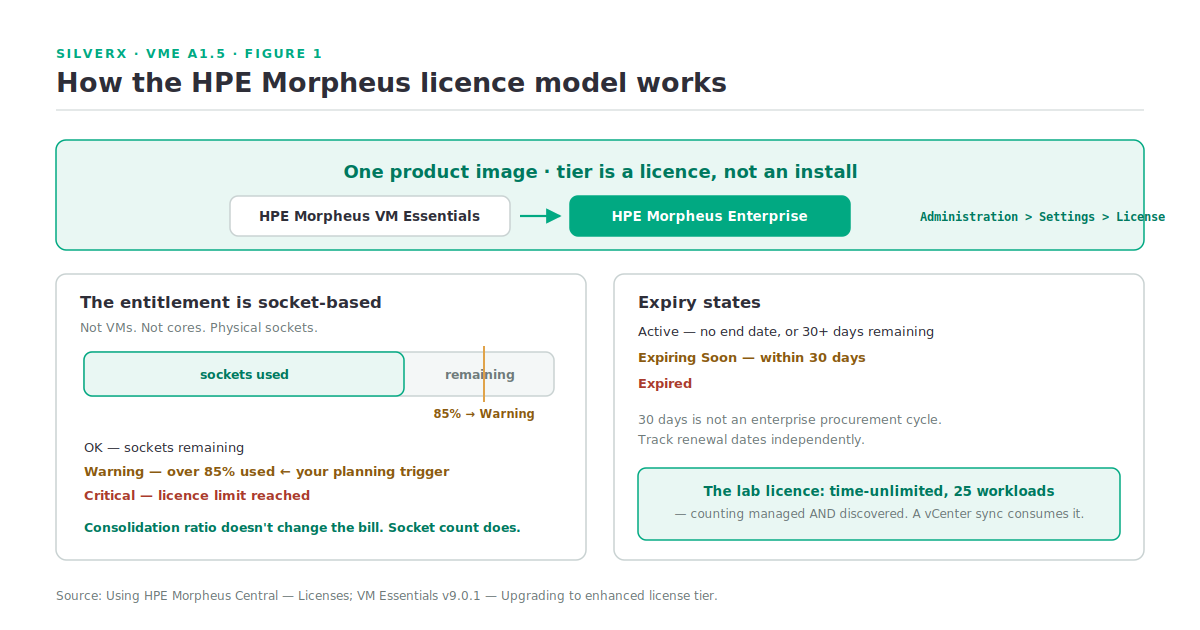
The foundation, and I’ve mentioned it in every post in this track because it changes so much: HPE Morpheus is a single product image for any licensing edition. Elevating from HPE Morpheus VM Essentials Software to HPE Morpheus Enterprise Software is a licence change under Administration > Settings > License — not an install, not a migration.
For a TCO model that means the VM Essentials-to-Enterprise step is a pure licence delta. There’s no migration project, no parallel run, no second platform to operate during transition. That’s genuinely unusual, and it’s worth an explicit line in any multi-year model because it lets you defer the Enterprise spend without stranding the investment.
Mechanic two: the entitlement is socket-based
This is the mechanic people most often guess wrong, and it’s documented plainly in HPE Morpheus Central — the GreenLake control panel for managing multiple appliances. Its Licenses screen shows “a high-level breakdown of license tiers, status, and socket usage for all appliances.”
Specifically, per appliance, it reports:
| Field | What it shows |
|---|---|
| Tier | The licence tier associated with the appliance |
| Sockets | Percentage utilised; sockets used and total sockets |
| Status | OK — sockets remaining · Warning — over 85% used · Critical — limit reached |
| State | Active — no end date, or 30+ days to expiry · Expiring Soon — within 30 days · Expired |
(Source: Using HPE Morpheus Central, Licenses.)
Three practical consequences.
Your unit of cost is physical sockets, not VMs. So consolidation ratio doesn’t change your licence bill — but processor selection does. Two 64-core sockets and four 32-core sockets deliver similar compute and different licence positions. That is a hardware-refresh conversation as much as a software one.
85% is your planning trigger, not 100%. The Warning state exists because you need lead time to procure. Wire that into whatever you use for capacity alerting rather than discovering it at Critical.
Expiry has a documented 30-day warning window. Expiring Soon at 30 days is not much runway for an enterprise procurement cycle. Track renewal dates independently.
Mechanic three: the lab licence, and its trap
Install without a licence and Morpheus automatically sets up a lab licence: time-unlimited, but limited to 25 managed and discovered workloads.
The word doing the damage is discovered. Point a lab-licensed appliance at a real vCenter and brownfield sync will consume the allowance almost immediately — not because you provisioned anything, but because Morpheus discovered what was already there. Every PoC I’ve seen hit this treated it as a scale problem for about half a day.
Plan PoCs against a scoped vCenter folder or a small dedicated cluster, and get a trial licence for anything resembling a real evaluation.
Mechanic four: software licence tracking is a separate thing
Don’t confuse the product licence with the Licenses tab under Administration > Settings > Provisioning, which is where software licences are added for tracking and applied on provision. Currently only Windows licence types are available there, and a Master Tenant user with the permission can scope which subtenants may consume them.
It’s a useful feature — Windows licence position is a real compliance exposure — but it’s unrelated to your Morpheus entitlement. Whether other licence types have been added in your build.
Building a TCO comparison that holds up
Here’s the framework. The categories matter more than any number I could supply.
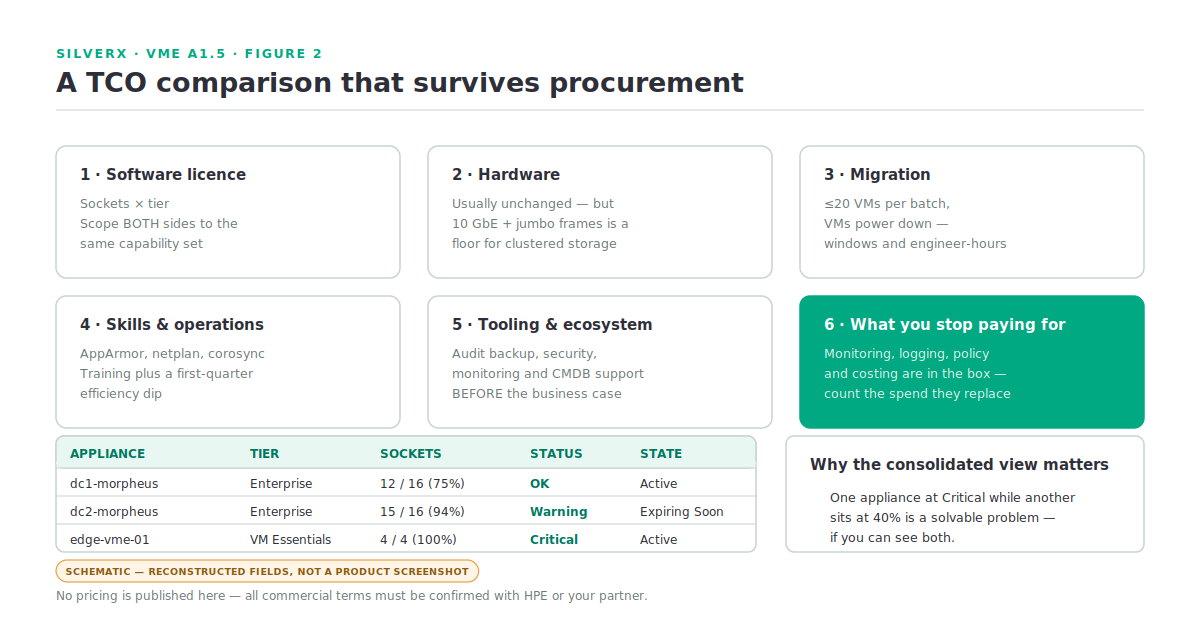
1. Software licence
Sockets × tier, for Morpheus. For the incumbent, the equivalent per whatever unit that vendor now uses. Scope both sides to the same capability set — this is where most comparisons quietly cheat.
That last point deserves emphasis. If you’re comparing VM Essentials against a hypervisor SKU, fine. If you’re comparing Morpheus Enterprise against a hypervisor SKU, you’re comparing a management platform against a hypervisor and the comparison is meaningless. Morpheus Enterprise includes monitoring, logging, costing, policy, multi-tenancy and automation — so the honest comparison is against the incumbent hypervisor plus its management suite, at whatever tier gives equivalent function.
2. Hardware
Usually unchanged if you’re re-platforming onto existing servers — but check the qualification matrix and reference architecture in the VM Essentials area of the HPE Support Center first. And note the 10 Gbps with jumbo frames floor for clustered storage: if your hosts are 1 GbE, networking is a real capital line, not a rounding error.
Socket count is the variable to model at refresh. Fewer, larger sockets is the direction that helps a socket-based licence.
3. Migration
The line most models understate. From A1.4 – ask-a-better-question-than-is-it-as-good-as-esxi: bulk migration is currently recommended at no more than 20 VMs at a time, VMs power down for the transfer, RDMs aren’t supported, and source VMs must have no attached ISOs. Model this as maintenance windows and engineer-hours, and add validation time per wave.
4. Skills and operations
AppArmor rather than SELinux, netplan rather than ESXi networking, Corosync and DLM rather than vCenter cluster views. Budget training and an efficiency dip during the first quarter. Teams that are already Linux-comfortable will find this smaller than teams that aren’t — but nobody’s is zero.
5. Tooling and ecosystem
Any tool in your stack that doesn’t support HVM is either a replacement cost or a blocker. Audit backup, security, monitoring and CMDB integrations before the business case, not after.
6. What you stop paying for
The category people forget, and it’s often the one that makes the model work. Morpheus Enterprise includes monitoring, logging, policy and costing. If you’re currently paying separately for any of those, that spend is in scope for the comparison.
Gotchas and caveats
Sockets, not cores, not VMs. Model the refresh, because socket count is the lever.
Discovered workloads count against the lab licence. Scope your PoC.
Compare like with like. Hypervisor-versus-hypervisor, or full-stack-versus-full-stack. Not one of each.
Multi-appliance estates need Morpheus Central to see licence position. If you’re running several appliances, that consolidated Licenses view is how you avoid one appliance hitting Critical while another sits at 40%. Morpheus Central needs a GreenLake account, an appliance on OS v9.0.0 or later, and outbound internet with TLS inspection and proxies correctly exempted.
Every commercial term here is The mechanics above are documented; pricing, packaging, bundle contents and any promotional terms are not, and must come from HPE or your partner in writing.
Beware TCO models with no migration line. If someone shows you a comparison where switching platforms is free, the model is wrong, whichever direction it favours.
Key takeaways
- One image, two tiers — VM Essentials to Enterprise is a licence change, so model it as a pure delta with no migration project.
- Entitlement is socket-based:
Warningat 85%,Criticalat the limit,Expiring Soonat 30 days. - The lab licence counts discovered workloads toward its 25. Scope your PoC or get a trial licence.
- Software licence tracking (currently Windows only) is a different feature from your product entitlement.
- A defensible TCO has six lines: licence, hardware, migration, skills, tooling, and what you stop paying for.
- Compare equivalent capability sets, and never publish a comparison without a migration line.
What’s next
Next in this track: A1.6 — Sizing and Prerequisites. Turning all of this into a build sheet: how to size hosts and the manager, what the network actually has to deliver, the qualification matrix, and the pre-flight checklist I run before touching a cluster build.
Sources: Using HPE Morpheus Central (Licenses — tier, status, socket usage, state thresholds; Prerequisites); HPE Morpheus VM Essentials Software Documentation v9.0.1