This opens the HPE Zerto Software track of the SilverX — HPE Morpheus Enterprise Series. Morpheus orchestrates and OpsRamp observes; this is the protect pillar of the HPE CloudOps Software suite.
“What’s your RPO?” is a question most teams answer with a number they’ve never tested. Nightly backup means the honest answer is up to 24 hours. Hourly snapshots mean up to an hour. Both answers are fine right up until the morning you need them, and then someone in a meeting works out what an hour of transactions was actually worth.
HPE Zerto Software (Zerto) attacks that number from a different direction. Instead of taking periodic point-in-time copies, it replicates every write, continuously, and keeps a rolling journal you can rewind into. Zerto — now a Hewlett Packard Enterprise company — describes itself as disaster recovery, ransomware resilience and workload mobility software for virtualised infrastructure and cloud, built on continuous data protection.
This post covers what CDP actually is mechanically, why that changes the recovery conversation, and — the part that matters if you’re running HPE Morpheus VM Essentials Software or HPE Morpheus Enterprise Software — precisely what is and isn’t supported on HVM today. That last section is the one to read before you promise anything to a risk committee.
Continuous data protection, mechanically
Forget the marketing framing and follow the write.
You define a virtual protection group (VPG) — a set of VMs grouped for recovery. The classic example in the documentation is a three-tier application: software, database, web server, all of which must be replicated together to maintain data integrity. The VPG, not the VM, is the unit of protection, boot ordering, and failover.
When you create a VPG, protected disks sync with the recovery site. After that initial sync, here’s the loop:
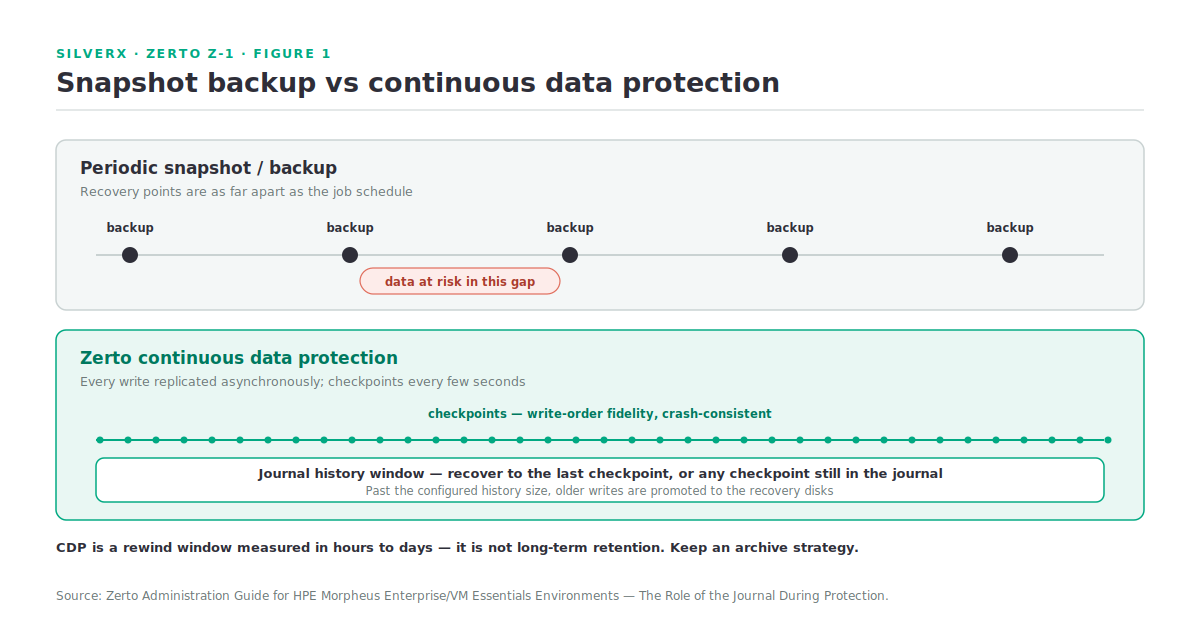
- Every write to a protected VM is copied by Zerto to the recovery site. The write continues to be processed normally at the protected site — the copy is sent asynchronously.
- At the recovery site, a Virtual Replication Appliance (VRA) writes that copy into a journal. Each protected VM has its own dedicated journal, consisting of one or more volumes.
- Every few seconds, all journals get a checkpoint time-stamp. Checkpoints ensure write-order fidelity and crash consistency.
- Data and checkpoints accumulate until the configured journal history size is reached. Past that, older writes are promoted onto the recovery virtual disks.
(Source: Zerto Administration Guide for HPE Morpheus Enterprise/VM Essentials Environments, The Role of the Journal During Protection.)
Two consequences fall straight out of that design.
Your recovery points are seconds apart, not hours. You recover to the last checkpoint, or to any user-selected crash-consistent checkpoint still held in the journal. The documentation gives the obvious use case plainly: if the VM was hit by a virus, you recover to a point-in-time before the attack.
Your journal history is your rewind window. Set 24 hours and you can recover to any checkpoint within 24 hours; beyond that, the mirror volumes maintained by the VRA have already been updated. Journal sizing is a recovery-capability decision disguised as a storage decision.
Where the data actually lives
The journal defaults to the storage used for recovery of each VM, overridable at both VM and VPG level — and a dedicated per-VM journal is what lets journal data survive a change of recovery host.
At recovery, VMs are created at the recovery site, the VRA-managed recovery disks are attached, and journal information is promoted to bring them to the selected checkpoint. Usefully, machines can be used during promotion; Zerto ensures the user sees the latest image even when part of it still comes from the journal. The caveat: VMs cannot be moved to another host during promotion.
CDP versus snapshot backup — the honest comparison
| Snapshot / periodic backup | Zerto CDP | |
|---|---|---|
| Recovery points | Per backup job — hours apart | Checkpoints every few seconds |
| Mechanism | Periodic point-in-time copy | Every write replicated asynchronously |
| Consistency | Per snapshot | Write-order fidelity, crash-consistent checkpoints |
| Rewind window | Retention of stored copies | Configured journal history |
| Production impact | Snapshot overhead at job time | Write continues normally; copy sent async |
| Recovery unit | Per VM or job | The VPG — application-consistent grouping with boot order |
The honest caveat in the other direction: CDP is not long-term retention. A journal is a rewind window measured in hours to days, not a seven-year archive. Zerto’s answer to longer retention is retention sets and Extended Journal Copy — and, as we’ll see, that’s one of the features not yet available on HVM.
Zerto on HVM: what you actually get today
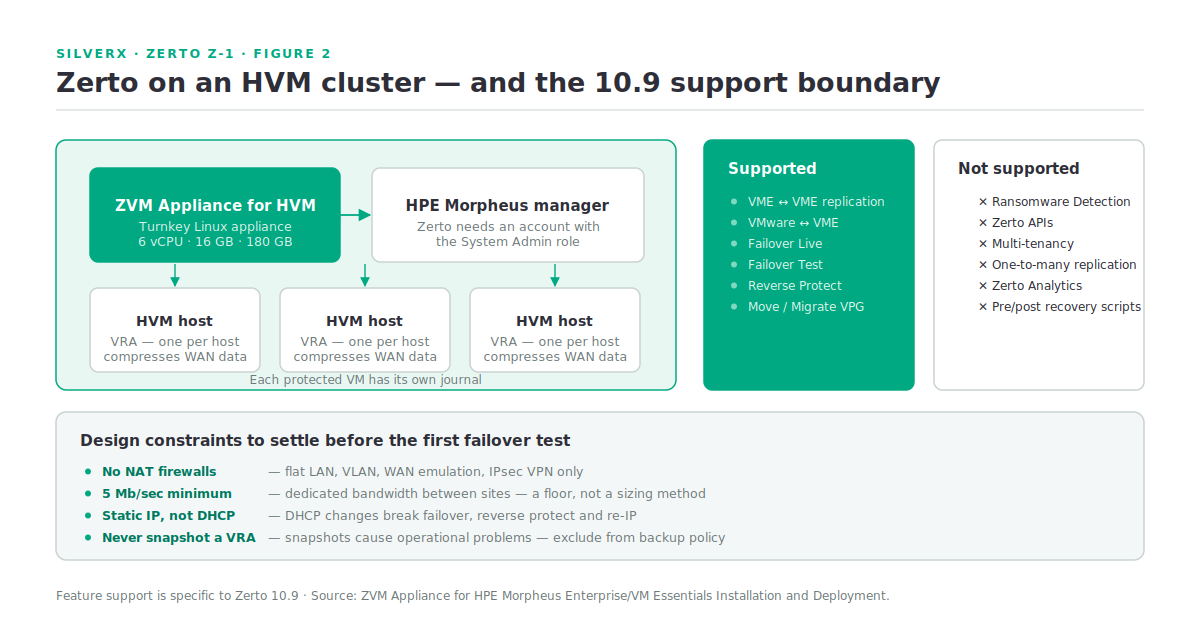
Here’s where this post earns its place. Zerto on HPE Morpheus is delivered as the ZVM Appliance for HVM — a turnkey, Linux-based virtual appliance with microservices for security and authentication, logging, and management, designed for deployment on the HPE Morpheus Enterprise / VM Essentials platforms.
The supported-features table is the most important page in the whole deployment guide. For Zerto version 10.9:
| Supported | Not supported |
|---|---|
| VME-to-VME replication | Zerto Analytics |
| Cross-platform replication: VMware ↔ VME | Ransomware Detection |
| Failover Live | One-to-many replication |
| Failover Test | Multi-tenancy |
| Reverse Protect | Zerto APIs |
| Move / Migrate VPG (VMware ↔ VME) | Extended Journal Copy indexing and application-aware retention |
| Pre- and post-VPG recovery scripts |
(Source: ZVM Appliance for HPE Morpheus Enterprise/VM Essentials Installation and Deployment, Supported Features and Configurations.)
Read that right-hand column twice. Ransomware Detection is one of the headline reasons people buy Zerto, and on HVM in 10.9 it isn’t there yet. Neither are the APIs, which matters enormously if your DR runbooks are automated. Neither are pre- and post-recovery scripts, which is how most mature runbooks handle application startup ordering beyond simple boot delay.
None of that makes Zerto on HVM a bad choice — VME-to-VME and cross-platform VMware↔VME replication with live failover, test failover, reverse protect and move is a genuinely strong feature set for a first-generation platform integration. But if you build a business case on the ransomware-resilience pillar and deploy on HVM today, you will have an awkward conversation later. This table against the Zerto version you’re actually deploying — this is exactly the kind of matrix that changes release to release, and the whole point of checking is that it should get better.
Sizing and prerequisites
The ZVM Appliance for HVM asks for real resources:
- 6 vCPU (no reservation), 16 GB RAM with 8 GB reserved, 180 GB storage
etcddisk performance: at least 50 sequential IOPS, and 500 recommended for heavily loaded clusters- Ubuntu 24.04 on the Morpheus host, and AVX exposed to the guest (
grep -o avx /proc/cpuinfo) - Datastores: HPE Alletra B10000 (via the Alletra MP Plugin), NFS, local (directory pool), GFS2
- Keycloak authentication — local users plus SAML/OpenID, with mobile MFA
Deployment runs through the Morpheus UI in a way that will feel familiar after the VM Essentials track: create a KVM service plan (16 GB, 6 cores, 1 core per socket), upload the Zerto QCOW2 bundle to Library > Virtual Images as Debian 12 64-bit with cloud-init enabled, then provision an HVM instance from it. Zerto needs a Morpheus account with the System Admin role.
Gotchas and caveats
No NAT. At all. The Zerto architecture explicitly does not support NAT firewalls. Flat LANs, VLANs (including private and stretched), WAN emulation and IPsec VPN are supported. Find this out during design, not during the first failover test.
Minimum 5 Mb/sec dedicated bandwidth between sites — and that’s a floor, not a sizing method. Your actual requirement is the change rate of the protected workloads.
Static IP, not DHCP. Zerto recommends static addressing for production ZVM appliances, because DHCP-assigned addresses can change and cause connectivity issues during failover, reverse protection, or re-IP operations.
You cannot snapshot a VRA. Snapshots cause operational problems for VRAs. Make sure that’s excluded in whatever backup policy sweeps your infrastructure VMs.
VRA installation is GUI-only on HVM. In 10.9, VRAs install on all hosts of a cluster, APIs aren’t supported for installation, and network and datastore in cluster VRA settings can’t be edited afterwards. Installing the Zerto filter may also need internet access on the VME hosts.
Cross-platform replication has guest prerequisites. VMware → HVM needs VirtIO storage and network drivers plus the QEMU Guest Agent in the guest (drivers in initramfs for Linux). HVM → VMware needs VMware Tools or open-vm-tools. Miss these and the VM replicates fine, then fails to boot after failover — the worst possible time to find out.
Port 9669 is dead. On the Linux ZVM Appliance (Zerto 9.7 and later) it is not used and must not be opened. If your firewall request is copied from an older Windows-based ZVM runbook, fix it.
Key takeaways
- CDP replicates every write and stamps checkpoints every few seconds — recovery points are seconds apart, and your journal history is your rewind window.
- The VPG is the unit of protection: grouped VMs, boot order, one consistent recovery.
- CDP is not long-term retention. Don’t let it replace an archive strategy.
- On HVM in Zerto 10.9, you get VME↔VME and VMware↔VME replication, live and test failover, reverse protect and move — but not Ransomware Detection, Zerto APIs, multi-tenancy, one-to-many, or pre/post recovery scripts.
- The ZVM Appliance wants 6 vCPU / 16 GB / 180 GB and cares about etcd IOPS.
- No NAT support, 5 Mb/sec minimum, static IPs, and don’t snapshot the VRAs.
What’s next
Next in this track: Z-2 — Zerto Architecture: VRA, ZVM, and the Journal. We take the three components apart properly — what the VRA does to the I/O path, how the ZVM Appliance’s microservices are arranged, how bandwidth is distributed by VPG priority, and what the port map actually looks like when you’re filling in a firewall request.
Sources: Zerto Administration Guide for HPE Morpheus Enterprise/VM Essentials Environments (Introduction to Zerto for HVM; Introduction to Protecting Virtual Machines; The Role of the Journal During Protection; Managing VRAs; Licensing) and ZVM Appliance for HPE Morpheus Enterprise/VM Essentials Installation and Deployment (System Requirements; Supported Features and Configurations; Public DNS Targets and Firewall Port Requirements; Considerations; HVM Permissions Required by Zerto; Prerequisites for Cross Replication; Limitations and Known Issues; Deploying the ZVM Appliance)