This opens the HPE Morpheus Enterprise track of the SilverX — HPE Morpheus Enterprise Series. Track 1 covers the hypervisor layer; this track is the platform that sits above it.
Start here, because it reframes everything else: HPE Morpheus Enterprise Software and HPE Morpheus VM Essentials Software are the same product image. Moving from one to the other is a licence change under Administration > Settings > License — not an install, not a migration. (Source: HPE Morpheus VM Essentials Software Documentation v9.0.1, Upgrading to enhanced license tier.)
That single fact explains a lot of the confusion in the market. People compare “Morpheus” against a CMP and against a hypervisor platform in the same breath and can’t work out which one it is. It’s both, tiered. VM Essentials is the virtualisation layer — HVM clusters, vCenter integration, VM lifecycle. Morpheus Enterprise keeps all of that and adds the hybrid-cloud management platform: dozens of cloud endpoints, an automation engine, policy governance, multi-tenancy, costing, and self-service.
This post is the map of that upper tier — what the appliance is made of, the four nouns you must understand before anything else makes sense, and where the platform’s real boundaries are.
The appliance: one package, four tiers
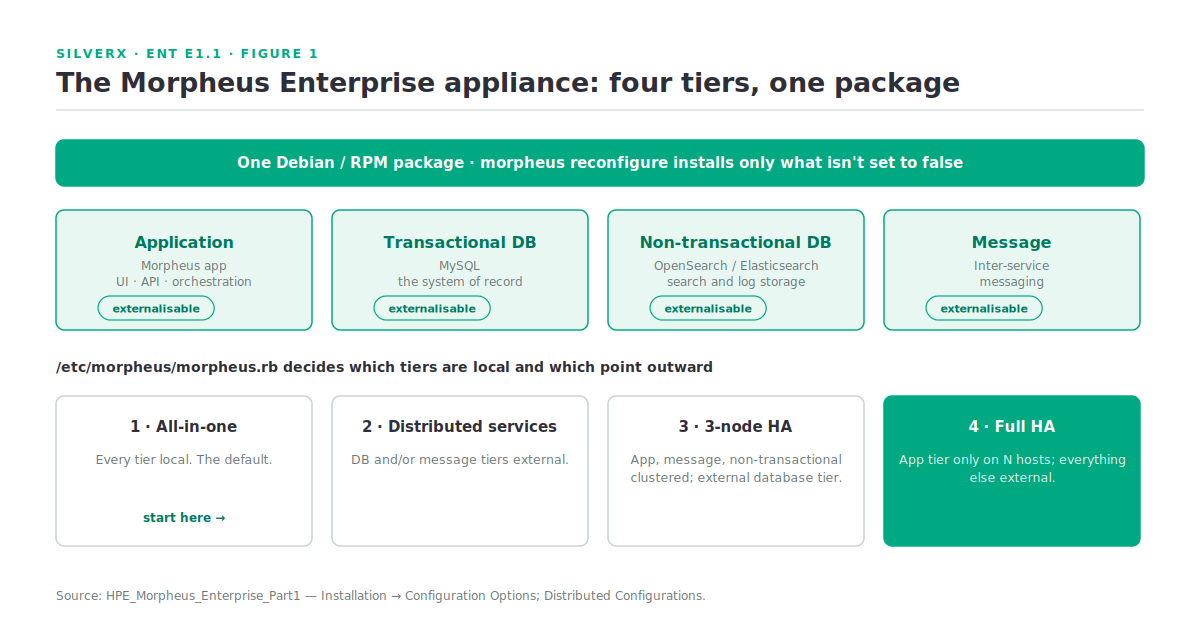
Morpheus Enterprise ships as a Debian or RPM package. The default installation puts everything on one VM or bare-metal host, and a single morpheus reconfigure installs and wires up every required service.
There are four service tiers inside that package:
| Tier | What it does |
|---|---|
| Application | The Morpheus app itself — UI, API, orchestration |
| Transactional database | MySQL — the system of record |
| Non-transactional database | Search and log storage (OpenSearch/Elasticsearch) |
| Message | Inter-service messaging |
Any of them can be externalised. The config file /etc/morpheus/morpheus.rb decides what gets installed locally versus pointed at an external service — set a tier to false and reconfigure skips it. That produces four documented deployment shapes:
- Single host (all-in-one) — the default; every tier local.
- Single host with distributed services — database and/or message tiers externalised, the rest local.
- Clustered hosts with distributed transactional database (3-node HA) — application, message, and non-transactional tiers clustered across three or more hosts, all pointing at an external database tier.
- App hosts with distributed services (full HA) — application tier only on one or more hosts, everything else external.
(Source: HPE_Morpheus_Enterprise_Part1, Installation → Configuration Options / Distributed Configurations.)
# The appliance config that decides your topology
sudo vi /etc/morpheus/morpheus.rb

# e.g. externalise MySQL: mysql['enable'] = false, then point at the cluster
#      externalise search / message tiers the same way

sudo morpheus-ctl reconfigure     # installs only what isn't set to false
sudo morpheus-ctl status
The important design point: start all-in-one, grow outward. Because the tiers are declared rather than baked, a PoC appliance can become the application tier of a full-HA build without rebuilding the platform. I’d still size the transactional database like you mean it from day one — that’s the tier you regret under-provisioning.
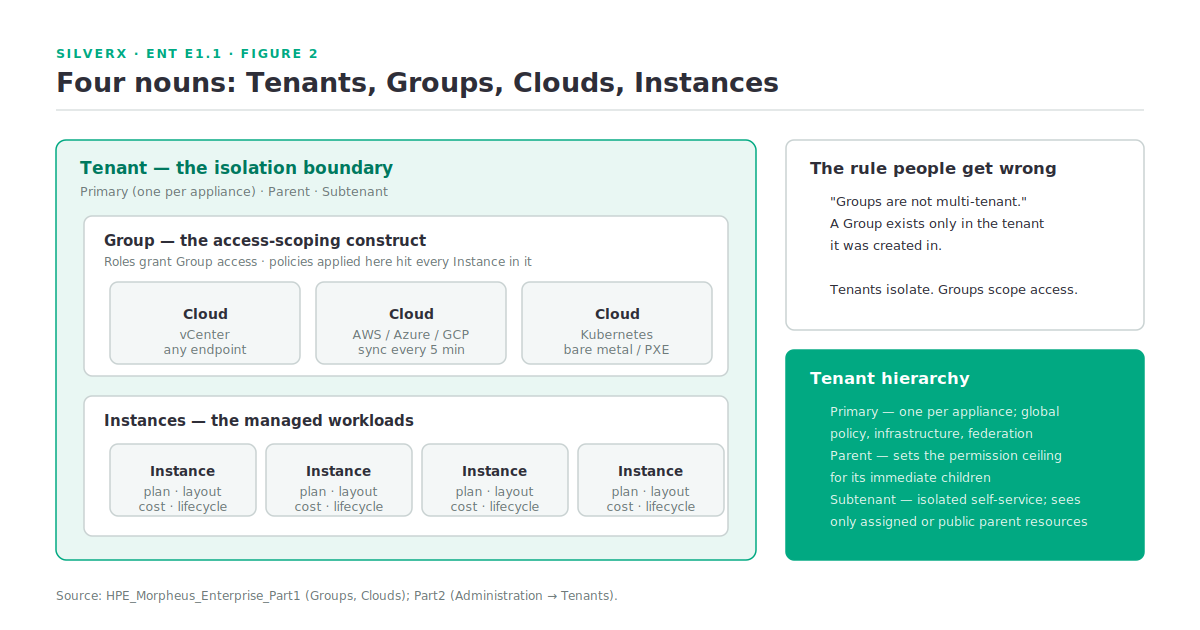
Four nouns: Groups, Clouds, Instances, Tenants
Every argument I’ve watched about Morpheus permissions traces back to someone conflating two of these. Get them straight now.
Clouds
A Cloud is any consumable endpoint — public, private, hybrid, or bare metal. The supported list is long and genuinely broad: Amazon, Azure (public and Stack), Google Cloud, Alibaba, Oracle Public Cloud and Oracle VM, IBM Cloud, Huawei, DigitalOcean, Open Telekom Cloud, UpCloud, OpenStack, Nutanix, SCVMM, Hyper-V, XenServer, Platform9, Canonical MaaS, Kubernetes, VMware vCenter / ESXi / vCloud Director / VMware on AWS, plus generic PXE and bare-metal cloud types for HPE, Dell, Supermicro, and UCS hardware. (Source: HPE_Morpheus_Enterprise_Part1, Clouds → Supported Cloud Types.)
Clouds sync on a schedule — a standard sync every five minutes by default, plus a nightly sync. When something you changed at the provider hasn’t shown up, that’s usually the answer.
Groups
A Group defines what resources a user can reach. Clouds are added to Groups; a user can only access Clouds in the Groups their Role grants. Networks, datastores, resource pools, and folders carry their own additional Group access settings. Policies applied to a Group are enforced on every Instance provisioned into or moved into it.
One line from the docs is worth pinning to the wall: “Groups are not multi-tenant. A group only exists in the tenant it is created in.” Groups are an access-scoping construct, not an isolation boundary.
Instances
An Instance is the managed workload — VM, container, cluster node, or an XaaS item — carrying its own plan, layout, network config, tags, cost, and lifecycle. It’s the unit that policies, costing, and day-2 actions all attach to.
Tenants
Tenants are the isolation boundary. Morpheus Enterprise organises them into three types:
- Primary tenant — created during initial installation; only one per appliance. Configures global policies, integrates infrastructure, manages identity federation, and scopes resources to any tenant in the hierarchy.
- Parent tenant — any tenant with children beneath it (the primary tenant or a subtenant can be one). Defines the tenant roles that cap permissions for its children, and assigns resources only to its immediate children.
- Subtenant — an isolated self-service environment for a business unit or customer. Creates roles within the boundary its parent set, and can see only its own resources plus what the parent explicitly assigned or made public.
(Source: HPE_Morpheus_Enterprise_Part2, Administration → Tenants.)
If you’re a service provider, this hierarchy plus white-labelling is the commercially interesting part of the platform, and I’ll spend a whole module (E4) on it.
What comes in the box beyond provisioning
Worth knowing up front, because these frequently get bought separately elsewhere:
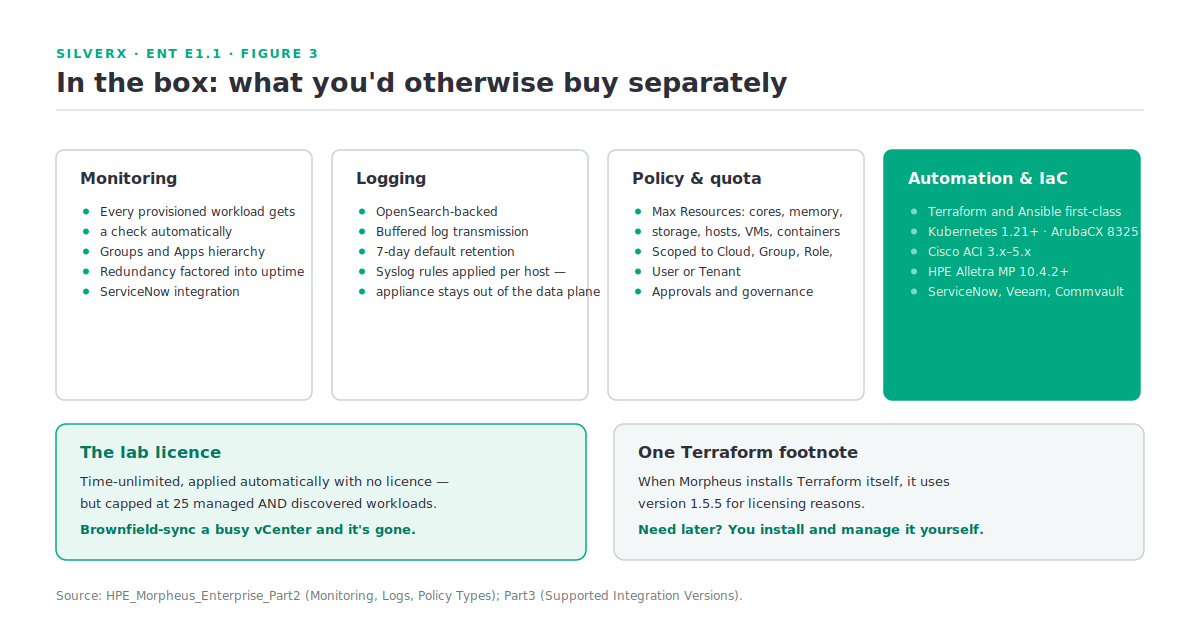
- Monitoring. Anything provisioned in Morpheus automatically gets a check, organised hierarchically into monitoring Groups and Apps, with redundancy factored into uptime calculation. There’s a ServiceNow monitoring integration.
- Logging. Backed by OpenSearch, with buffered log transmission and a default 7-day retention adjustable under Administration > Settings > Logs. Syslog forward rules are applied per host — which deliberately keeps the appliance out of the data plane. Extend retention and you may need to scale out OpenSearch.
- Policy and quota. Max Resources policies cap cores, memory, storage, hosts, VMs, and containers per Cloud, Group, Role, User, or Tenant.
- Automation and IaC. First-class Terraform and Ansible integrations, among a long verified list — Kubernetes 1.21+, ArubaCX 8325 series, Cisco ACI 3.x–5.x, HPE Alletra MP Storage 10.4.2+, Commvault, Veeam, Rubrik, F5, Infoblox, ServiceNow.
One Terraform footnote that has bitten people: when Morpheus handles the Terraform installation itself, it uses version 1.5.5 for licensing reasons. Need something later, and you install and manage Terraform yourself.
Gotchas and caveats
The lab licence is real but capped. Install without a licence and Morpheus sets up a lab licence automatically: time-unlimited, but limited to 25 managed and discovered workloads. Discovered counts against you — brownfield-sync a busy vCenter and you’ll hit the ceiling faster than you expect.
Deleting a Cloud is not a shortcut. Every Instance, managed host, and VM must be removed first. Plan decommissions accordingly.
Groups ≠ tenants. Repeating it because it’s the single most common design error: use Tenants for isolation, Groups for access scoping.
Appliance logs aren’t in the Logs section. They live in /var/log/morpheus/ and under Administration > Health. The Logs section is workload logging.
Morpheus Central is a separate thing. HPE Morpheus Central is a cloud-based control panel in HPE GreenLake for managing multiple Morpheus appliances at scale — centralised visibility and real-time monitoring across deployments. It needs a GreenLake account, an appliance on OS v9.0.0 or later, and outbound internet with any TLS inspection, proxy auth, or secure web gateway correctly exempted. Don’t confuse it with the appliance UI. (Source: Using HPE Morpheus Central.)
Version-sensitive integrations. The compatibility table is precise about minimum versions — Nutanix AOS 6.5.3.7+ for Morpheus Enterprise 6.3.4 and higher, for instance. The table for your build rather than trusting anything quoted second-hand, including this post.
Key takeaways
- Morpheus Enterprise and VM Essentials are one image, two licences — plan phasing around that.
- The appliance is four tiers you can externalise individually via
morpheus.rb; start all-in-one and grow. - Learn the nouns: Clouds are endpoints, Groups scope access, Instances are workloads, Tenants are the isolation boundary. Groups are not multi-tenant.
- Monitoring, logging, policy, and costing are in the box — worth counting when you build the TCO comparison.
- The free lab licence counts discovered workloads toward its 25, so brownfield syncs consume it fast.
What’s next
Next in this track: E1.2 — Morpheus Enterprise Architecture: appliance, agents, and workers. We take the four tiers apart properly, follow a provisioning request end to end, and look at where the agent fits, what runs in-band versus out-of-band, and how the whole thing behaves when a tier goes away.
Sources: HPE_Morpheus_Enterprise documentation, HPE Morpheus Central, and HPE Morpheus VM Essentials Software Documentation v9.0.1
Pingback: Almost every failure is one of three things – silverX.org