Second post in the HPE Zerto Software track. Z-1 covered what CDP is and what’s supported on HVM; this one is the architecture — and the firewall request.
HPE Zerto Software (Zerto) has fewer moving parts than most DR products, which is one of its quieter advantages. There are three things to understand, and everything else is configuration:
- the ZVM Appliance — the manager
- the VRA — a replication appliance on every host
- the journal — a per-VM rewind buffer at the recovery site
Z-1 covered what those do conceptually. This post is about what they do mechanically, because that’s what determines your sizing, your bandwidth plan, and the ports your network team will ask for.
The VRA: what actually happens to a write
The Virtual Replication Appliance is described in the documentation as “a custom, very thin, Linux-based virtual machine with a small footprint, disk – memory and CPU – and increased security since there are a minimum number of services installed.” It must be installed on every hypervisor that hosts protected VMs at the protected site, and on every hypervisor hosting replicas at the recovery site.
Zerto’s recommendation is stronger than the requirement: install a VRA on every host in each site, so that when a protected VM moves between hosts — within a cluster or to a different one — there is always a VRA available to protect it. On HVM this is less of a choice anyway, since VRAs install at cluster or host level and cover all hosts of the cluster.
Two behaviours matter operationally.
The VRA compresses WAN traffic, adaptively. It compresses data passed from the protected site to the recovery site, and automatically adjusts the compression level according to CPU usage — including disabling it entirely if needed. So compression is not a fixed cost you plan around; it degrades gracefully under CPU pressure. If your replication throughput drops when hosts are busy, this is the first mechanism to consider.
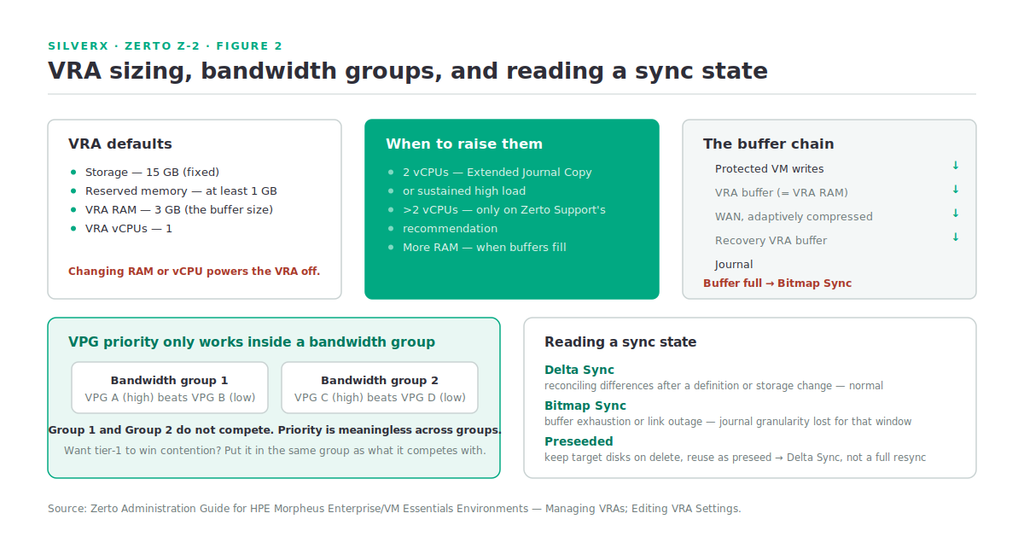
The VRA is a buffer, and buffers fill. The VRA’s RAM allocation “determines the maximum buffer size for the VRA for buffering IOs written by the protected virtual machines, before the writes are sent over the network to the recovery VRA.” The recovery VRA also buffers incoming IOs until they’re written to the journal. And critically: if a buffer becomes full, a Bitmap Sync is performed after space is freed up in the buffer.
That’s the sentence to remember. A Bitmap Sync isn’t a failure, but it means Zerto has stopped tracking individual writes and switched to tracking which blocks changed, then reconciling later. You lose journal granularity for that window. Sustained buffer exhaustion — from an undersized VRA, a saturated link, or a change-rate spike — is how a healthy-looking VPG quietly stops delivering the RPO you promised.
VRA sizing
The defaults are deliberately small, and the documentation is specific about when to change them:
| Setting | Default | When to change it |
|---|---|---|
| Storage | 15 GB | Fixed requirement |
| Reserved memory | at least 1 GB | Floor, not a target |
| VRA RAM | 3 (GB) | Raise it when buffers fill — this is your Bitmap Sync defence |
| VRA vCPUs | 1 | 2 recommended for Extended Journal Copy or high loads; more than 2 only on Zerto Support’s recommendation |
Note that changing RAM or vCPU powers the VRA off to apply the update — so it’s a maintenance-window change, not a live tune. Size it deliberately the first time.
One constraint that will catch a lab build: a VRA cannot be deployed on a host containing VMs with an NVMe EFI bootloader.
Bandwidth: VPG priority, and the group boundary
This is the piece most people get subtly wrong.
The ZVM distributes bandwidth among the VRAs based on VPG priority — VPGs with higher priorities are handled before writes from VPGs with lower priorities. Straightforward enough. But priority operates inside a VRA Bandwidth Group, and that changes the design.
You group VRAs together when they use different networks — for example, when protected and recovery sites are managed by the same management server and you’re replicating from a branch site to a main site. Within a group, VPG priority allocates bandwidth. Between groups, priority is irrelevant: VPG1 on VRA1 in group1 and VPG2 on VRA2 in group2 do not affect each other at all.
The practical consequence: if you want your tier-1 application to genuinely win contention against a bulk replication job, they must be in the same bandwidth group. Setting one to High and the other to Low across two groups achieves precisely nothing. Bandwidth groups are a network-topology construct; priority is a scheduling construct inside it.
Sync types, and what they tell you
Zerto’s status vocabulary is diagnostic if you know it. The three you’ll see most:
- Delta Sync — reconciling differences, typically after a VPG definition change or storage move. Normal, temporary.
- Bitmap Sync — the buffer-exhaustion path described above, and also what follows a link outage. Recovery is happening, but journal granularity for that period is gone.
- Preseeded volumes — when recreating a VPG, you can keep target disks at the peer site (
Keep target disks at the peer siteon delete) and then configure the VM’s volumes to use those saved volumes as preseeded. The VPG does a Delta Sync rather than a full initial sync.
That preseed trick is worth internalising. Rebuilding a large VPG without it means re-replicating everything over the WAN; with it, you reconcile deltas. The documented pattern for moving journal storage is exactly this: delete the VPG keeping target disks, recreate with the new journal storage, add the VMs back configured to use the saved volumes as preseeded.
The port map
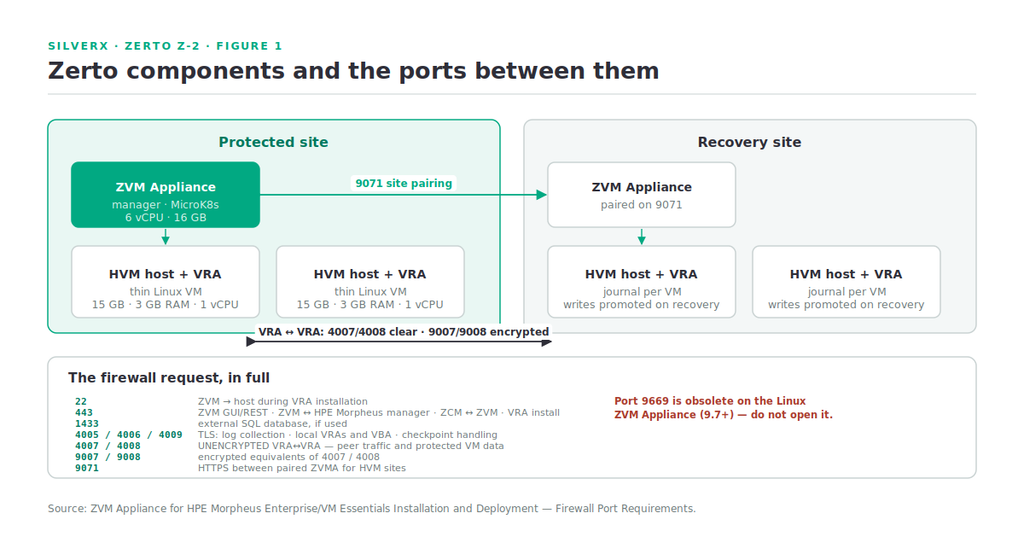
Here it is, in the form your network team wants. This is the documented table for the ZVM Appliance for HVM.
| Port | Purpose |
|---|---|
| 22 | ZVM Appliance → host, during VRA installation |
| 443 | ZVM ↔ ZVM GUI, REST APIs, PowerShell cmdlets · ZVM ↔ HPE Morpheus manager · Zerto Cloud Manager ↔ ZVM · ZVM → host during VRA install |
| 1433 | External SQL database, if one is used |
| 4005 | Log collection, ZVM ↔ site VRAs (TLS over TCP) |
| 4006 | ZVM ↔ local site VRAs and site VBA (TLS over TCP) |
| 4007 | Protecting ↔ peer VRAs (unencrypted TCP) |
| 4008 | VRA ↔ VRA, protected VM data to recovery-site VRA (unencrypted TCP) |
| 4009 | ZVM ↔ local site VRAs, checkpoint handling (TLS over TCP) |
| 9007 | Protecting ↔ peer VRAs (encrypted TCP) |
| 9008 | VRA ↔ VRA, protected VM data to recovery site (encrypted TCP) |
| 9071 | HTTPS between paired ZVMA for HVM sites |
Two things jump out. 4007/4008 are the unencrypted pair; 9007/9008 are their encrypted equivalents. If your data crosses anything you don’t control, that distinction belongs in your design document, not discovered later in a security review.
And 9071 is the site-pairing port — it’s the one you enter when pairing, and the default offered during installation. Pairing itself uses a token generated at the remote site that expires at the earliest of: 48 hours after copying, the next ZVM process termination, or first use. If a pairing attempt fails with a stale token, that third condition is usually why.
The DNS allowlist people forget
Deploying, updating and upgrading the ZVM Appliance needs a set of public DNS targets allowlisted — Debian mirrors and security.debian.org, PyPI, the Ansible PPA, zapps-registry.zerto.com, zvml-upgrade.s3.amazonaws.com, keyserver.ubuntu.com and snapcraft for MicroK8s, k8s.gcr.io and registry.k8s.io, plus Zerto’s own endpoints for licence validation, log upload and CallHome.
That list tells you something about the appliance: it’s MicroK8s-based, which is why the etcd IOPS requirement from Z-1 matters and why an air-gapped deployment needs real planning rather than a firewall exception.
Gotchas and caveats
Set up peer-site routing before defining VRAs. If peer-site VRAs aren’t reachable via the default gateway, routing must exist first. Routing added afterwards applies only to VRAs installed after the change — existing VRAs keep using the default gateway, and if that gateway stops being used you must reinstall the VRAs built before the routing change.
The ZVM enables SSH on the Morpheus manager during VRA installation. Temporary and by design, but worth knowing before your security monitoring flags it.
Unpairing sites deletes VPGs. If VPGs exist on either site being unpaired, they are deleted — with a warning, but deleted. Check the Events tab on the recovery site for where saved target disks ended up.
VRA auto-population is cluster-controlled on HVM. When VRAs are installed at cluster level, auto-population is governed by the cluster configuration only — site-level Workload Automation settings do not apply. Enable it during cluster installation or in cluster settings.
Don’t put the journal on the wrong tier. The journal defaults to the recovery storage for each VM and is overridable per VM and per VPG. It absorbs every write for the whole history window — treat it as a performance-relevant tier, not leftover capacity.
Key takeaways
- The VRA compresses adaptively and buffers writes; a full buffer triggers a Bitmap Sync and costs you journal granularity. Raise VRA RAM before that becomes routine.
- VRA defaults are 15 GB / 1 GB reserved / 3 GB RAM / 1 vCPU — 2 vCPUs for high load, more only on Support’s advice. Changes power the VRA off.
- VPG priority only arbitrates inside a VRA Bandwidth Group. Cross-group priorities do nothing.
- **Preseeded volumes +
Keep target disks at the peer site** turn a VPG rebuild into a Delta Sync instead of a full resync. - Know which ports are encrypted: 4007/4008 unencrypted, 9007/9008 encrypted, and 9071 pairs sites.
- The appliance is MicroK8s-based — the DNS allowlist and etcd IOPS requirement both follow from that.
What’s next
Next in this track: Z-3 — Building Your First VPG. The wizard end to end — grouping VMs that must recover together, boot ordering, journal sizing against a real RPO, SLA settings, and running a Failover Test that actually proves something.
Sources: Zerto Administration Guide for HPE Morpheus Enterprise/VM Essentials Environments (Managing VRAs; Installing a VRA; Editing VRA Settings; Pair to Another Site; Unpair Sites; Creating a VPG; Enabling Protection to Continue when Journal Storage will be Unavailable) and ZVM Appliance for HPE Morpheus Enterprise/VM Essentials Installation and Deployment (Installing Virtual Replication Appliances; VRA Installation Requirements; Public DNS Targets and Firewall Port Requirements; Considerations)