Third post in the HPE Morpheus VM Essentials track. A1.2 took a host apart; this one covers the appliance that drives them all.
Hypervisor comparisons are fun. Manager comparisons are where deployments are actually won and lost, because the manager is what your team touches every day — and it’s the layer that decides whether multi-team access works, whether costs are attributable, and whether you find out about a problem before your users do.
HPE Morpheus VM Essentials Software (VM Essentials, VME) ships its manager as an appliance. This post walks the parts that matter in practice: the settings that quietly govern the whole system, the plan and RBAC model, and the operational surfaces. If you’re building a PoC evaluation checklist, most of it lives here.
Settings: small page, large blast radius
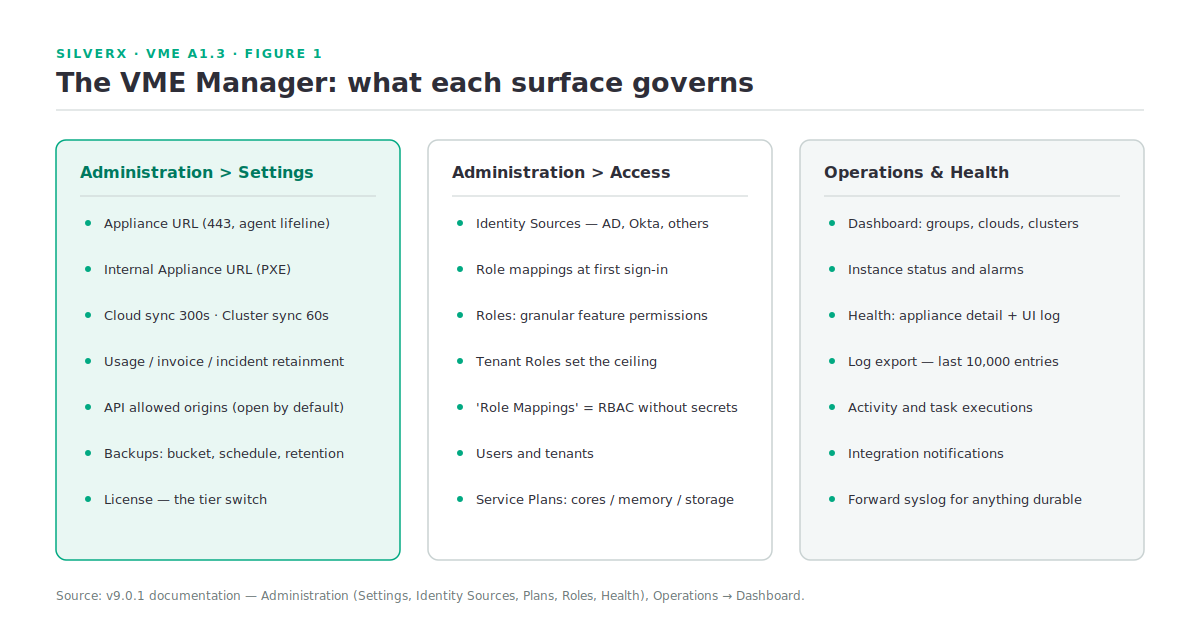
Administration > Settings holds global configuration for the appliance, whitelabelling, provisioning, monitoring, backups, logs, software licences, and the VM Essentials licence itself. Five fields there deserve deliberate decisions rather than defaults.
Appliance URL
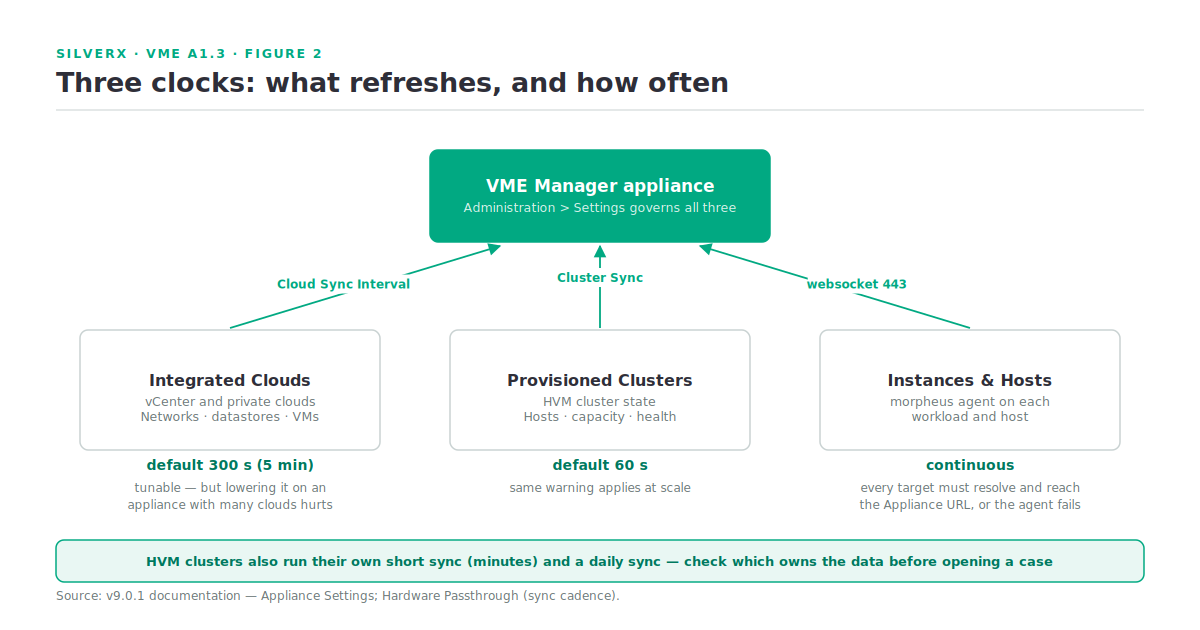
The default URL used for agent install and agent functionality. All Instances and Hosts must resolve and reach this URL over 443 or the agent will not install and cannot communicate. Alternate Appliance URLs can be set per cloud under Edit Cloud > Advanced Options, which is how you handle split DNS or a segmented estate properly.
There’s also an Internal Appliance URL (PXE) for bare-metal provisioning, where the appliance must be routable with minimal NAT masquerading; unset, it falls back to the default.
The two sync intervals
| Setting | Default | What it refreshes |
|---|---|---|
| Cloud Sync Interval | 300 seconds (5 minutes) | Data from cloud integrations |
| Cluster Sync Interval | 60 seconds | Data from provisioned clusters |
Both are tunable, and both carry the same documented warning: appliances managing a very large number of clouds or clusters may be adversely affected by setting these too low. The instinct when someone complains that the UI lags reality is to shorten the interval. Resist it — you’ll trade a cosmetic delay for a real performance problem. Diagnose why a sync is slow first.
The retainment settings
Three database-growth governors, and one has a default that surprises people:
- Usage Retainment — days to keep account usage (metered costing) records. Not set by default, meaning usage records remain indefinitely. It doesn’t affect generated invoice records.
- Invoice Retainment — days to keep invoice records; very large invoice tables can affect application stability.
- Incident Retainment — days to keep incident records.
An appliance that’s been running for a year with unset usage retainment has a table nobody has looked at. Set a value that matches your actual reporting window during build, not during an incident.
API Allowed Origins
A CORS field specifying which origins may access the VM Essentials API. By default all origins are allowed; populate it and you’ve established an exclusive allowlist. If anyone in your organisation is building tooling against the API, this is a two-minute hardening step that’s easy to forget forever.
Service Plans: the sizing contract
Service Plans determine the compute resources available to each Instance — cores, memory, storage. They’re used in three places, which is why they matter more than a t-shirt-size dropdown suggests:
- At provisioning, selecting the resources a new Instance gets.
- When converting discovered instances in integrated clouds to VME-managed Instances — you pick the plan that best fits the VM as it currently is.
- On reconfigure, where a new plan redefines what the Instance should have.
Plans can be tight or open-ended: either restrict users to exactly what the plan defines, or let them raise the values at provision time. VM Essentials seeds a set of plans for supported cloud types out of the box, more may sync in when you add clouds, and you can create your own or edit the seeded ones for private cloud types. Availability is governed by Group Access permissions on the plan.
That second use — brownfield conversion — is the one to design for. Sloppy plan definitions turn a clean vCenter onboarding into a hundred instances mapped to plans that don’t reflect what they’re actually running, and every cost report afterwards inherits that error.
Identity and RBAC
VM Essentials integrates with the common identity sources — Active Directory, Okta, and others — configured from the Identity Sources button on the Users list page. These integrations map roles in the identity provider to equivalent roles in VME so users land with the right role at first sign-in.
The permission model itself is unusually granular, and the documentation does something I wish more vendors did: for each permission it gives both a recommendation for who should hold it and a separate recommendation for what the Tenant Role should be. A few that set the tone:
| Permission | Options | Why it matters |
|---|---|---|
| Admin: Appliance Settings | None, Full | Gates the Appliance and License tabs — appliance URL, tenant/user management, email, proxy, currency, and which cloud types are enabled. Docs recommend Master Tenant roles only, and None on the Tenant Role |
| Admin: Identity Source | None, Role Mappings, Full | “Role Mappings” lets someone manage RBAC mappings without seeing server IPs and admin usernames — a genuinely useful middle tier |
| Admin: Backup Settings | None, Full | Default backup bucket, schedule, retention count; Master Tenant users additionally get appliance backup |
| Admin: Health | None, Full | Health overview, integration notifications, current UI log |
| Admin: Integrations | None, Read, Full | Chef, Puppet, Ansible, Ansible Tower, vRealize Orchestrator, Microsoft DNS, PowerDNS, Route 53, Git, GitHub, Docker, Jenkins, ServiceNow, Cherwell, Remedy, ACI |
| Admin: License Settings | None, Full | Software licence tracking (currently Windows types only) applied at provision |
The pattern to copy: build subtenant Tenant Roles that set the ceiling, then grant feature access inside it. The “Role Mappings” option on Identity Source is the model example of least privilege done thoughtfully — give it to whoever owns RBAC, and keep the identity integration credentials away from them.
The operational surfaces
Dashboard. A single high-level view: environment counts (Groups, Clouds, Clusters, Apps, Instances, Users), system status, favourited Instances, the five most recent Alarms, Instance status as a pie chart by state, Instances by cloud, backups, task executions, and activity. Most panels drill through to the detail page behind them.
Health. Administration > Health is the real diagnostic page — appliance health detail, integration notifications, and the current VM Essentials-ui log. Logs can be exported, which downloads the last 10,000 entries as a .log file. Useful for a support case; not a substitute for forwarding logs somewhere durable.
Backups. Administration > Settings > Backups defines the default backup bucket, schedule, and retention count, and — for Master Tenant users with the permission — enables scheduled backups, creating backups, and backing up the appliance itself. Configure the appliance backup during build. An appliance holding your entire estate’s configuration and no backup schedule is a bad afternoon waiting to happen.
The License tab. Where you view the current licence and apply a new one — and, as covered in A1.1, the exact place you elevate from VM Essentials to HPE Morpheus Enterprise Software, since HPE Morpheus is one product image across licensing editions.
Gotchas and caveats
Lowering sync intervals is a trap on large estates. Documented explicitly for both cloud and cluster sync. Treat the defaults as tuned until you have evidence otherwise.
Usage retainment unset means forever. Nobody notices until the database is large.
API origins default to open. Set the allowlist if you’re exposing the API to internal tooling.
Log export is capped at 10,000 entries. Enough for a snapshot, not enough for forensics. Configure syslog forwarding (Administration > Settings > Logs) if logs matter to you — and they should.
Permissions have tenant-level ceilings. Granting a user feature access does nothing if the Tenant Role caps it. When someone “can’t see” a page they’ve been granted, check the Tenant Role before the user role.
Software licence tracking is Windows-only today. [VERIFY] against your build’s release notes if you’re planning to track other licence types.
Key takeaways
- The Appliance URL is the setting the whole platform hangs on; use per-cloud overrides rather than DNS workarounds.
- Sync intervals default to 300s (clouds) / 60s (clusters) — lowering them on a large appliance causes more problems than it solves.
- Usage retainment is unset by default — records accumulate indefinitely. Set it at build time.
- Service Plans govern provisioning, brownfield conversion, and reconfigure. Sloppy plans corrupt cost reporting from day one.
- RBAC is granular with per-permission tenant-role guidance — “Role Mappings” on Identity Source is the least-privilege pattern worth copying.
- Configure appliance backups during build, and forward logs; the 10,000-entry export won’t save you.
What’s next
Next in this track: A1.4 — HVM vs ESXi: an honest comparison. Feature by feature, where HVM genuinely matches vSphere, where it doesn’t yet, and which gaps actually matter for the workloads most enterprises are trying to move.
Sources: HPE Morpheus VM Essentials Software Documentation v9.0.1