Second post in the HPE Morpheus VM Essentials track. A1.1 covered what the product is; this one gets under the lid of a host.
When I tell people HPE Morpheus VM Essentials Software (VM Essentials, VME) runs a KVM-based hypervisor called HVM, the reaction splits cleanly. Half relax — “fine, I know KVM.” The other half tense up — “so it’s a science project.” Both reactions come from not knowing what’s actually installed on a host and what holds the cluster together.
So let’s look. What follows is the anatomy of an HVM host and an HVM cluster: what gets installed, what the agent does, how the data path is built, and what makes the difference between a cluster that survives a host loss and one that splits its brain.
What VM Essentials installs on a host
You hand VME a set of Ubuntu boxes with static IPs, DNS resolution of the appliance, and internet access for packages. Cluster creation runs scripts against them over SSH — the documentation is direct about what those scripts do: install KVM, install OVS, and prepare the cluster. You can watch it happen on the Cluster detail page under the History tab.
So a finished HVM host looks like this:
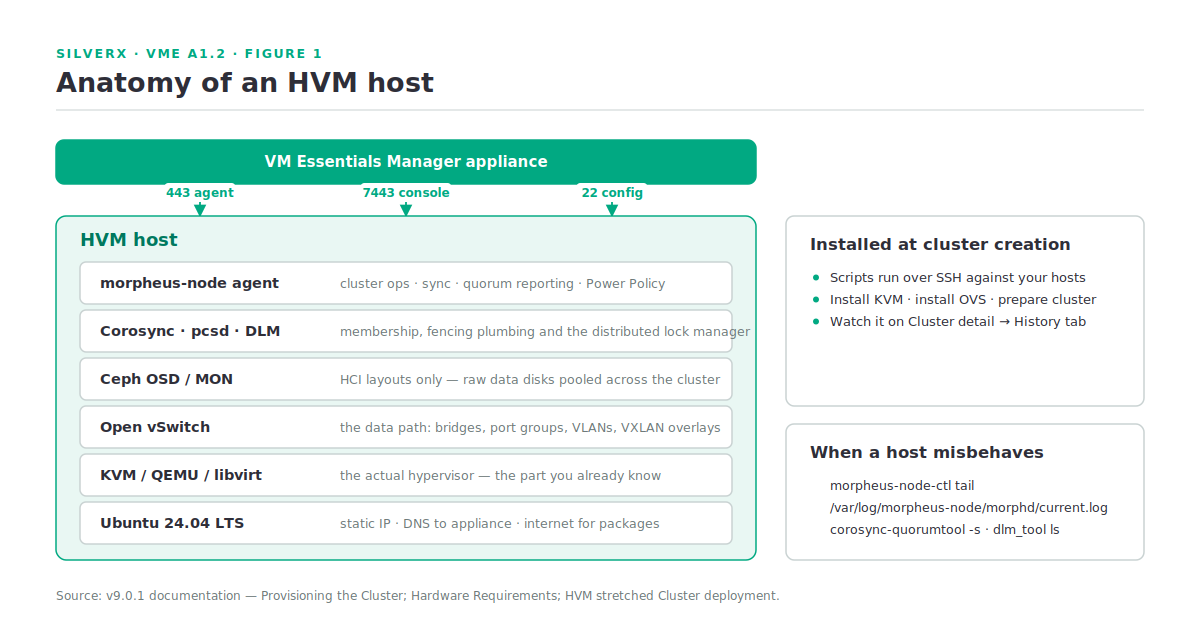
Nothing exotic. That’s the point: every layer is a component you can already reason about, and the agent is the only HPE-specific piece. It has its own control tool and log, which is where I start when a host misbehaves:
# On an HVM host
morpheus-node-ctl tail
tail -f /var/log/morpheus-node/morphd/current.log

# Cluster membership and lock manager
corosync-quorumtool -s
dlm_tool status
dlm_tool ls
(Source: HPE Morpheus VM Essentials Software Documentation v9.0.1, Provisioning the Cluster; HVM stretched Cluster deployment.)
Cluster layouts are versioned
This trips people up. The cluster layout has a version, and it’s tied to the host OS: Ubuntu 24.04 gets layout 1.2+, Ubuntu 22.04 gets layout 1.1, and the stretched cluster feature requires an HVM 1.3 cluster. Build a lab on 22.04 and you’ll quietly be evaluating an older layout than the one you’d deploy. Start on 24.04.
One more placement rule: HVM clusters must live in a Private Cloud-type Cloud in the VME data model. Create one to house them, or reuse an existing one.
The choices made at cluster creation
The creation modal is short, but four fields set behaviour you’ll live with:
| Field | What it decides |
|---|---|
| Layout: HCI or non-HCI | Ceph (3 hosts minimum) versus external storage |
| CPU model | The entire libvirt model database is surfaced; host-passthrough is the default and the right answer unless you have a specific reason |
| Dynamic placement | On: VMs auto-balance across hosts by utilisation. Off: VMs only move if pinned or failed over |
| Power policy | Balanced (default) or Performance — the latter applies configuration similar to the tuned network-latency profile and switches CPUs to performance mode |
Two footnotes worth carrying into a design: **CPU type is currently x86_64 only, and Power Policy needs agent 3.0.0+** on the host, taking effect on the next sync cycle (it does persist across host reboots). Agents upgrade from the Host detail page under ACTIONS → Upgrade Agent, or via a per-host download script.
The network: OVS and five network types
At cluster creation you nominate three interfaces — management (inter-host), storage, and compute — and a COMPUTE VLANS value or range. That range becomes OVS port groups, selectable as networks when you provision a workload. That’s the quick path.
The real networking story is the HVM Network Plugin: networking is separated from the HPE Morpheus core as a modular provider so it can be updated independently. It’s pre-installed and auto-registered during cluster configuration, cannot be removed, and manages the full lifecycle of virtual networks on cluster hosts. Verify it under Administration > Integrations > Plugins.
Underneath the network types sits an OVS Bridge Domain virtual switch — a Network Router resource of type openVSwitch. Create it before Standard or Overlay networks, either wrapping an existing host bridge or provisioning a new one, in which case the chosen uplink interface must exist on every host in the cluster.
Five network types, each with a different mechanism:
| Type | Mechanism | Use for |
|---|---|---|
| Standard | OVS-backed port groups, VLAN modes Access / Hybrid / Trunk-only | Connecting VMs to physical networks with segmentation |
| Overlay | VXLAN | Scalable east-west traffic across compute nodes |
| Data | Linux VLAN interfaces | High-throughput, low-latency storage traffic (iSCSI, NFS) |
| Private | MacVTAP | Isolated VM-to-physical with minimal overhead |
| SR-IOV | VF passthrough | Near-native network performance |
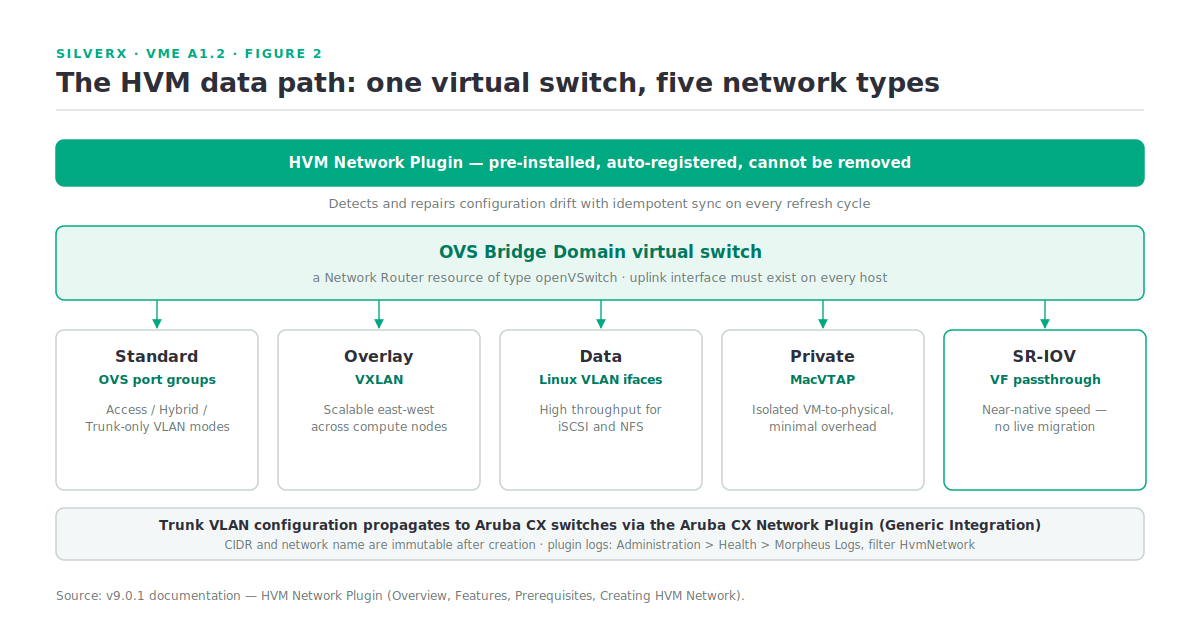
The plugin also propagates trunk VLAN configuration to Aruba CX switches through the Aruba CX Network Plugin (Generic Integration) — where this track eventually meets the SDN module in Track 2. It provisions and removes network config automatically as hosts join or leave a cluster, discovers existing libvirt networks and OVS bridges at onboarding, and detects and repairs configuration drift using idempotent synchronisation on every refresh cycle. That last one is a genuinely good design decision.
Plugin logs are filterable: Administration > Health > Morpheus Logs, search HvmNetwork.
Quorum, fencing, and the stretched cluster
Ordinary cluster membership is Corosync-based, with pcsd and DLM alongside. The interesting design is what happens when you stretch across sites.
A stretched cluster extends an HVM 1.3 cluster across two physical sites with a witness in a third location, giving site-level fault tolerance inside one management domain. Requirements: minimum 6 hosts (3 per site), one Distributed Worker as the witness at a third site, HPE Morpheus Software 9.0.0 or higher, and two layers of quorum — intra-site and inter-site.
The arbitration logic, when all non-witness nodes at a site go unreachable (60-second timeout):
- If the surviving site cannot reach the witness, it self-fences — it can’t confirm it’s the correct winner.
- If it can reach the witness, arbitration proceeds.
- Ties break deterministically: the first site alphabetically wins.
- The winner adjusts Corosync votes to hold quorum and issues
fence_ackfor the failed site’s nodes; the loser self-fences and stops DLM and Corosync. - On recovery, three consecutive healthy ping cycles (~3 minutes) must pass before votes are restored and fenced nodes reboot and rejoin.
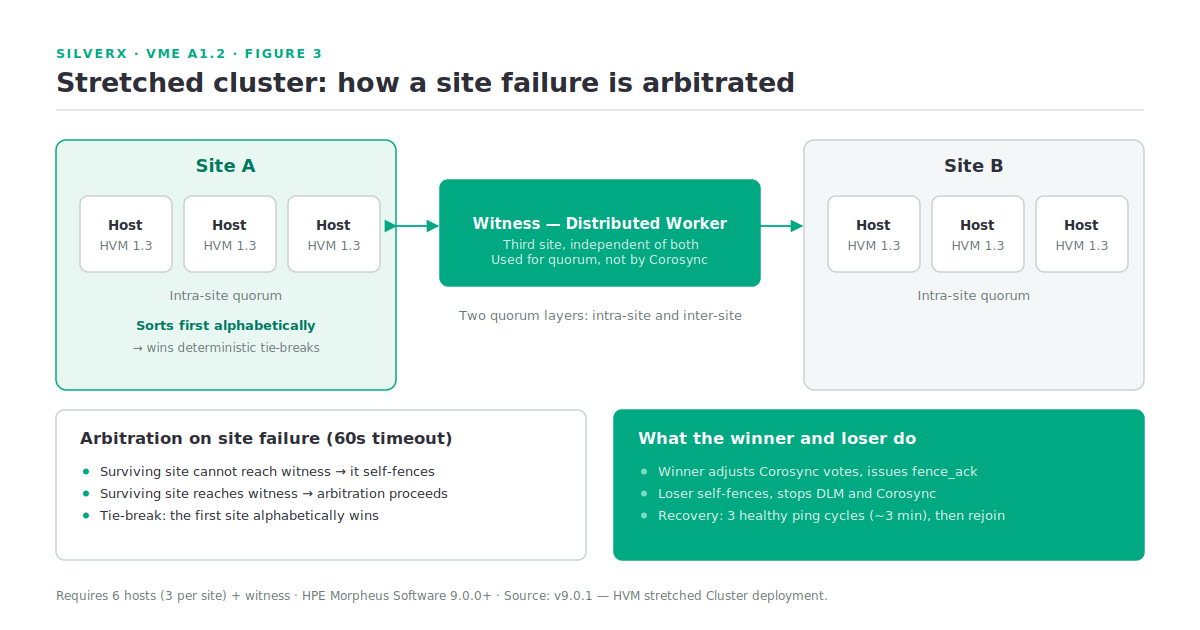
Name your sites with that alphabetical tie-break in mind. It’s deterministic, which is good — but it means the site you’d prefer to win should be the one that sorts first.
Useful inspection points, straight from the docs:
# Quorum state as JSON, direct from a host
curl -k https://192.168.130.44:7443/quorum

# Same information, on-disk
cat /opt/morpheus/.quorum-nodes
cat /opt/morpheus/.mounts        # once a GFS2 mount exists
Note the documented caveat: **the witness won’t appear in corosync-quorumtool or dlm_tool.** HPE Morpheus uses the witness for quorum but not the underlying services — Corosync here is primarily a host list, not the fencing or quorum authority. If you go looking for the witness in the standard tools and don’t find it, nothing is broken.
Gotchas and caveats
SR-IOV rules out live migration. VMs on SR-IOV networks cannot live-migrate. Decide per workload whether near-native throughput is worth losing mobility — it usually isn’t, outside of NFV and specific data-plane cases.
SR-IOV also needs AppArmor work. Enable SR-IOV in host BIOS/UEFI first, then configure AppArmor on each host to allow VFIO device access. The plugin handles VF enablement and libvirt definitions after that — no manual VF configuration.
ARP flux will make VLAN isolation look broken. In trunk or hybrid mode you may see cross-VLAN reachability. The documented cause is Linux ARP flux from the weak host model (arp_ignore=0 by default) — a host behaviour, not a VME defect. Don’t spend a day on the switch config.
CIDR and network name are immutable. Neither can be changed after network creation; you delete and recreate. Get naming conventions right the first time.
**siteWitness is reserved.** You can’t use it as a site group name — the witness is auto-assigned to it when the first site group is created.
The quorum service only activates when a shared LUN appears. Adding an HPE Clustered Datastore (Shared LUN — formerly called GFS2 datastores) is what activates quorum, because it isn’t needed until then. If you’re testing stretched-cluster arbitration before you’ve added shared storage, you’re testing nothing.
Key takeaways
- An HVM host is Ubuntu + KVM/QEMU/libvirt + OVS + Ceph + Corosync/pcsd/DLM + the node agent. Every layer is inspectable with tools you already know.
- Cluster layouts are versioned to the host OS — 24.04 for layout 1.2+, and 1.3 for stretched clusters. Build labs on 24.04.
host-passthroughis the default CPU model and usually the correct one; CPU type is x86_64 only today.- Networking is a removable-in-name-only plugin with five distinct network types and idempotent drift repair on every refresh.
- Stretched clusters need 6 hosts + a Distributed Worker witness at a third site, and break ties alphabetically — name sites accordingly.
- SR-IOV costs you live migration. Choose deliberately.
What’s next
Next in this track: A1.3 — The VME Manager: what actually runs the show. The other half of the product — the appliance, the settings that quietly govern everything (appliance URL, sync intervals, retainment), the RBAC model, and the health and logging surfaces you’ll actually live in.
Sources: HPE Morpheus VM Essentials Software Documentation v9.0.1
Pingback: The half of the product nobody evaluate – silverX.org
Pingback: Ask a better question than “is it as good as ESXi? – silverX.org