Fourth post in the HPE Morpheus VM Essentials track. A1.2 – a.k.a HVM took an HVM host apart and A1.3 – a.k.a VME Manager covered the manager; this is the comparison you’re actually here for.
The honest answer to that question is no, and it’s also useless. ESXi has had two decades and an enormous engineering investment aimed at one thing. Any hypervisor arriving now is behind on maturity by definition.
The useful question is narrower: does HVM do the things my workloads actually depend on, and are the gaps ones I can live with? For a large fraction of enterprise estates the answer is yes, and for a specific minority it’s clearly no. This post is about telling those apart.
The feature map
| Capability | ESXi / vSphere | HVM (VM Essentials 9.0.1) |
|---|---|---|
| Hypervisor core | ESXi, purpose-built | KVM / QEMU / libvirt on Ubuntu 24.04 |
| Clustering | vSphere HA + cluster services | HVM cluster, Corosync / pcsd / DLM |
| Automatic failover | vSphere HA | Configurable automatic failover of running workloads when a host is lost — and per-VM failover configuration |
| Load balancing | DRS | DRS — automatic rebalancing by resource consumption; Dynamic Placement toggle |
| Live migration | vMotion | Migration of workloads across hosts |
| Storage migration | Storage vMotion | Disk migration across datastores |
| HCI storage | vSAN | Ceph (HCI layout, 3-host minimum), not used often, HPE Suggest to look at their Simplivity for HCI. |
| External storage | VMFS/NFS on FC, iSCSI, NVMe-oF | NFS, iSCSI and Fibre Channel via GFS2; HPE Alletra MP integration- This is similar to vVOLS. |
| Host maintenance | Maintenance mode | Maintenance mode — graceful, zero-downtime host access |
| Snapshots / clones | Yes | Snapshots and revert; clone VMs |
| Backup | Third-party via VADP | Backup and restore with optional synthetic full backups |
| Affinity | DRS affinity rules | Affinity placement — pin VMs to hosts |
| Hot-add / reconfigure | Yes, guest-dependent | Reconfigure running workloads: resize plan, add/remove disks and NICs |
| Hardware passthrough | DirectPath I/O, vGPU | Passthrough and pooling of host-attached NVMe, USB and GPU; claim from a pool at provision time |
| Networking | vSwitch / vDS / NSX | Open vSwitch — five network types incl. VXLAN overlay, SR-IOV, MacVTAP |
| Secure boot / TPM | UEFI, vTPM | UEFI support; TPM with shared metadata datastore |
| Stretched cluster | vSAN stretched cluster | HVM stretched cluster (1.3) — two sites plus witness |
| Brownfield discovery | Inventory native | Brownfield discovery of existing VMs |
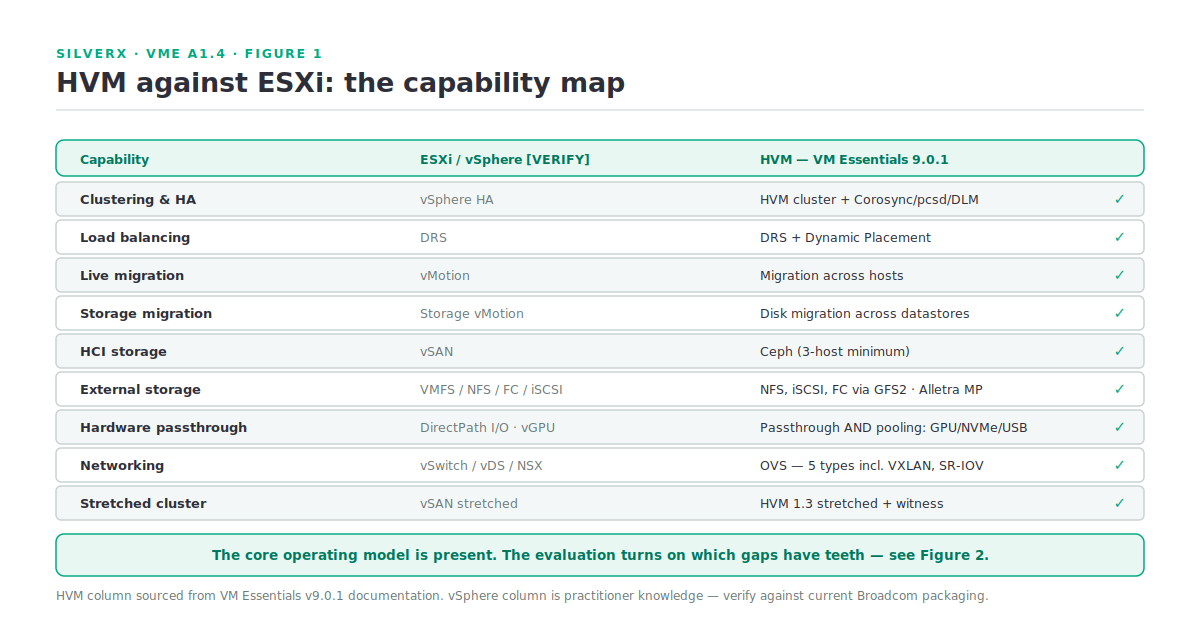
Look at that table honestly and the picture is: the core operating model is there. Cluster, HA, DRS, live migration, storage migration, maintenance mode, snapshots, affinity, passthrough, stretched clusters. This is not a hypervisor that can only run test workloads.
Where HVM does something ESXi doesn’t
Worth naming, because comparisons usually run one way.
Hardware pooling, not just passthrough. VM Essentials detaches GPU, NVMe, USB and other PCIe devices from the host OS and adds them to a pool available for consumption by VMs — with GPU attachable at provision time through custom Service Plans. That pooling model is a cleaner fit for AI/ML fleets than per-host device assignment.
Standard Linux plumbing all the way down. Corosync, pcsd, DLM, Ceph, OVS, libvirt. When something misbehaves you debug it with tools that have public documentation and twenty years of Stack Overflow behind them. That’s a real operational asset, and the opposite of a black box.
Idempotent network drift repair. The HVM Network Plugin detects and repairs configuration drift on every refresh cycle. That’s a genuinely good design decision that I don’t have an ESXi equivalent for.
The management layer comes with it. You’re not buying a hypervisor and then a management suite. That’s A1.5’s subject, but it belongs in any honest comparison.
Where the gaps actually are
Now the part that decides deployments. Not every gap matters equally.
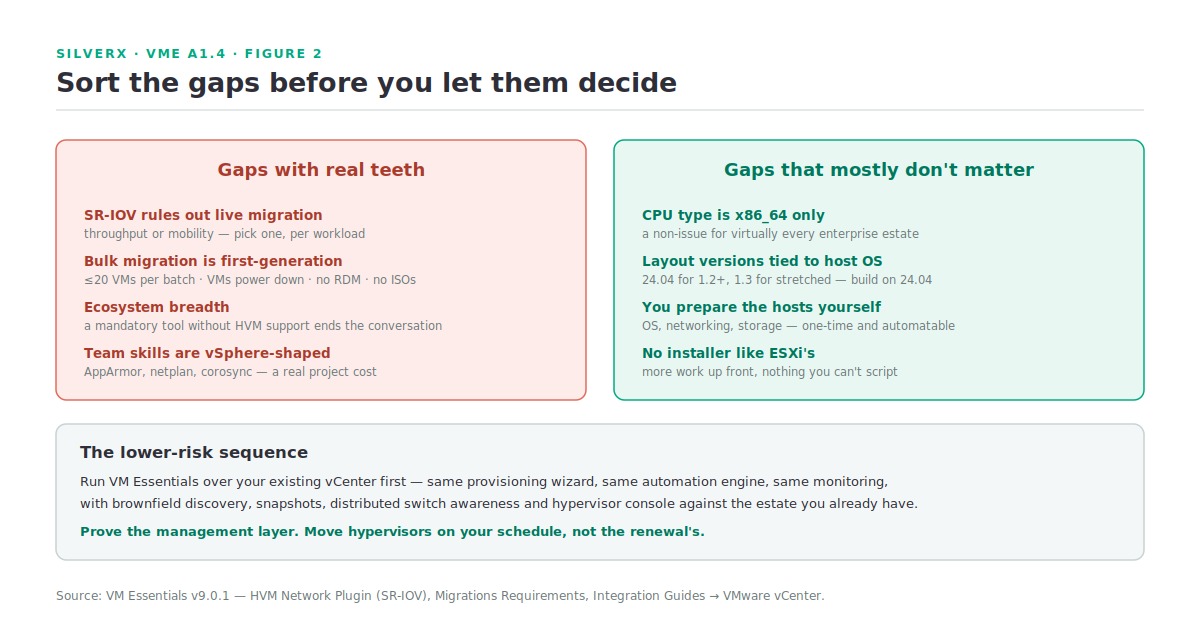
Gaps with real teeth
SR-IOV rules out live migration. Documented plainly: VMs using SR-IOV networks cannot live-migrate. If you have workloads that need near-native network throughput and mobility, that’s a hard conflict. ESXi has its own constraints with DirectPath I/O, but the practical NFV and data-plane story on vSphere is more developed.
Bulk migration is throttled and disruptive. The current guidance is to migrate no more than 20 VMs at a time, and VMs power down for the transfer. RDMs are not supported, and source VMs must have no attached ISOs or CD-ROMs. Compare with a mature vMotion-based migration and this is clearly a first-generation tool — the docs themselves flag these as first-release constraints. Plan migration waves and maintenance windows accordingly.
Ecosystem breadth. The list of backup, security and monitoring products certified against ESXi is enormous. The HVM list is growing but shorter. If a mandatory tool in your stack has no HVM support, that’s the end of the conversation regardless of what the feature table says.
Operational skills. Your team’s runbooks, muscle memory and troubleshooting instincts are vSphere-shaped. AppArmor instead of SELinux, netplan instead of ESXi networking, corosync-quorumtool instead of vCenter cluster views. That’s not a product deficiency, but it is a real project cost.
Gaps that mostly don’t matter
CPU type is x86_64 only today. For virtually every enterprise estate this is a non-issue.
Cluster layouts tied to host OS version. Ubuntu 24.04 for layout 1.2+, 22.04 for 1.1, and 1.3 for stretched clusters. It’s a planning constraint, not a capability limit — just build on 24.04.
You prepare the hosts yourself. OS install, networking, external storage at OS level, bonds via the Linux CLI. Compared to an ESXi installer this is more work up front. It’s also entirely automatable, and it’s a one-time cost per host.
So who should, and shouldn’t, move
Good candidates. General-purpose server virtualisation — application servers, web tiers, databases with standard storage, internal tooling, VDI back-ends, dev/test. Estates already comfortable with Linux operations. Organisations wanting one vendor across hypervisor, management, observability and DR. Anyone whose renewal maths has stopped working.
Think harder. Workloads needing SR-IOV and mobility. Estates with a hard dependency on a tool that has no HVM support. Very large migrations under tight time pressure, where the 20-VM batch guidance and power-down requirement set the pace. Environments deeply invested in NSX.
A pattern worth stealing: run VM Essentials over your existing vCenter first. The manager integrates deeply into vCenter with the same provisioning wizard, automation engine and monitoring — brownfield discovery, snapshots, distributed switch and datastore awareness, hypervisor console, Veeam integration. You get the management layer, prove the operating model, and move hypervisors on your own schedule rather than the renewal’s.
Gotchas and caveats
Don’t benchmark KVM against ESXi and call it a product evaluation. Raw hypervisor performance is rarely the deciding factor, and both are mature enough that workload-specific testing matters more than synthetic numbers.
Check the qualification matrix before you quote. The VM Essentials area of the HPE Support Center carries a reference architecture with specific SKUs and a qualification matrix of certified hardware. “It’s just KVM, it’ll run on anything” is how you end up unsupported.
10 Gbps with jumbo frames is a floor for clustered storage — the documentation says performance below that is highly likely to be unacceptable. This changes the hardware comparison if your existing hosts are 1 GbE.
Key takeaways
- The core operating model is present: cluster, HA, DRS, live migration, storage migration, maintenance mode, affinity, passthrough, stretched clusters.
- HVM’s distinct advantages: hardware pooling, standard Linux plumbing, idempotent network drift repair, and management included.
- The gaps with teeth: SR-IOV vs live migration, first-generation bulk migration (≤20 VMs, power-down), ecosystem breadth, and team skills.
- The gaps that don’t: x86_64-only, OS-tied layout versions, manual host prep.
- Run VM Essentials over vCenter first. Prove the management layer before you touch a hypervisor.
What’s next
Next in this track: A1.5 — Licensing and TCO. How the licence model actually works, what “socket” means in this context, what the free lab licence really allows, and how to build a TCO comparison that survives contact with a procurement team.
Sources — HVM side: HPE Morpheus VM Essentials Software Documentation v9.0.1 (HVM clusters → Features; Base Cluster Details; Hardware Requirements; Provisioning the Cluster; HVM stretched Cluster deployment; HVM Network Plugin; Hardware Passthrough; Migrations Requirements; Integration Guides → VMware vCenter)
Pingback: Say the quiet part first – silverX.org