This opens the HPE OpsRamp track of the SilverX — HPE Morpheus Enterprise Series. Where Morpheus orchestrates and Zerto protects, this is the observe pillar of the HPE CloudOps Software suite.
Orchestration gets the attention. You can demo a self-service catalogue; it looks like progress. Observability is harder to demo and much harder to retrofit, which is exactly why it’s usually the thing that’s broken — six tools, four alert channels, and nobody able to say whether last night’s incident started in the array, the fabric, or the application.
HPE OpsRamp Software (OpsRamp) is HPE’s answer to that: a SaaS platform for hybrid discovery, monitoring, event correlation, and automated remediation across on-prem infrastructure, public cloud, and cloud-native workloads. This post is the orientation — the architecture, the vocabulary, and the honest scoping notes — before the rest of the track goes hands-on.
Everything here is grounded in the official documentation at docs.opsramp.com.
The shape of the platform
The docs describe OpsRamp as four layers, and it’s a useful mental model:
- Discovery and monitoring — find resources across hybrid environments and start collecting from them, via agents or agentlessly.
- Data collection and ingestion — gateways and agents ship infrastructure and application data over secure pipelines to the cloud platform.
- AI-driven analytics — machine learning on the collected data: detect bottlenecks, predict outages, correlate events, and identify root cause across dependencies.
- Automation and remediation — trigger workflows and scripts, or escalate to ITSM when automation can’t resolve it.
(Source: OpsRamp Core Components.)
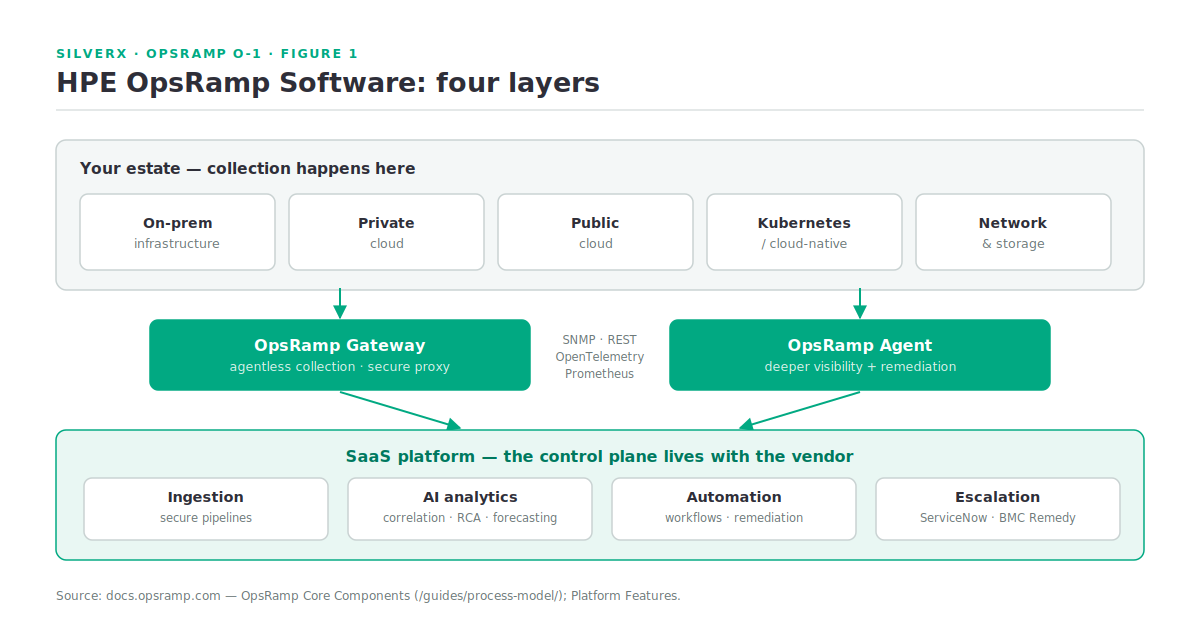
The control plane is SaaS. What lives in your datacentre is the collection layer — which is where the architecture decisions actually are.
Gateways and agents
Two collection mechanisms, and the choice per resource class matters more than people expect.
The Gateway
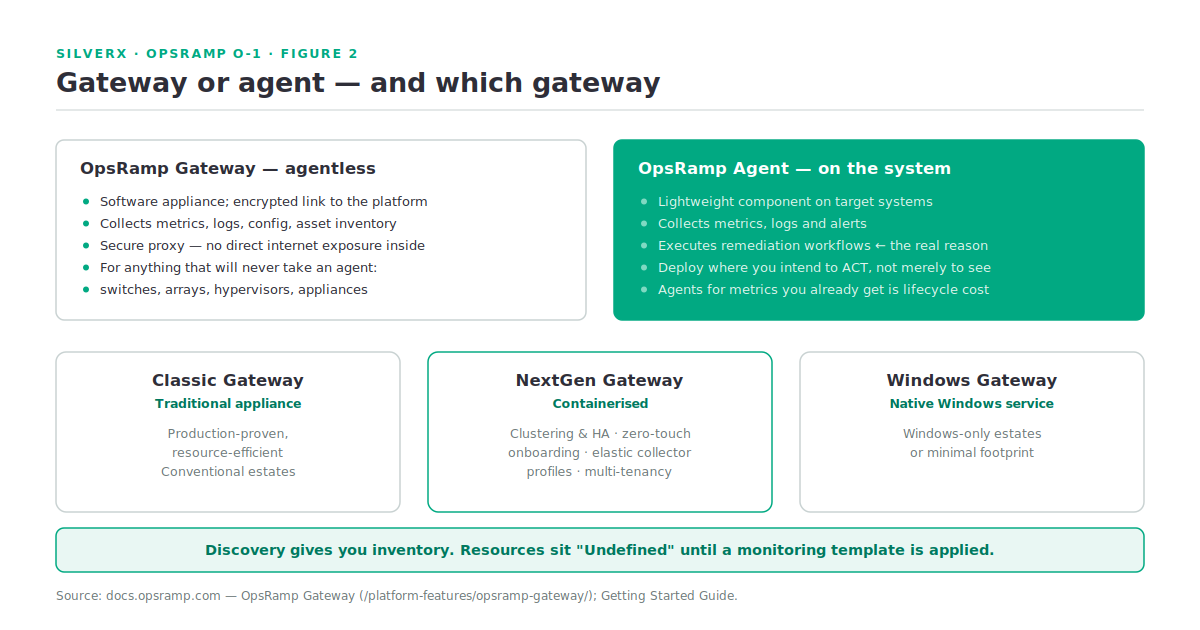
The OpsRamp Gateway is a software appliance that centralises management of an environment and establishes an encrypted connection between on-prem or private-cloud infrastructure and the OpsRamp platform. It collects metrics, logs, configuration details, and asset inventory, and acts as a secure proxy so internal infrastructure needs no direct internet exposure. This is how you monitor things that will never take an agent — switches, arrays, hypervisors, appliances — over SNMP, WMI, SSH and friends.
Three variants are documented:
| Variant | Shape | Use it when |
|---|---|---|
| Classic Gateway | Traditional appliance | Conventional environments; production-proven and resource-efficient |
| NextGen Gateway | Containerised | You want clustering/HA, elastic collector profiles, zero-touch onboarding, multi-tenancy, and third-party app support beyond Java |
| Windows Gateway | Native Windows service | Windows-only estates or a minimal footprint |
(Source: OpsRamp Gateway.)
The NextGen Gateway is the direction of travel — containerised, clustered, higher availability. If you’re standing up something new and your platform team is comfortable with containers, that’s the one to evaluate first.
The Agent
The OpsRamp Agent is a lightweight component installed on target systems. It collects metrics, logs, and alerts, and — importantly — executes remediation workflows. That last capability is the real reason to deploy agents: agentless monitoring can tell you a filesystem is full; an agent can clear it.
Beyond the two, ingestion is open: SNMP, REST, OpenTelemetry, and Prometheus are all documented integration paths, which matters if you already have a Prometheus estate you’d rather federate than replace.
Clients, templates, and the onboarding path
Two pieces of vocabulary to internalise:
Client accounts. OpsRamp uses a multi-tenant model where each logical business unit, department, or customer — for service providers — maps to a client account. Even in a single-enterprise deployment, decide your client structure deliberately at day zero. It shapes RBAC, dashboards, and reporting later, and it is not a fun thing to restructure.
Monitoring templates. Templates define the metrics, thresholds, and collection intervals for each type of infrastructure. This is the piece that trips people up on day one: after discovery, resources appear in inventory with an “Undefined” status until a monitoring template is applied. Discovery alone produces an inventory, not monitoring. You either apply pre-built templates or build your own.
The documented getting-started path is six steps — log in, create the client account, install the agent, apply templates, view dashboards, validate alerts — and it’s worth walking exactly that sequence on one host before scaling anything.
Onboarding order that actually works:
  1. Client account structure decided (BU / customer / environment)
  2. Gateway deployed and connected  →  agentless discovery of the estate
  3. Agents on the systems you intend to auto-remediate
  4. Monitoring templates applied      →  resources leave "Undefined"
  5. Alert thresholds tuned BEFORE integrating ITSM
  6. Dashboards + service maps last, once the data is trustworthy
Step 5 is the one people invert, and it’s how you end up piping several thousand untuned alerts into ServiceNow in week one.
What’s actually in the platform
The feature guides organise into these areas (Platform Features):
- Resource management — discovery and inventory, device policies, resource groups, sites
- Monitoring and alerts — template-based monitoring, alert views, filtering, reporting, time-series forecasting
- Dashboards — Dashboard 2.0, with variable filters, sharing, RBAC, and tiles for metrics, services, alerts, resources, tickets, and logs
- Service maps and topology — service maps, topology maps, network topology management
- AIOps / intelligence — the OpsPilot AI capabilities: root cause analysis, alert insights, command centre, search
- Observability — log management, distributed tracing, metrics explorer
- Automation — scheduled tasks, job execution, remote consoles, service desk automation
- Service desk — incidents, changes, requests, problems, tasks
- Network management — network performance management and configuration backup
- Administration — accounts, users, permissions, authentication, tenancy
A note on naming, because it matters for this series: the suite-level messaging talks about a GenAI operations copilot; the documentation’s AIOps section is OpsPilot.
Gotchas and caveats
It’s SaaS, and that’s an architectural decision, not a detail. Your control plane lives with the vendor; your estate reaches it through gateways. That means egress paths, TLS inspection, and proxy behaviour are day-one design items, not day-thirty surprises — the same class of consideration as connecting a Morpheus appliance to HPE Morpheus Central.
Discovery ≠ monitoring. Say it twice. “Undefined” resources are the single most common “the tool isn’t working” ticket.
Gateway sizing is a real exercise. The gateway is your collection choke point for everything agentless. Size and place it against poll volume and network topology; one gateway per site is a starting assumption, not a rule.
Agents earn their keep through remediation. If you deploy agents purely for metrics you already get agentlessly, you’ve taken on lifecycle cost for little return. Deploy them where you intend to act.
Alert noise is the actual project. Correlation and RCA are the reason to buy an AIOps platform, but they work on the data you give them. Tuning thresholds and templates is the work; the ML is the leverage on top of it.
Key takeaways
- OpsRamp is a SaaS observability + AIOps platform; only the collection layer lives in your datacentre.
- Gateway = agentless collection and secure proxy (Classic / NextGen / Windows); Agent = deeper visibility plus remediation execution.
- Client accounts and monitoring templates are the two concepts that shape everything downstream — decide them early.
- Resources sit “Undefined” until a template is applied. Discovery is inventory, not monitoring.
- Open ingestion — SNMP, REST, OpenTelemetry, Prometheus — means you can federate rather than rip and replace.
- Tune before you integrate ITSM, or you’ll automate your noise.
What’s next
Next in this track: O-2 — OpsRamp Architecture: Agents and Gateways. I will go properly into the collection layer — Classic versus NextGen internals, sizing and placement, HA and clustering, the ports and egress the connection actually needs, and how discovery profiles drive what lands in inventory.
Sources: OpsRamp Documentation · OpsRamp Core Components · OpsRamp Gateway · Platform Features · Getting Started Guide · NextGen Gateways.