Second post in the HPE OpsRamp track. O-1 mapped the platform; this one is the part that lives in your datacentre and shows up on a firewall request.
HPE OpsRamp Software (OpsRamp) is SaaS. The analytics, correlation, dashboards and service desk all run on the vendor’s platform, and none of that is your problem to size or patch. What is your problem is the collection layer: gateways and agents. Get those wrong and everything above them is starved or noisy.
This post is the practical detail — sizing, ports, deployment formats, and the decision rule for gateway versus agent. Everything here comes from the official documentation at docs.opsramp.com, since there’s no uploaded product doc for this track.
The gateway: your collection choke point
The OpsRamp Gateway is a software appliance that establishes an encrypted connection between your on-prem or private-cloud infrastructure and the OpsRamp platform. It collects metrics, logs, configuration details and asset inventory, and acts as a secure proxy so internal infrastructure needs no direct internet exposure.
Three variants, as covered in O-1: Classic (traditional appliance, production-proven, resource-efficient), NextGen (containerised — clustering and HA, zero-touch onboarding, elastic collector profiles, multi-tenancy, third-party app support beyond Java), and Windows (native Windows service for Windows-only or minimal-footprint sites).
The port map
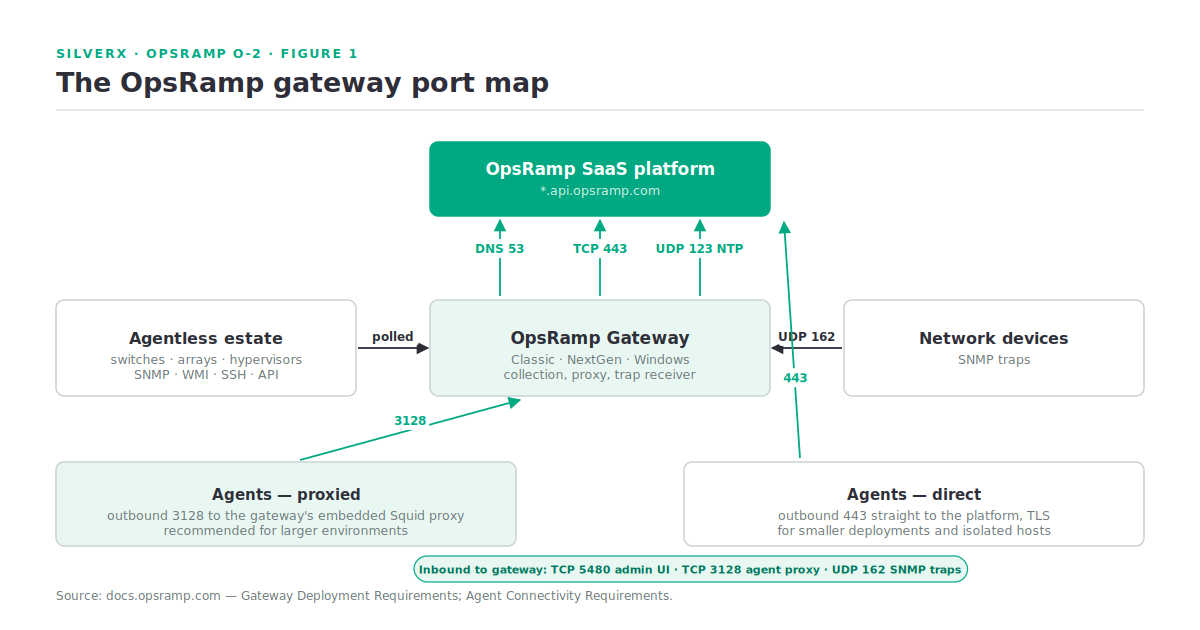
This is the table to put in your firewall request. Nothing here is guesswork — it’s the documented deployment requirement.
Outbound, from the gateway:
| Port / protocol | Purpose |
|---|---|
| TCP 443 | Connection to the OpsRamp cloud platform |
| UDP 123 (NTP) | Clock synchronisation |
| TCP/UDP 53 (DNS) | Resolving *.api.opsramp.com |
Inbound, to the gateway:
| Port | Purpose |
|---|---|
| TCP 5480 | Web admin UI |
| TCP 3128 | Agent proxy connections |
| UDP 162 | SNMP traps from network devices |
(Source: Gateway Deployment Requirements.)
Two of those deserve comment. NTP is not optional — a monitoring platform with clock skew produces alert timelines nobody can reason about, and it’s the first thing I’d check when correlation looks wrong. And UDP 162 inbound is what makes the gateway a trap receiver; if your network team is used to pointing traps at a dedicated NMS, that destination changes.
Sizing
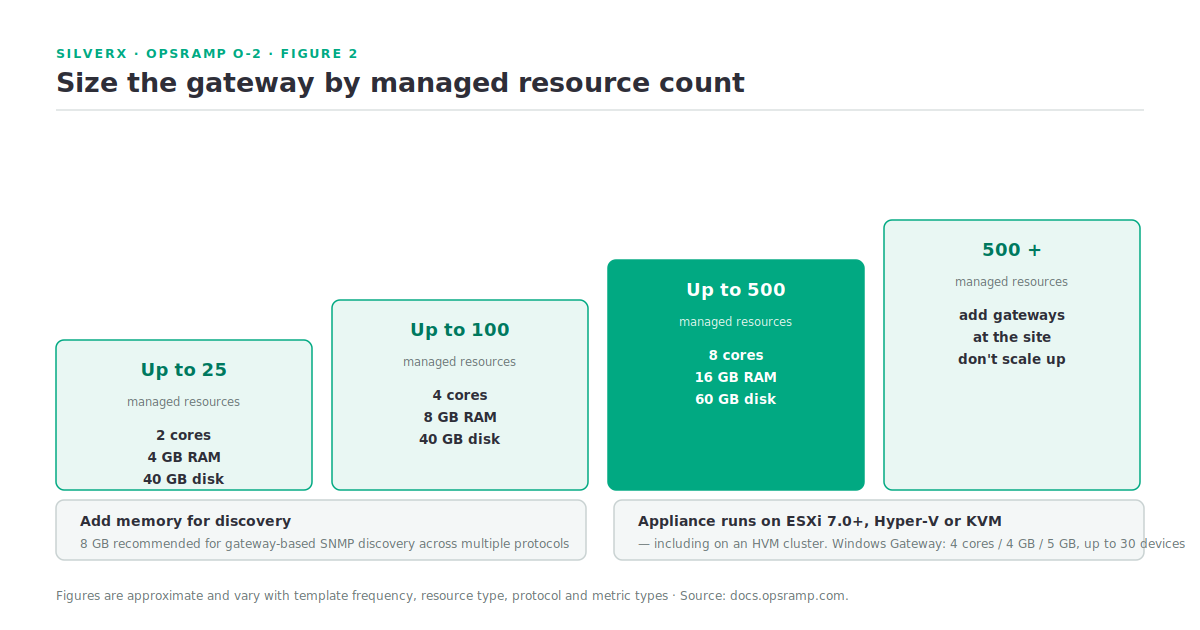
Gateway capacity scales with the number of managed resources:
| Managed resources | Gateway appliance |
|---|---|
| Up to 25 | 2 CPU cores · 4 GB RAM · 40 GB disk |
| Up to 100 | 4 CPU cores · 8 GB RAM · 40 GB disk |
| Up to 500 | 8 CPU cores · 16 GB RAM · 60 GB disk |
| 500+ | Deploy multiple gateways at the site |
The documentation adds a specific caveat worth heeding: 8 GB RAM is recommended if you’re doing gateway-based SNMP discovery across multiple protocols. Discovery is spikier than steady-state polling, and undersizing shows up as slow or incomplete discovery rather than an obvious failure.
NextGen sizing runs slightly differently — up to 100 resources on 4 cores / 8 GB / 50 GB / 1 NIC, up to 500 on 8 cores / 16 GB / 50 GB / 1 NIC, and multiple gateways beyond that. OpsRamp is explicit that these are approximate and vary with template frequency, resource type, network protocol and metric types.
Supported hypervisors for the appliance: VMware ESXi 8.0+, Microsoft Hyper-V, and KVM — which means it deploys onto an HVM cluster like any other workload. The Windows Gateway runs on Windows Server 2016/2019/2022 or Windows 10/11, 64-bit only, sized at 4 cores / 4 GB / 5 GB for up to 30 network resources.
Deployment formats
NextGen supports three installation routes — ISO (Ubuntu-based image), OVA (virtual appliance), and Kubernetes — plus HA setups, plain Ubuntu VM installation, and Helm deployment. OpsRamp supports the ISO and OVA images it builds on Ubuntu; if you bring your own Kubernetes cluster, you own its configuration and maintenance. That’s a fair split, but make sure the team that owns the cluster knows they’ve signed up for it.
Internally, a NextGen gateway runs a set of pods: the primary application pod (nextgen-gw-0), a Redis cache (nextgen-gw-redis-master-0), an optional Squid proxy service, and third-party app pods for SDK applications. From version 18.0.0, new deployments create separate gateway devices in the infrastructure platform.
The agent, and the connection decision
The OpsRamp Agent is a lightweight component on the target system that collects metrics, logs and alerts — and executes remediation workflows. That last capability is the reason to deploy agents at all; O-1 made the point and it bears repeating, because agent sprawl for metrics you already collect agentlessly is pure lifecycle cost.
The connectivity choice is the interesting part:
- Direct connection — each agent connects to the platform over the internet on outbound 443, TLS encrypted. Best for smaller deployments without infrastructure constraints.
- Proxy connection — agents route through a proxy (typically the Squid proxy embedded in the gateway) on outbound 3128. Documented as the recommendation for larger environments, because it avoids needing outbound internet access for every agent.
(Source: Agent Connectivity Requirements.)
For most enterprises that’s not really a choice: proxy through the gateway. One egress path to review, one set of firewall rules, no per-host internet access. The direct model is for cloud instances and remote sites where a gateway would be overkill.
Decision rule I use:

  Can it take an agent?        no  → gateway, agentless (SNMP / WMI / SSH / API)
  Will I automate remediation? no  → gateway is enough; skip the agent
                               yes → agent, proxied through the gateway on 3128
  Is it isolated from a gateway?   → agent, direct on 443
Placement and topology
The documentation gives you sizing but not your topology — that’s a design decision. The rules of thumb I work to:
One gateway per site, then scale by resource count. Latency and firewall boundaries usually make site-level placement obvious. Past 500 resources, add gateways rather than growing one.
Put the gateway where the traps and the polling are. It’s your SNMP trap receiver on UDP 162 and your polling source; placing it across a WAN link from the devices it polls produces timeouts that look like device faults.
Treat the gateway as production infrastructure. It’s a single point of collection for everything agentless at that site. NextGen’s clustering exists precisely because a Classic gateway is a single point of failure for site visibility.
Plan the DNS. The gateway resolves *.api.opsramp.com. In segmented networks where internal resolvers don’t forward externally, that’s a specific rule, not an assumption.
Gotchas and caveats
NTP failure is silent and corrosive. Nothing errors; timelines just stop making sense and correlation quality quietly degrades.
SNMP discovery needs headroom. 8 GB is the documented recommendation when running gateway-based SNMP discovery with multiple protocols — size for the discovery peak, not the steady state.
Bring-your-own Kubernetes means bring-your-own support. OpsRamp supports its ISO/OVA images; proprietary clusters are the customer’s to configure and maintain.
Agents deployed for visibility alone are a cost, not a capability. Deploy them where you intend to act.
The gateway is not a monitoring policy. It collects; templates decide what’s monitored. Resources stay “Undefined” until a monitoring template is applied — the point from O-1 that generates the most day-one support tickets.
Version-specific behaviour changes. The 18.0.0 separate-gateway-device change is one example.
Key takeaways
- Outbound from the gateway: 443, NTP 123, DNS 53 (for
*.api.opsramp.com). Inbound: 5480, 3128, SNMP trap 162. - Size by managed resource count — 25 / 100 / 500 tiers, then add gateways. Add RAM for SNMP discovery.
- The appliance runs on ESXi 8.0+, Hyper-V or KVM — including on an HVM cluster.
- Proxy agents through the gateway on 3128 in any sizeable estate; go direct on 443 only where a gateway makes no sense.
- Deploy agents for remediation, not for metrics you already collect agentlessly.
- NextGen brings clustering and HA — worth it precisely because a single gateway is a single point of site visibility.
What’s next
Next in this track: O-3 — Discovery and Resource Inventory. How discovery actually finds things, what lands in inventory, why resources arrive “Undefined”, and how to structure resource groups and device policies before the estate gets big enough to make restructuring painful.
Sources: OpsRamp Documentation · Gateway Deployment Requirements · OpsRamp Gateway · Installation of NextGen Gateways · Agent Connectivity Requirements · OpsRamp Core Components.