Sixth post in the HPE Morpheus Enterprise track. E1.1 named the four constructs; this is how they actually interact when someone tries to provision something.
“Why can’t this user see that cloud?”
I’ve been asked that in every HPE Morpheus Enterprise Software (Morpheus Enterprise) deployment I’ve worked on, and the answer is never one thing. It’s a path — through the Tenant, the Role, the Group, and then the Cloud — and if you can’t trace that path from memory you’ll spend an afternoon clicking through admin screens.
So this post traces it properly, then covers how to structure the model so the question stops coming up.
The path from user to workload
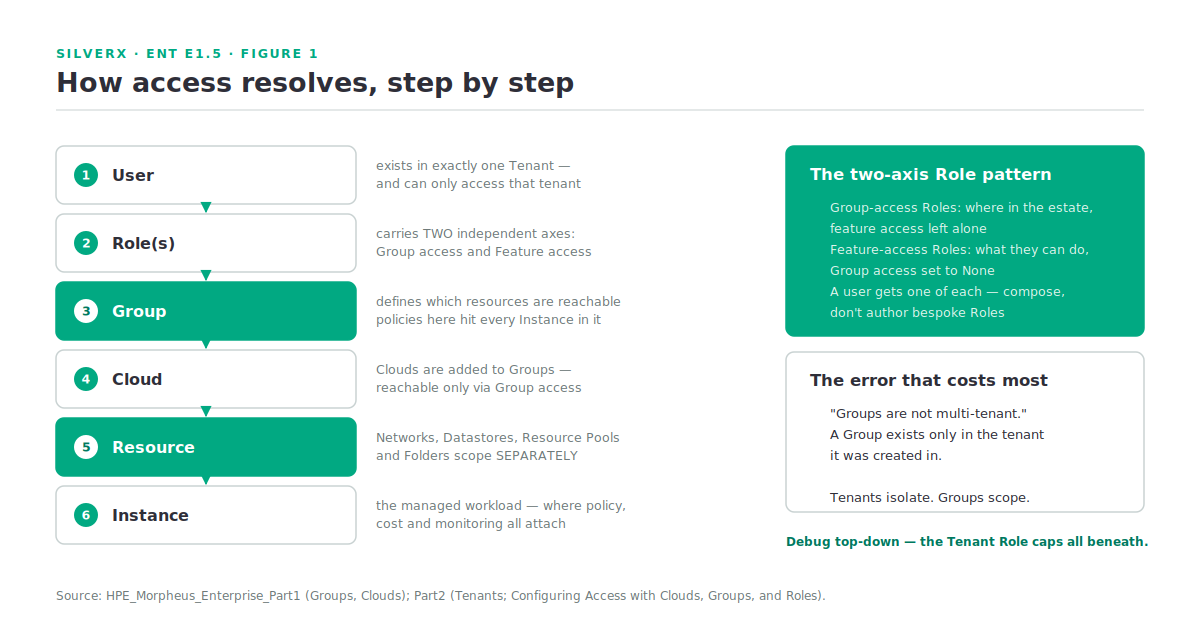
Here’s the resolution order, and it only runs one way:
- A user exists in exactly one Tenant. Users are specific to the tenant they’re created in and can only access that tenant. That’s the outer boundary — nothing below crosses it.
- The user holds one or more Roles. A Role carries two independent things: Group access and Feature access.
- Group access on the Role determines which Groups the user can reach. Groups define what resources a user has access to.
- Clouds are added to Groups. A user can only access the Clouds that are in the Groups their Role(s) give them access to.
- Resources within a cloud — Networks, Datastores, Resource Pools, Folders — carry their own additional Group access settings on top of that.
- Policies applied to a Group are enforced on every Instance provisioned into or moved into that Group.
- What the user can then do — see the Library, run automation, edit clouds — is Feature access, which is a separate axis entirely.
Step 5 is the one that catches people. Granting Group access doesn’t automatically grant every resource inside the cloud; a datastore or resource pool can be scoped separately, and it’s a common cause of “the cloud is there but I can’t provision to it.”
Two axes, not one
The single most useful mental model: Roles carry Group access and Feature access independently.
The documented pattern is to build them as separate Roles and combine them. You create Roles that handle Group access — which parts of the estate someone can touch — with all feature access left alone. Then you create Roles that handle Feature access — what capabilities they have — with all Group access set to None. A developer gets one of each: a Role giving the right Group access, plus a “Developer” Role giving only the feature access their responsibilities need.
That composition is what makes RBAC maintainable at scale. Onboarding someone becomes picking two Roles rather than authoring a bespoke one, and changing what developers can do is one edit rather than forty.
Above all of it sits the Tenant Role, which caps the maximum permission boundary for every user in a child tenant. If a subtenant user can’t see something you granted them, check the Tenant Role before you check theirs — the ceiling wins.
Groups: what they are and aren’t
A Group defines what resources a user has access to. Clouds are added to Groups; Groups can contain many Clouds; a Cloud can belong to many Groups. Policies attach here and hit every Instance in the Group.
And the line worth tattooing on the design document: “Groups are not multi-tenant. A group only exists in the tenant it is created in.”
Groups are an access-scoping construct within a tenant. Tenants are the isolation boundary between organisations or business units. Using Groups where you needed Tenants is the most expensive design error available in this platform, because unpicking it later means recreating clouds and reassigning every workload.
How to structure them. The documentation’s own guidance is that Groups are normally organised so that one Cloud exists in one Group, unless the networks are set up such that internal routing is possible between the Clouds — in which case combining them supports bursting and hybrid patterns.
That’s a better default than the “group by team” instinct most people arrive with. Group by routable network domain first, then use Roles to give teams access to the Groups they need. Teams change; network topology changes more slowly.
The exception worth making: an “All Clouds” Group for testing. The documented getting-started guide creates exactly this, and it’s genuinely useful for lab and validation work. Just don’t let it become the production pattern.
The CODE field on a Group is used when calling Morpheus through the API or CLI. Set it deliberately and consistently at creation — automation written against it later will thank you.
Clouds: endpoints that sync
A Cloud is any consumable endpoint — on-prem, public, hybrid, or bare metal. The behaviour that matters day to day is the sync.
Clouds refresh on a standard sync every five minutes by default, plus a nightly sync. From the Cloud detail page you can force either, and for costing data you can force a pull for a period — or “rebuild” it, which deletes all costing data for that Cloud for the period and reconstructs it from the cloud API.
Know which sync owns which data before you open a support case, and treat rebuild with respect: it’s destructive to costing history for that window.
The Cloud detail page is also where multi-tenancy gets real. Synced Resource Pools, Networks and Datastores each carry visibility and target-tenant settings, so a single vCenter can be carved up and assigned to different tenants from one integration.
Deleting a Cloud requires emptying it first — every Instance, managed host and VM must be removed. Plan decommissions around that.
Instances: where everything attaches
An Instance is the managed workload. It carries the plan (cores, memory, storage), the layout, network configuration, tags, cost, and lifecycle state. Policies, costing, monitoring and day-2 actions all attach to Instances, which is why the data model above matters — everything you configure at the Group or Cloud level is ultimately expressed as constraints on Instances.
Two Instance-adjacent facts worth carrying:
- Discovered VMs count against your licence as well as managed ones — the lab licence’s 25-workload cap counts both (A1.5).
- Service Plans are used at conversion, not just provisioning. When you convert a discovered VM to a managed Instance you pick the plan that best fits it as configured, and that choice propagates into every subsequent cost report.
Structuring the model: a working pattern
What I’d build on a greenfield appliance, in order:
- Tenants first. Decide the isolation boundaries — business units, customers, environments-that-must-not-see-each-other. Getting this wrong is the expensive one.
- Groups by routable network domain. One Cloud per Group unless routing genuinely permits otherwise. Plus one “All Clouds” Group for lab use.
- Group-access Roles — one per meaningful slice of the estate, feature access untouched.
- Feature-access Roles — Developer, Operator, Auditor, whatever fits, with Group access set to None.
- Tenant Roles to cap subtenants.
- Policies on Groups, so they apply to everything that lands there — Max Resources quotas, naming, placement.
- Users get two Roles: one for where, one for what.
Gotchas and caveats
Groups are not an isolation boundary. Repeating it because it’s the error that costs most.
Resource-level Group access is a second gate. Networks, Datastores, Resource Pools and Folders scope separately from the Cloud.
Tenant Roles cap everything beneath. Debug top-down, not bottom-up.
Costing “rebuild” deletes before it reconstructs. Use it deliberately.
Set the Group CODE at creation. Renaming things that automation references is a bad afternoon.
Sync intervals are tunable and shouldn’t be. As A1.3 covered, lowering them on an appliance with many clouds trades a cosmetic delay for a real performance problem.
Key takeaways
- Access resolves Tenant → Role → Group → Cloud → resource-level scoping. Trace it in that order every time.
- Roles carry Group access and Feature access independently — build them separately and compose. That’s the maintainable pattern.
- Groups scope access within a tenant; Tenants isolate. Groups are not multi-tenant.
- Structure Groups by routable network domain, one Cloud per Group unless routing says otherwise.
- Clouds sync every 5 minutes plus nightly; costing rebuild is destructive for the period.
- Everything ultimately lands on Instances — which is why the model above is worth getting right before you have five hundred of them.
What’s next
Next in this track: E1.6 — Connect Your First Cloud. The vCenter integration end to end — the fields that matter, RPC mode, what “inventory existing instances” actually starts doing to your licence count, and the first provision.