Fifth post in the HPE Morpheus Enterprise track. E1.2 covered the architecture; this is the install, and the handful of pre-flight checks that decide whether it comes up clean.
The actual installation of HPE Morpheus Enterprise Software (Morpheus Enterprise) is close to trivial. The documentation’s quick-install section is two sentences: install the appliance package, run sudo morpheus-ctl reconfigure, and after the reconfigure completes it’s available at https://your_machine_name in a minute or few.
That’s genuinely how it goes — when the prerequisites are met. When they aren’t, reconfigure fails somewhere in the middle, and the failure message points at whichever service was unlucky rather than at the missing repository, the wrong NTP config, or the disk you undersized. So this post spends more time on the pre-flight than the install itself, which is the correct ratio.
Base requirements
Supported appliance operating systems: Amazon Linux 2; Debian 11, 12; RHEL 7.x (deprecated), 8.x, 9.x, 10.x; Oracle Enterprise Linux 7.x (deprecated), 8.x, 9.x; SUSE SLES 15; Ubuntu 20.04, 22.04, 24.04; Rocky 8, 9. Note that Ubuntu 14.04 is no longer supported as an appliance OS, though it is still supported by the agent.
Resources:
| Resource | Requirement |
|---|---|
| Memory | 16 GB recommended for default installations; 8 GB minimum with 4 GB+ available swap |
| Storage | 200 GB minimum — see below |
| CPU | 4-core, 1.4 GHz or better, 64-bit for all-in-one; 2-core per tier for distributed installs |
| Network | TCP 443 (HTTPS) from your users to the appliance |
| Privileges | sudo for the installing user |
On storage, the documentation is worth quoting because people size to the wrong number: initial installation takes less than 10 GB, but services, virtual images, backups, logs, stats and user-uploaded data need real space. 200 GB is “a general figure to start from,” storage needs “vary dramatically,” and in some cases significantly more is needed. It is explicitly the customer’s responsibility to ensure adequate space and to monitor the appliance so it doesn’t run low. Virtual images are the line item that surprises people — an image library of Windows templates eats a 200 GB disk quickly.
NTP is a requirement, not a nicety. All Morpheus service nodes must be configured to use accurate NTP servers — app nodes, database nodes, RabbitMQ nodes, OpenSearch nodes.
Repository access. The host needs base YUM/DNF or APT repositories. RHEL 8 additionally requires the codeready repository (codeready-builder-for-rhel-8-x86_64-rpms) enabled and accessible; RHEL 7 requires the Optional RPMs repo. This is the single most common cause of a failed first reconfigure in my experience.
Internet connectivity (optional but relevant). App nodes reconfiguring to download embedded packages and plugins need port 443 access to hpe.com/support/hpesc, share.morpheusdata.com and its CloudFront domain; downloading system images and playbooks needs morpheus-images.morpheusdata.com, registry.morpheusdata.com and playbooks.morpheusdata.com.
An appliance licence is required for any operations involving provisioning. Without one you get the lab licence — time-unlimited, capped at 25 managed and discovered workloads.
What actually gets installed
A single-node appliance host runs more than “Morpheus”:
| Role | Component |
|---|---|
| Application | Morpheus App |
| Web server / proxy | NGINX |
| Database | MySQL |
| Messaging | RabbitMQ |
| Search | OpenSearch |
| Console | Guacamole |
| Monitoring | Check Server |
And the paths, which the documentation warns should not be altered — changing them is unsupported and may break functionality:
/opt/morpheus                          installation location
/var/log/morpheus                      logs
  /var/log/morpheus/morpheus-ui        the UI log — start here
  /var/log/morpheus/mysql
  /var/log/morpheus/nginx
  /var/log/morpheus/check-server
  /var/log/morpheus/opensearch
  /var/log/morpheus/rabbitmq
/etc/morpheus/morpheus.rb              user-defined install/config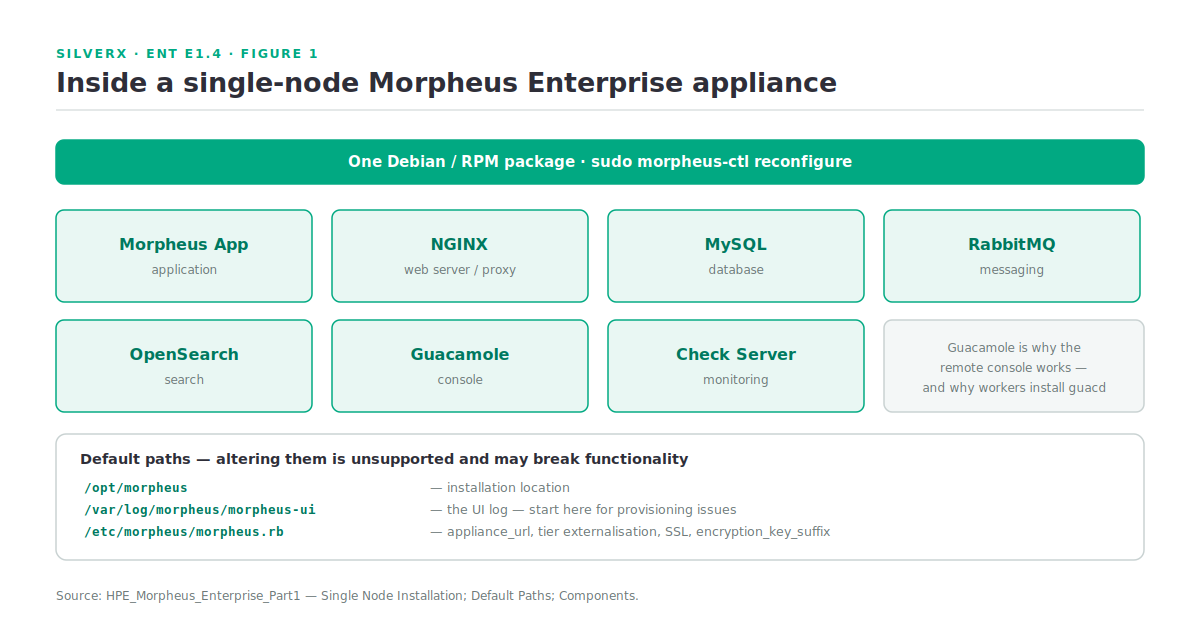
Seeing Guacamole in that list explains something useful: the remote console you get in the UI is a Guacamole-backed session, which is also why the Distributed Worker reconfigure installs guacd alongside the worker and nginx.
The install
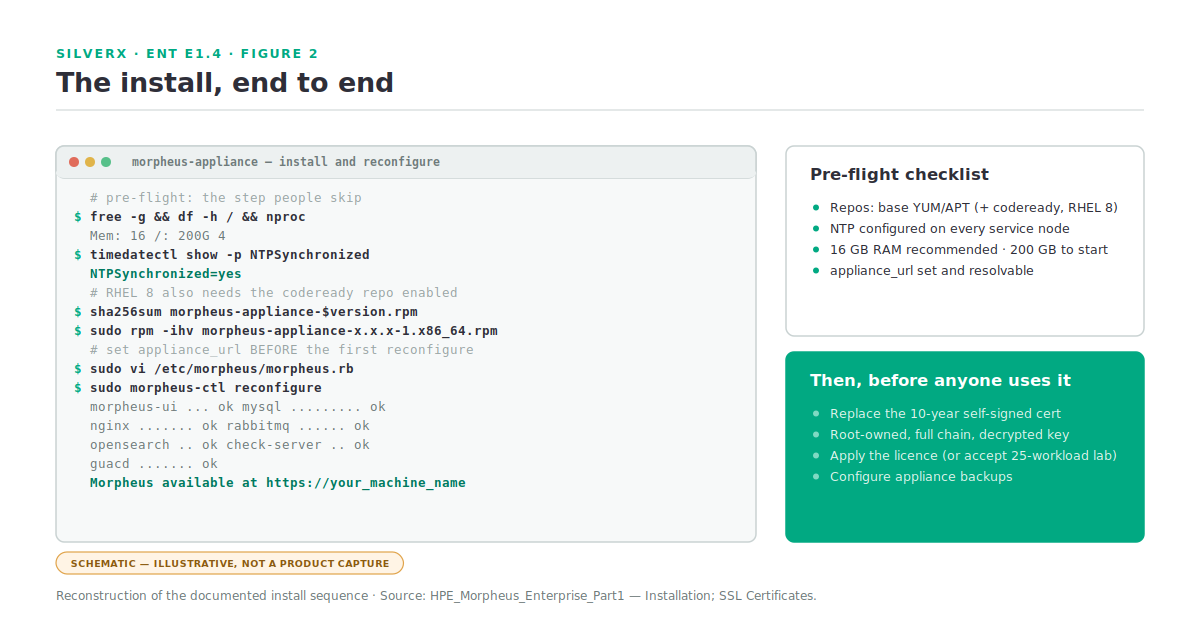
# 1. Confirm the host meets the base requirements first — this is the step people skip
free -g && df -h / && nproc && timedatectl show -p NTPSynchronized

# 2. Download the package for your distro
wget https://www.hpe.com/support/hpesc/path/to/morpheus-appliance-$version.rpm

# 3. Validate the checksum against the published value
sha256sum morpheus-appliance-$version.rpm

# 4. Install
sudo rpm -ihv morpheus-appliance-x.x.x-1.x86_64.rpm     # or: sudo dpkg -i morpheus-appliance_$version_amd64.deb

# 5. Set the appliance URL BEFORE the first reconfigure
sudo vi /etc/morpheus/morpheus.rb
#    appliance_url defaults to the machine hostname: https://your_machine_name

# 6. Build it
sudo morpheus-ctl reconfigure
sudo morpheus-ctl status
Step 5 is the one to get right first time. The appliance_url defaults to the machine’s hostname, and as E1.2 covered at length, that URL is the load-bearing setting for every agent that will ever install. Fixing it later is easy; fixing it after you’ve provisioned fifty instances that can’t resolve it is less fun.
SSL certificates
The appliance generates a 10-year self-signed certificate at deployment. That’s fine for a lab and wrong for anything else — not least because Distributed Workers require a trusted certificate on the appliance or load balancer.
To install your own:
# /etc/morpheus/morpheus.rb
nginx['ssl_certificate'] = '/path/to/certificate.pem'
nginx['ssl_server_key']  = '/path/to/server.key'
sudo morpheus-ctl reconfigure
sudo morpheus-ctl restart nginxThree documented constraints that cause most of the failures here: both files must be owned by root and readable only by root; if the certificate is signed by an intermediate, the signing chain must be included in the certificate file; and the key must be decrypted for Morpheus to install it properly.
To regenerate the self-signed pair, delete the files in /etc/morpheus/ssl/, then reconfigure and restart nginx. To trust an internal CA, drop the full PEM chain into /etc/morpheus/ssl/trusted_certs, reconfigure on each appliance, and import each certificate into the embedded Java keystore with keytool — the documentation gives the exact invocation, and it’s worth following literally.
Offline installations
For appliances behind a firewall or proxy that can’t reach the download site, there’s a supplemental package carrying the packages the standard installer would otherwise fetch.
The rules that matter:
- The supplemental package is additive — you still need the full installer.
- It is linked 1-to-1 with the appliance release. The supplemental for 4.2.1-1 goes with the appliance package 4.2.1-1. Mismatched versions are a bad afternoon.
- Local yum/apt repository access is still required even for offline installs. “Offline” means no access to Morpheus’s download site, not no package management.
- NTP must still be correctly configured and reachable.
wget http://example_url/morpheus-appliance_version_amd64.deb
wget http://example_url/morpheus-appliance-supplemental_version_all.deb
sudo dpkg -i morpheus-appliance_version_amd64.deb
sudo dpkg -i morpheus-appliance-supplemental_version_all.deb
sudo vi /etc/morpheus/morpheus.rb     # set appliance_url
sudo morpheus-ctl reconfigure
Gotchas and caveats
RHEL repository prerequisites. codeready on RHEL 8, Optional RPMs on RHEL 7. Miss it and reconfigure fails partway with a message about a package, not about a repository.
Sizing memory at the 8 GB minimum. It’s a minimum with a swap caveat, not a recommendation. 16 GB is the documented recommendation for default installs, and the appliance runs MySQL, OpenSearch, RabbitMQ and a JVM.
200 GB is a starting figure. Monitor it. Image libraries and backups grow without anyone deciding they should.
Don’t move the paths. Altering default system paths is unsupported and may break functionality.
Externalised services ignore service configuration. For external MySQL, OpenSearch or RabbitMQ, only the connection settings in morpheus.rb apply — service configuration settings don’t.
Alternate SSL ports need more than a URL change. The documentation warns that appending a port to appliance_url may not be enough; expect additional configuration steps.
**Set encryption_key_suffix deliberately.** It’s a morpheus.rb option, and it’s the sort of thing you want decided and documented at build time rather than discovered during a restore.
Key takeaways
- Install is two commands; the prerequisites are the project. Repositories, NTP, memory and disk in that order.
- 16 GB RAM recommended, 200 GB storage as a starting figure — and the storage grows with images, backups and logs.
- The appliance is Morpheus plus NGINX, MySQL, RabbitMQ, OpenSearch, Guacamole and a check server. Fixed paths; don’t move them.
- Set **
appliance_urlbefore the first reconfigure**. - Replace the 10-year self-signed certificate — root-owned, full chain, decrypted key — especially before deploying Distributed Workers.
- Offline installs need the version-matched supplemental package and still need local yum/apt repos.
What’s next
Next in this track: E1.5 — The Data Model: Clouds, Groups, Instances. With an appliance running, we go deep on the four constructs E1.1 introduced — how access actually resolves through Roles and Groups, what a Cloud sync really does, and how to structure the model before it structures itself.