Third post in the HPE Zerto Software track. Z-2 took the components apart; this is the thing you actually build with them.
The unit of recovery is not the VM
Every DR conversation that goes wrong starts with someone protecting virtual machines. Machines aren’t what fails and machines aren’t what you recover — applications are. A three-tier app whose database comes back forty seconds ahead of its middleware, on a different network, in the wrong boot order, is not recovered. It’s just running.
The virtual protection group (VPG) exists to fix that. It’s the unit of protection, the unit of consistency, and the unit of failover in HPE Zerto Software (Zerto) — and building your first one properly is mostly a matter of understanding what each page of the wizard actually commits you to.
The six things a VPG defines
The documentation lists the VPG configuration as six components, and it’s worth seeing them as a set of decisions rather than a form:
| Page | What you’re deciding |
|---|---|
| General | The VPG name, and its priority |
| Virtual Machines | Which VMs recover together, plus boot order and boot delay |
| Replication | Recovery site, host and storage, and the VPG SLA — journal history defaults and test frequency |
| Storage | Default storage for recovered VM files and data volumes |
| Recovery | Networks, subnets, security groups and sizing for failover, move and test |
| NIC | Per-VM network detail after a live or test failover, or a migration |
Every default set here applies to every VM in the group and can be overridden per virtual machine. That per-VM override is the mechanism people forget exists, and it’s what lets one VPG hold an application whose database needs different storage from its web tier.
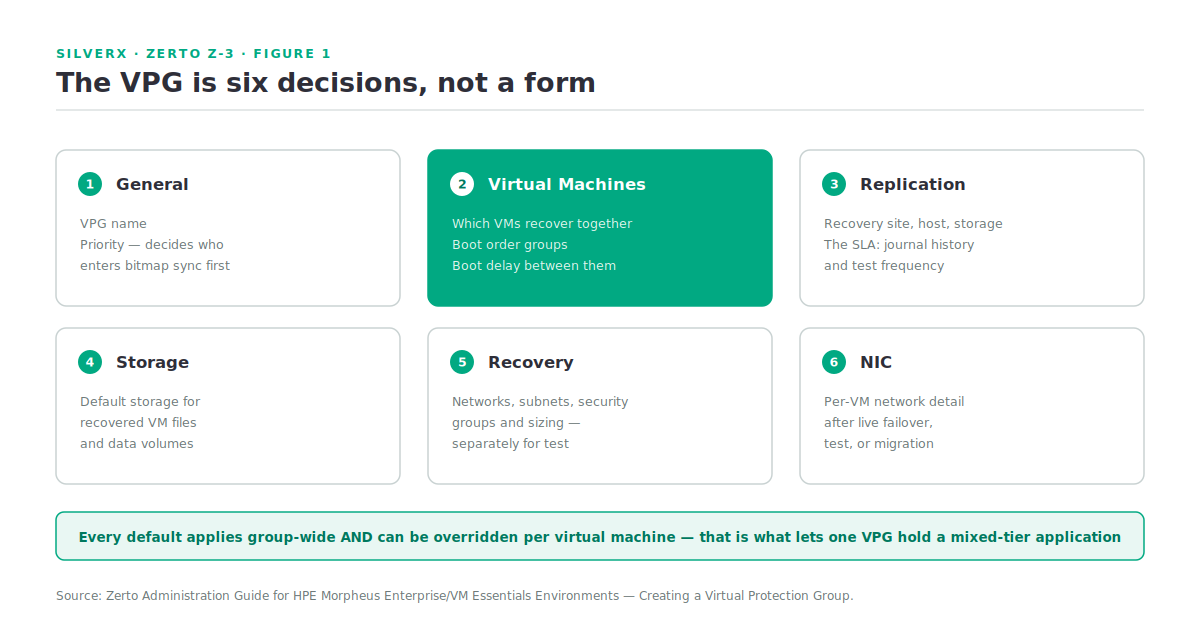
General: priority is a bandwidth decision
The priority you set here is the one that arbitrates bandwidth between VPGs — and, as Z-2 covered at length, it only arbitrates inside a VRA Bandwidth Group. Setting your tier-1 application to High achieves nothing if the thing it competes with sits in a different group.
There’s a second consequence worth knowing now: when WAN load is too great to handle, the VPGs with the lower priorities are the first to enter a bitmap sync. Priority isn’t just about who goes first in good weather; it decides who loses journal granularity in bad weather.
Virtual Machines: boot order is the whole point
This page is where a VPG stops being a backup selection and becomes a recovery plan. VMs are assigned to boot order groups, with a boot delay between them.
Get this from the application owner, not from a diagram. The question isn’t “what depends on what” — it’s “what has to be answering before the next thing starts”. A database that has begun booting is not a database that accepts connections, and boot delay is your only lever for that gap.
The Protected VMs tab shows each VM’s Group — its boot order group — alongside protected storage, provisioned size, used and recovery data size. That’s the view to check after your first sync completes.
Replication: the SLA is two numbers
The VPG SLA covers journal history and how often tests should be performed. Both matter more than they look.
Journal history is your rewind window, and it’s a storage commitment. Set 24 hours and every write for 24 hours lives on your recovery storage before being promoted to the replica disks. Set it to something you can actually afford, then check the Journal History panel on the VPG detail view, which shows the SLA you defined, the amount of time currently covered by the journal, and the earliest checkpoint available for recovery. Those three are not always the same number, and the gap between them is worth watching.
Test frequency in the SLA is Zerto reminding you to do the thing everyone skips. Set it to something real — quarterly at minimum — because an untested DR plan is a hypothesis.
Recovery and NIC: the part that breaks failover tests
Recovery settings cover the networks, subnets and security groups for recovered VMs, separately for failover/move and for failover test. The NIC page then sets per-VM network detail.
Configure the test network as genuinely isolated. A failover test that brings recovered VMs up on the production network, with production IPs, will do exactly what you’d expect to the production instances of those machines.
What the status field is telling you
Zerto’s VPG statuses are unusually diagnostic once you can read them. The ones that matter day to day:
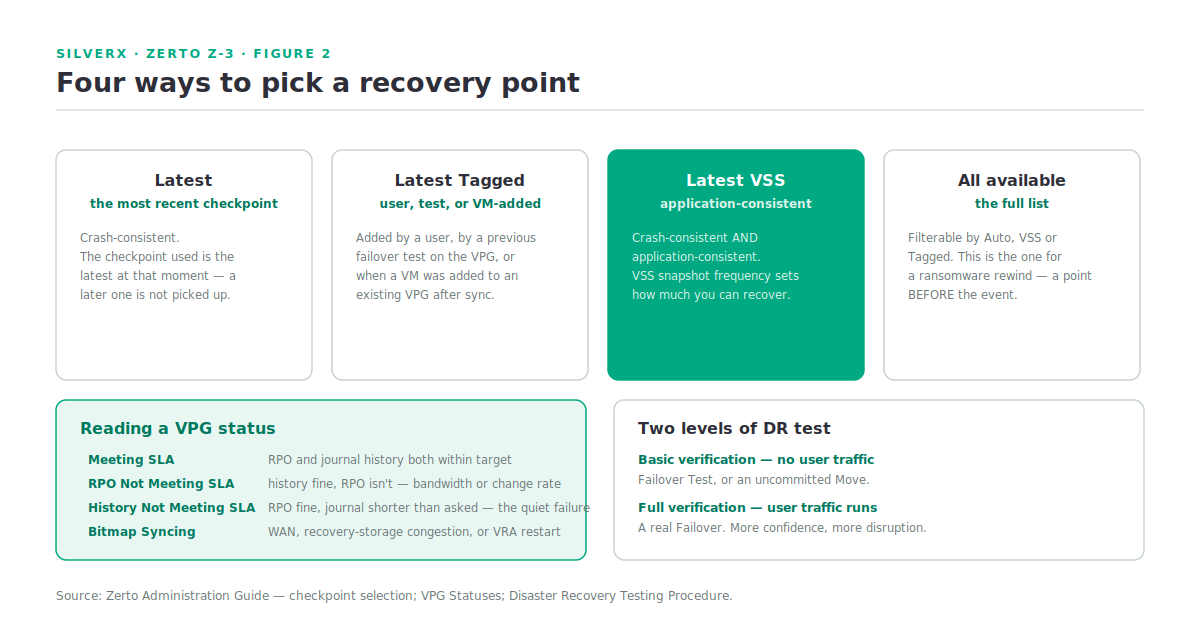
- Meeting SLA — both RPO and journal history within target.
- RPO Not Meeting SLA — journal history is fine, the RPO isn’t. Usually bandwidth or change rate.
- History Not Meeting SLA — the RPO is fine, the journal doesn’t hold as much history as you asked for. Usually journal sizing.
- Not Meeting SLA / Delta Sync — reconciling, when Force Sync wasn’t applied.
- Bitmap Syncing — the change-tracking fallback.
That third one, History Not Meeting SLA, is the quiet failure. Everything looks healthy, replication is current, and your actual recoverable window is shorter than the one in your DR document. Nothing alerts a user about it unless someone reads the status.
On bitmap sync, the documentation is precise about the causes, and all three are worth knowing:
- WAN failure, or WAN load too great to handle — lower-priority VPGs enter bitmap sync first.
- Storage congestion at the recovery site — the recovery VRA can’t write incoming I/O to the journal fast enough.
- The recovery VRA goes down and reboots — a Zerto upgrade will do this.
The mechanism is elegant: Zerto keeps a smart bitmap in memory on the VRA recording which storage areas changed, not the I/O itself. It’s small, scales dynamically, and needs no LUN or volume per VPG at the protected side. When the underlying issue clears, the bitmap drives a targeted resync. You lose granularity, not data.
Testing recovery
A failover test is the only evidence your VPG works. The documentation separates two levels of DR testing, and the distinction is worth adopting:
**Basic verification — user traffic is not run against the recovered VMs.** Either a Failover Test operation, or an uncommitted Move. This proves the VMs come up, in order, on the test network.
**Full verification — user traffic is run against the recovered VMs.** A real Failover operation. Higher confidence, higher disruption.
Start with the first. Run it from the VPG, watch the boot groups come up in order, confirm each tier answers before the next starts, then stop the test. Test results are viewable afterwards, and stopping a running test is initiated from the Running Tasks section of the VPG detail view.
Choosing a checkpoint
Recovery operations let you filter the checkpoint list, and the options encode real differences:
| Option | What you get |
|---|---|
| Latest | The most recent checkpoint — crash-consistent |
| Latest Tagged | The latest checkpoint added by a user, by a previous failover test on that VPG, or when a VM was added to an existing VPG after sync |
| Latest VSS | Crash-consistent and application-consistent, where VSS is in use |
| Select from all available | The full list; filterable by Auto, VSS or Tagged |
For a test, Latest is usually right. For a ransomware recovery, you want the full list and a specific point before the event — which is exactly the scenario Z-1 described, and exactly why journal history sizing is a security decision as much as a storage one.
One caveat the docs call out: if the selected VMs weren’t protected when the chosen checkpoint was taken, you get a warning — and if none of them can be recovered to it, an error.
Gotchas and caveats
A VPG with no VMs is a status, not a mistake you’ll notice. VPG has no VMs is a documented substatus. It happens after removals and it looks harmless in a list view.
Watch the RPO graph, not just the status. The VPG detail view shows current RPO, IOPS, throughput (uncompressed) and WAN traffic (compressed). During any sync, throughput also includes data read from the protected disks — so a throughput spike during a delta sync is expected, not a problem.
Journal storage is overridable, so override it deliberately. It defaults to the recovery storage for each VM. Per Z-2, it absorbs every write for the whole history window.
Changing journal storage means rebuilding the VPG — delete with Keep target disks at the peer site, recreate with the new journal storage, then add the VMs back configured to use the saved volumes as preseeded. That turns a full resync into a Delta Sync.
Export your VPG definitions. The VPGs tab has an Export. Do it after every meaningful change; it’s the cheapest DR documentation you’ll ever produce.
The number of VPGs per site is limited only by the number of protectable VMs — but check the Zerto Scale and Benchmarking Guidelines for the per-site VM maximum before designing around it, against the guidelines for your version; those numbers are not in the documentation uploaded to this series.
Key takeaways
- The VPG is the unit of recovery — grouped VMs, boot order, one consistent point in time.
- Every default is overridable per VM, which is what lets one VPG hold a mixed-tier application.
- Priority decides who enters bitmap sync first under WAN pressure, and only within a bandwidth group.
- History Not Meeting SLA is the quiet failure: replication looks healthy while your real rewind window has shrunk.
- Bitmap sync has three causes — WAN, recovery-site storage congestion, VRA restart — and costs granularity, not data.
- Test with an isolated test network, start with basic verification, and pick checkpoints deliberately: Latest for tests, the full list for a ransomware rewind.
What’s next
Next in this track: Z-4 — Protecting VMs Across VMware and HVM. Cross-platform replication in practice — the guest prerequisites that decide whether a VM boots after failover, what Move actually does, and how to run VMware and HVM side by side while you migrate.
Pingback: Protecting VMs Across VMware and HVM – silverX.org