Fourth post in the HPE Zerto Software track. Z-3 built a VPG within one platform. This one crosses hypervisors — which is where the interesting failures are.
Replication is the easy part
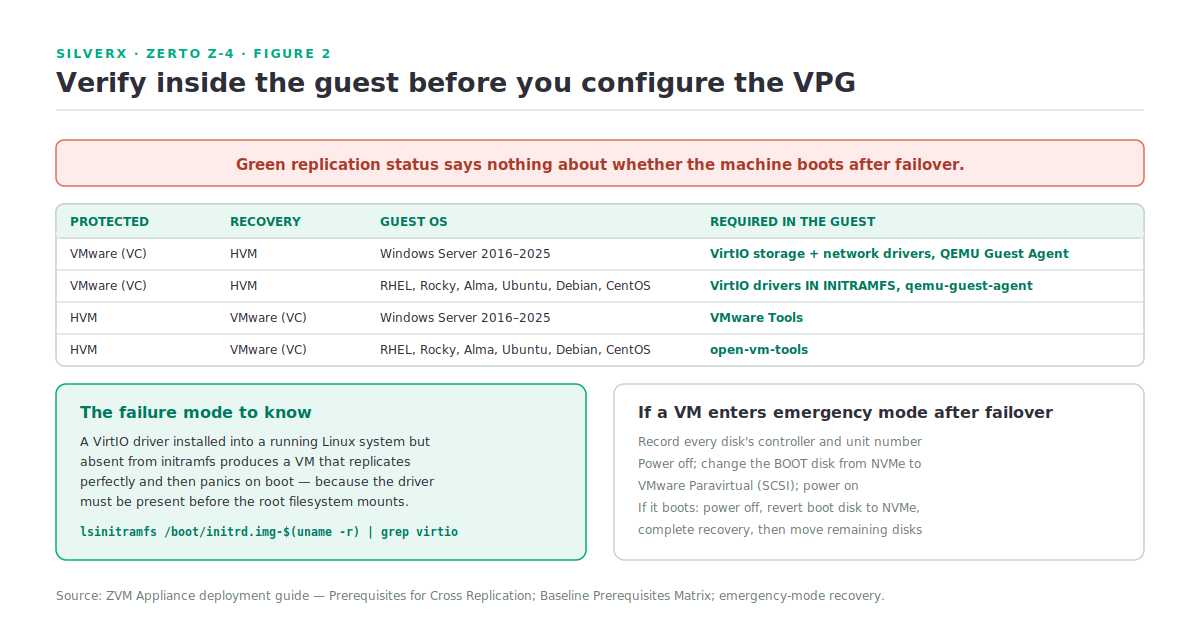
A VM that replicates cleanly from VMware to HVM and then fails to boot after failover is worse than one that never replicated, because you didn’t know. The replication status was green. The dashboard said Meeting SLA. The failure surfaces at the exact moment you can least afford it.
That’s the whole subject of this post. HPE Zerto Software (Zerto) will happily replicate a VM between VMware vCenter and HPE Morpheus VM Essentials Software / HPE Morpheus Enterprise Software (HVM). Whether the resulting machine boots depends on drivers and agents inside the guest, and Zerto cannot install those for you.
What’s supported, precisely
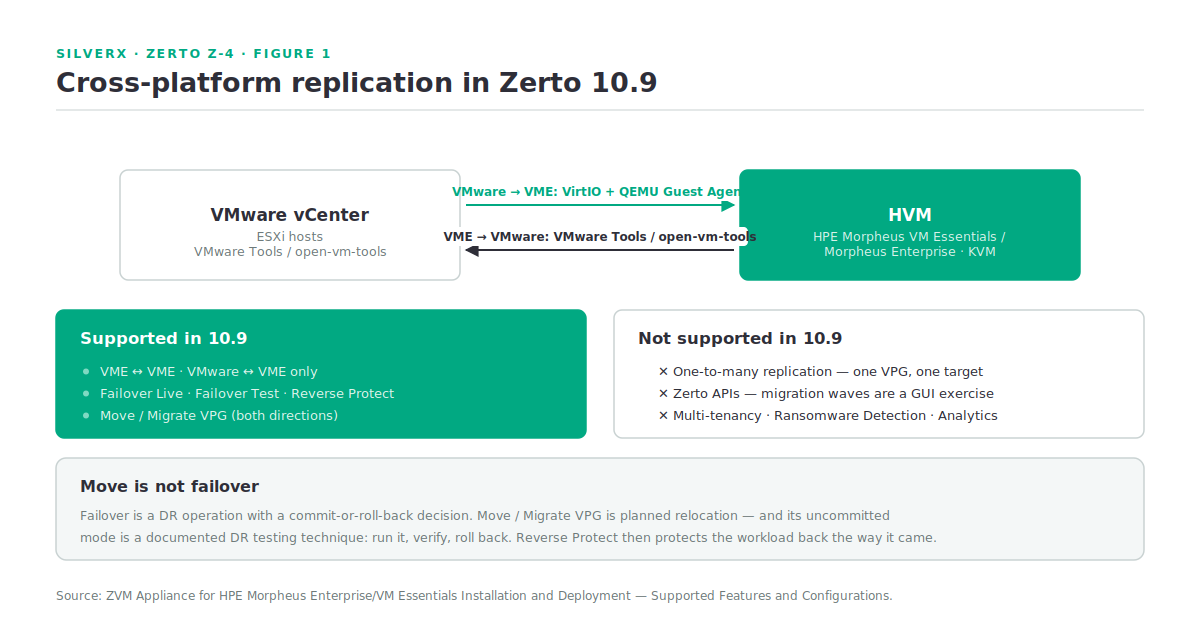
From the version 10.9 support matrix (Z-1):
- VME → VME replication
- Cross-platform replication: VMware → VME and VME → VMware only
- Failover Live, Failover Test, Reverse Protect
- Move / Migrate VPG — VMware → VME and VME → VMware only
Note what “only” is excluding: cross-platform replication is a two-way street between VMware and HVM, not a general any-to-any capability. And one-to-many replication is not supported on HVM in 10.9, so a single protected VPG has one recovery target.
The other constraint worth restating: when recovering to a different hypervisor, the protected virtual machines must also be supported by the recovery hypervisor. A guest OS that VMware supports and KVM doesn’t is not a Zerto problem to solve.
The guest prerequisites
This is the section to hand to whoever owns the VMs. The baseline matrix from the deployment guide:
| Protected | Recovery | Guest OS | Required in the guest |
|---|---|---|---|
| VMware (VC) | HVM | Windows Server 2016 / 2019 / 2022 / 2025 | VirtIO storage driver, VirtIO network driver, QEMU Guest Agent |
| VMware (VC) | HVM | RHEL, Rocky, AlmaLinux, Ubuntu, Debian, CentOS | VirtIO storage and network drivers in initramfs, qemu-guest-agent |
| HVM | VMware (VC) | Windows Server 2016 / 2019 / 2022 / 2025 | VMware Tools |
| HVM | VMware (VC) | RHEL, Rocky, AlmaLinux, Ubuntu, Debian, CentOS | open-vm-tools |
The asymmetry is the point. Going to HVM you’re moving onto KVM, so the guest needs VirtIO — and critically, needs it in initramfs on Linux, because the driver has to be present before the root filesystem mounts. A VirtIO driver installed into a running system but absent from initramfs produces a VM that replicates perfectly and then panics on boot.
Going to VMware you need VMware Tools or open-vm-tools, which is a lower bar because most estates already have them.
Per OS family
Run these on the source VMs before you configure the VPG.
RHEL 7 / CentOS 7:
rpm -qa | grep qemu-guest-agent
lsinitrd /boot/initramfs-$(uname -r).img | grep virtio
# expect virtio_blk, virtio_scsi, virtio_pci, virtio_net
Remediation:
sudo yum install qemu-guest-agent -y
sudo systemctl enable qemu-guest-agent
sudo vi /etc/dracut.conf.d/virtio.conf
#   add_drivers+=" virtio_blk virtio_pci virtio_scsi virtio_net "
sudo dracut -f --no-hostonly
RHEL 8/9, Rocky, AlmaLinux:
sudo dnf install qemu-guest-agent -y
sudo systemctl enable qemu-guest-agent
sudo vi /etc/dracut.conf.d/virtio.conf
#   add_drivers+=" virtio_blk virtio_scsi virtio_net "
sudo dracut -f --no-hostonly
Ubuntu / Debian:
dpkg -l | grep qemu-guest-agent
lsinitramfs /boot/initrd.img-$(uname -r) | grep virtio
# expect virtio, virtio_pci, virtio_blk, virtio_scsi, virtio_net

sudo apt update && sudo apt install qemu-guest-agent -y
sudo systemctl enable qemu-guest-agent
sudo vi /etc/initramfs-tools/modules
#   virtio / virtio_pci / virtio_blk / virtio_scsi / virtio_net
sudo update-initramfs -u
Windows — check Device Manager for VirtIO devices under Storage Controllers, Network Adapters and System Devices, and confirm QEMU Guest Agent under Programs and Features. If they’re missing, the documented remediation injects drivers offline from the virtio-win ISO in Windows Recovery Mode:
dism /image:C:\ /add-driver /driver:E:\viostor\<version>\amd64\viostor.inf /forceunsigned
dism /image:C:\ /add-driver /driver:E:\vioscsi\<version>\amd64\vioscsi.inf /forceunsigned
Then install virtio-win-gt-x64.msi and virtio-win-guest-tools.exe from the ISO, and verify with dism /online /get-drivers | find "vio" and sc query qemu-ga.
UEFI-based VMs may need additional preparation to boot successfully after cross-platform failover — check that section of the deployment guide for anything UEFI in scope.
Move versus failover
Both bring a VM up on the other platform; they mean different things.
Failover is a DR operation. Something happened, and you’re recovering. Live failover has a commit or roll back decision after the VMs come up — visible in Running Tasks on the VPG, and the point at which you decide whether the recovery stands.
Move / Migrate VPG is a planned operation. Everything is healthy and you’re relocating the workload — VMware → VME or VME → VMware. It’s the migration tool, and it has an uncommitted mode the documentation recommends as a DR testing technique: run an uncommitted Move, verify, then roll back.
For a VMware-to-HVM migration programme this is the interesting one. A1.4 covered VM Essentials’ own bulk migration — up to 20 VMs at a time, with VMs powered down for the transfer. Zerto’s Move takes a different shape: the data is already replicated continuously, so the cutover is short, and Reverse Protect means you can protect the workload back the way it came immediately afterwards.
Two tools, two profiles. VME’s migration is a bulk move with a disruption window per batch. Zerto’s is per-VPG with a short cutover and a return path — at the cost of running Zerto and having replicated the workload first.
Gotchas and caveats
Verify guest prerequisites before configuring the VPG, not after. Replication succeeding tells you nothing about whether the machine boots.
VirtIO in initramfs, not just installed. The most common Linux failure by a distance.
An emergency-mode boot after failover has a documented recovery. If a VM enters emergency mode and fails to boot, and it uses multiple controllers with disks on an NVMe controller: record every disk’s controller and unit number, power off, change the boot disk’s controller from NVMe to VMware Paravirtual (SCSI), power on. If it boots, power off, revert the boot disk to NVMe and complete the recovery — then move the remaining disks to Paravirtual and remove the superfluous controllers. Worth having in the runbook before you need it.
Check SELinux state on source VMs. The deployment guide covers SELinux configuration as part of cross-platform preparation; enforcing mode with an unexpected relabel after a platform change is a slow boot at best.
One-to-many is not supported on HVM in 10.9. One VPG, one recovery target. If your DR design assumed fan-out replication, that’s a design change.
No Zerto APIs on HVM in 10.9 (Z-1). Cross-platform migration waves are a GUI exercise for now — worth knowing before you plan to script a few hundred VMs.
Everything here is version-specific. the support matrix and prerequisites against the Zerto version you’re deploying; this is exactly the area that improves release to release.
Key takeaways
- Cross-platform is VMware ↔ VME only in 10.9, with Failover Live, Failover Test, Reverse Protect and Move.
- To HVM: VirtIO storage and network drivers plus QEMU Guest Agent — drivers in initramfs on Linux. To VMware: VMware Tools or open-vm-tools.
- Green replication status says nothing about whether the guest boots. Verify inside the guest first.
- Move is the planned operation, failover is the DR one — and uncommitted Move is a legitimate DR test.
- Zerto Move and VME bulk migration are different migration profiles; pick per workload, not per programme.
- No one-to-many and no APIs on HVM in 10.9 — both are design constraints, not preferences.
What’s next
Next in this track: Z-5 — DR Orchestration and Non-Disruptive Failover. Turning VPGs into an actual DR plan — orchestrating multi-application recovery, what commit and roll back really decide, reverse protection after a failover, and building a runbook that someone other than you can execute.
Pingback: DR Orchestration and Non-Disruptive Failover – silverX.org