Eleventh post in the HPE OpsRamp track. O-10 covered Copilot’s conversational front end — including a documented “heal” action on alerts whose actual mechanics. This post goes underneath the chat panel and the correlation engine (O-9) to the execution layer both sit on top of: Process Automation, Scripts, and First Response — the machinery that actually runs a task when an alert, a schedule, or a person decides something needs doing.
Where this sits in OpsRamp’s own information architecture
OpsRamp groups this material under one documentation section — Remediation and Automation — and its own overview text is blunt about the problem it’s solving: in distributed IT environments, “knowledge of operational processes, maintenance procedures and incident triage is not widely shared, documented or available.” Teams re-solve the same incident from scratch because the fix lived in one engineer’s head, not in the platform. The section’s stated answer is to centralize three execution modes: ad-hoc (a person runs something once, right now), scheduled (a predictable, recurring job), and runbook automation (a fix that runs itself, attached to the event that indicates it’s needed) — with the last one framed explicitly as a mean-time-to-repair lever for “regularly occurring problems,” the blog’s own examples being disk-capacity and CPU/RAM pressure on high-transaction systems.
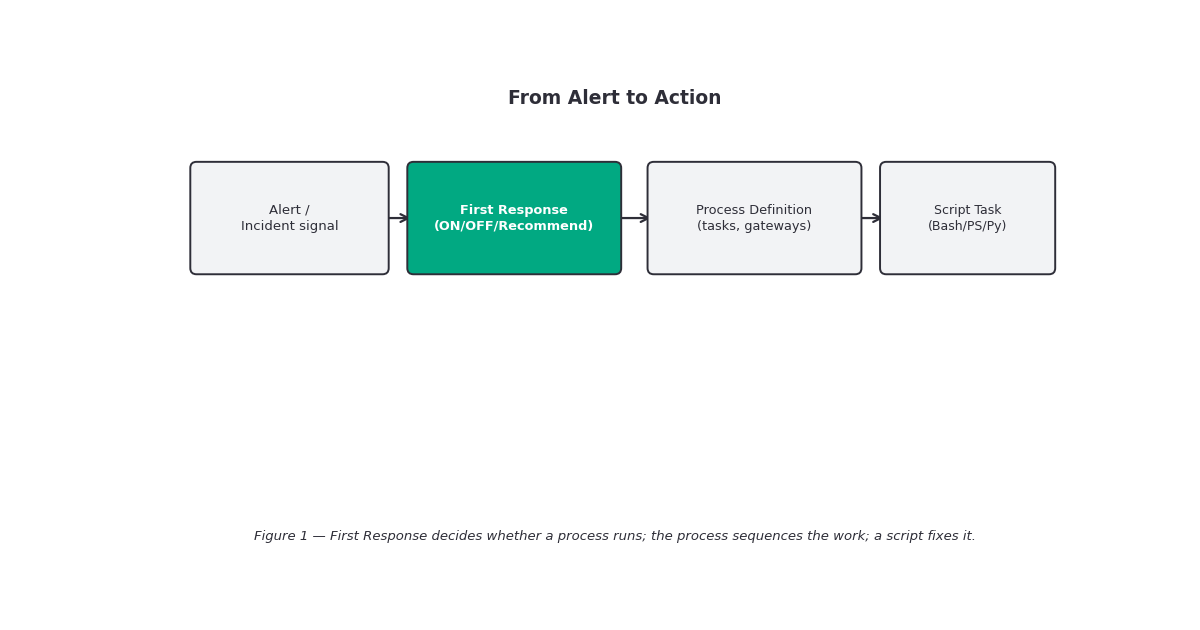
Underneath that framing sit four separately-documented pieces this post covers in order of how they compose: Scripts (V2) (the unit of work), Process Automation 2.0 (the orchestration layer that sequences and triggers work), Process Definitions (the actual workflow objects you build), and First Response (the alert-side policy that decides when a process runs automatically). Patch Management 2.0 lives in this same section too, but it’s substantial enough — and different enough in kind — to get its own post: O-12, next in this track.
Scripts: the executable unit everything else calls
A script in OpsRamp is documented plainly as “executable files written in languages like Bash, PowerShell, or Python, enabling the automation of various tasks across your infrastructure” — three supported languages, matching Linux/Unix, Windows, and cross-platform needs respectively. Scripts are uploaded and managed centrally, then run in one of four documented ways: on-demand (manual, immediate), scheduled, alert-triggered (fired automatically in response to a monitoring alert or incident), or as a component inside a larger Process Automation workflow. That last mode is the important one for this post — a script by itself is just a stored, reusable procedure; wired into a process definition, it becomes one task in an automated response.
Documented use cases span routine maintenance, installations, backups, and deployments through to incident response and diagnostics, external-system integration via API calls, data collection/reporting, and — the phrase the docs use — “self-healing automation.” The public-facing blog post on this topic makes the centralization case concretely with a worked example: an enable_disable_rdp.vbs script for managing Windows Remote Desktop sessions, framed as the kind of standardized, versioned procedure that should live in the platform rather than scattered across individual admins’ machines.
Process Automation: the event bus underneath the workflows
Process Automation’s own definition is more infrastructural than “automation” usually sounds: it’s described as “a messaging platform for customers to subscribe platform events, and configure various tasks to react to the event,” plus a scheduler for time-based tasks. Three stated objectives explain why it exists as its own layer rather than being folded into scripts or alerting directly: letting customers implement their own business logic without waiting for an OpsRamp product release, replacing ad-hoc “hardcoded, cluttered customer logic” with a cleaner configurable interface, and providing one substrate broad enough to cover patching, rule-based automation (RBA), and — named explicitly as a forward-looking category — future Robotic Process Automation work.
Getting here requires a subscription step most of this track’s earlier automation features didn’t: the Remediation and Automation product package must be enabled for the client, and the partner must be subscribed at the partner level first. Skip that step and the documented failure is specific: "Access Denied! This Partner is not subscribed for this product package." Once enabled, Process Automation is reachable from the hamburger menu on the OpsRamp home page, alongside Process Definitions, Process Instances (execution tracking), and the patch-management and network-configuration automation categories that live in the same menu.
Process Definitions: what an actual workflow looks like
A process definition is the concrete workflow object — “a sequence of tasks to run automatically,” built from a small, typed set of components: start/stop events, tasks (units of work that process input and generate output for downstream steps), gateways (decision points, e.g. an exclusive gateway branching on success/failure), and connectors wiring all of it together. Each component is configured through its own property panel rather than free-form scripting the workflow shape itself.
A documented worked example — resource patching — makes the shape concrete: a Timer Start Event (calendar-picked start date, a recurrence pattern of minute/hourly/daily/weekly/monthly, a “repeats every N” interval, and an end condition of never / after N occurrences / on a specific date) triggers a Script Task (choosing agent or agentless execution, selecting a script from the library, passing input via $-token expansion, and choosing which user context it runs as). An Exclusive Gateway branches on the outcome, a Service Task can create a new alert from the process itself (again populated via $ token references into a chosen Platform Service), and a Send Task notifies a recipient using a Notification Template scoped to Alert, Incident, Resource, Task, or JSON Object content — the same template concept O-8 documented for escalation-policy notifications, reused here for process-driven ones. Everything is committed with a Save & Deploy action, not a soft save — there’s no documented draft state short of that.
Triggering isn’t unconditional. Process definitions respond to timer events, generic start events, alert signals, and incident signals — but with a documented exclusion list: “Process won’t trigger on Scheduled Maintenance, Correlated, Obsolete, and Observed alerts for Alert Signal Start events.” Given O-9’s inference model, that exclusion matters directly: an alert that’s already been folded into a correlated inference is, by this rule, not itself a fresh trigger for a new process — the automation is meant to react to the discrete alert, not to fire again for every alert already absorbed into a group. Incident-side, there’s a second documented gap: incident signal events don’t fire during bulk update operations from Service Desk — closing 200 tickets in one bulk action won’t trigger 200 process runs.
Two numeric safeguards are worth knowing before you design anything recursive: a process cannot invoke on entities it created or updated itself (the built-in loop guard for self-triggering), and independently, any single task is capped at 5 invocations — “if the same task comes to execution for the 6th time, stopping the process,” with the terminated run visible afterward under Completed Instances, filterable as “Externally Terminated.” Neither limit is configurable in the documented material — they read as fixed platform safety rails, not tunable settings.
| Scripts | Process Definitions | First Response | |
|---|---|---|---|
| What it is | One executable unit (Bash/PowerShell/Python) | A multi-step workflow (tasks, gateways, events) | An alert correlation policy that decides whether to run one |
| Triggers | On-demand, scheduled, alert-triggered, or called from a process | Timer, generic start, alert signal, incident signal | New alerts only (not later occurrences of an existing one) |
| Modes | N/A — runs when called | N/A — deployed and active, or not | ON / OFF / Recommend |
| Documented safety limit | Not specified | 5 invocations per task; no self-triggering loop | N/A |
| Requires product package? | Not stated as a separate gate | Yes — Remediation and Automation package | No — part of core alerting (O-8/O-9) |
First Response: the alert-side switch that decides “run it or don’t”
O-9 named First Response only as the point where correlation, prediction, and automation meet; this post is where it actually belongs. Structurally, First Response is documented as part of the alert correlation policy family — “user settings… that are applied when taking first response actions on alerts” — and it runs in the same three-mode pattern O-8 and O-9 both used for escalation and correlation policies: ON (executes configured actions automatically), OFF (disabled, for review before rollout), and Recommend (surfaces a clickable, suggested action based on learned patterns in historical alerts, without executing it). Its scope is narrower than it might sound: actions apply only to newly generated alerts, not to later occurrences folded into an alert that already exists — matching the same “first alert in a sequence, not every repeat” boundary O-9 documented.
Each First Response policy’s own summary view tracks a count of alerts it suppressed and a count of alerts where it actually executed a process — a lightweight, built-in audit trail of how often the automation actually fired versus how often it just watched. Its two documented action types are suppress the alert and execute a process — the second one is the literal connective tissue to everything above: a First Response policy in ON mode is what turns “an alert matching these conditions arrived” into “the process definition you built now runs,” with no person in the loop. Recommend mode is the sane way to introduce that: it shows what the policy would have triggered against real alert history, without actually running anything, the same pattern O-8 documented for escalation-policy rollout.
Gotchas and caveats
Process Automation requires its own product-package subscription — this isn’t bundled with core alerting. Unlike escalation policies (O-8) or correlation and prediction policies (O-9), Process Automation sits behind the separate Remediation and Automation package at both the partner and client level. Confirm the subscription is active before promising a stakeholder a runbook will fire — the documented failure mode is a flat access-denied, not a degraded feature.
Correlated alerts don’t re-trigger process definitions on their own. If your mental model is “every alert that fires can run a remediation,” the documented exclusion list (Scheduled Maintenance, Correlated, Obsolete, Observed) breaks that for anything O-9’s correlation engine has already folded into an inference — design First Response and process triggers around the discrete alert, not assuming correlated group members each get their own shot.
The 5-invocation task cap is a hard safety rail, not a tunable setting in the documented material. A process design that legitimately needs a task to retry more than five times against the same entity will hit “Externally Terminated” rather than complete — worth testing against this limit deliberately rather than discovering it mid-incident.
Bulk Service Desk updates don’t fire incident-signal process triggers. If part of your remediation design depends on catching incident closures or updates, a bulk operation is a documented blind spot — don’t assume a mass ticket update will drive the same automation a one-at-a-time update would.
“Recommend” mode across First Response, escalation, and correlation policies is the same safe rollout pattern three times over — use it. O-8, O-9, and this post have each independently documented a Recommend mode that shows what would have happened without acting. There’s no reason to flip any of these straight to ON in a new environment when the platform gives you a free dry run against real history first.
Scripts’ parameter-passing and size/logging limits are thin in the public docs. Before building a script-heavy process definition, verify these details against your own tenant’s in-product documentation or support rather than the public pages — this is one of the more under-documented corners of this whole feature area.
Key takeaways
- Remediation and Automation covers three execution modes — ad-hoc, scheduled, and runbook (event-triggered) automation — aimed explicitly at the “tribal knowledge in one engineer’s head” problem, not just task scheduling.
- Scripts (V2) (Bash/PowerShell/Python) are the reusable unit of work, runnable on-demand, scheduled, alert-triggered, or as a task inside a larger process.
- Process Automation is an event-subscription-plus-scheduler platform; Process Definitions are the actual workflows (start events, tasks, gateways, connectors) — deployed via Save & Deploy, with a documented worked example (timer → script task → gateway → alert-create/notify).
- Process definitions have two hard safety limits: no self-triggering on entities they created/updated, and a 5-invocation cap per task; they also won’t trigger on Scheduled Maintenance, Correlated, Obsolete, or Observed alerts, or during Service Desk bulk updates.
- First Response is the alert-side switch (ON/OFF/Recommend) that decides whether a process runs automatically on a newly generated alert — it can suppress the alert or execute a process, and tracks both counts per policy.
- Process Automation requires its own product-package subscription, unlike the core alerting features (O-8, O-9) this track has covered so far.
- Scripts’ parameter-passing, size, and logging mechanics
What’s next
Next in this track: O-12 — Patch Automation. This post covered the general-purpose remediation machinery — scripts, process definitions, First Response. O-12 narrows into the specific, heavily-used case OpsRamp gives its own dedicated module: patch scanning, baselines, compliance tracking, and automated deployment, built on the same Process Automation substrate this post described.
Sources: OpsRamp Documentation · Remediation and Automation · Process Automation · Process Definition · Get Started with Process Definition · Define / Deploy an Automation Process · Scripts (V2) · First Response · Drive Systematic IT Process Automation With OpsRamp’s Policy-Based Management.