Twelfth post in the HPE OpsRamp track. O-11 covered OpsRamp’s automation engine and incident-remediation workflows — scripted, on-demand and alert-triggered actions run against resources. This post looks at the one remediation workload OpsRamp treats as a first-class module of its own rather than a generic automation task: patching. Discovering what’s missing, deciding what’s approved, scheduling when it installs, and proving afterward that it actually did.
Why patching gets its own module
Nothing about “install this update on that server” strictly requires anything beyond the automation engine O-11 already described — a script, a target, a schedule. OpsRamp ships patching as a separate module anyway (Configuration Management → Patch Management, with client-level and partner-level overviews), and the reason becomes clear once you look at what it tracks that a generic automation job wouldn’t: a patch feed kept current against vendor sources and WSUS, a compliance baseline that’s a moving target as new patches ship, and an audit trail distinguishing “we tried to install this” from “this device is actually caught up.” A one-off remediation script doesn’t need any of that scaffolding. A patch program run every month across a hybrid fleet does.
The five-stage pipeline
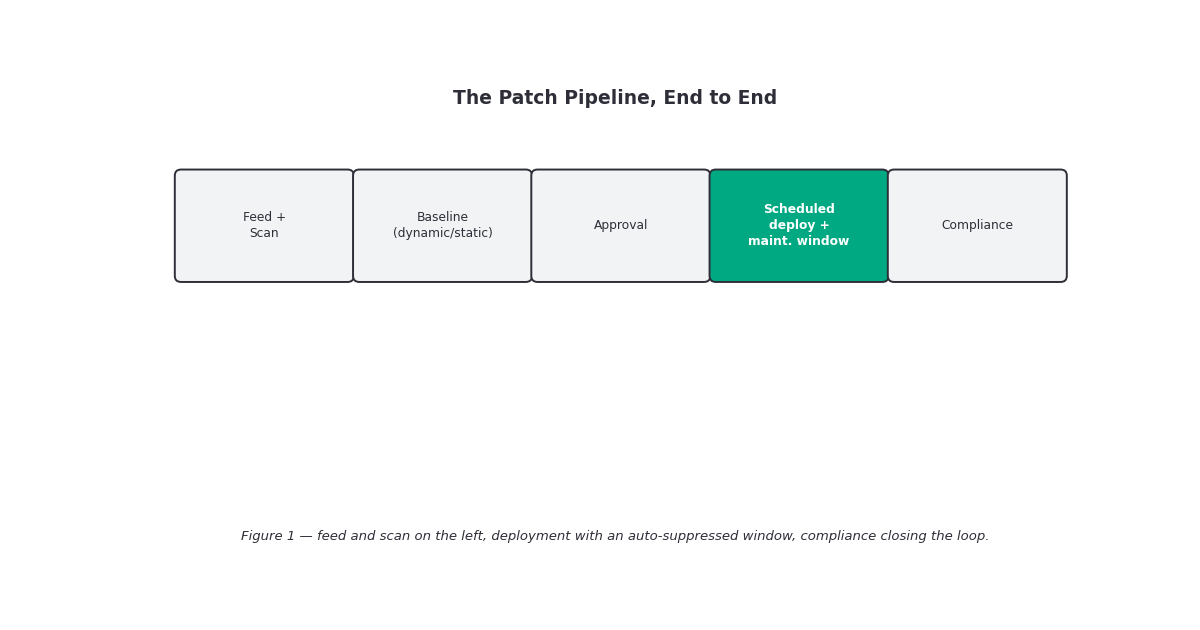
OpsRamp’s own framing of the module is a five-step sequence — scan, approve, configure, distribute, validate — and the documentation maps each step to a concrete object rather than leaving it as a diagram:
- Patch Feed — the source of available patches, pulled from platform integrations with vendor sites and from WSUS for Windows environments.
- Missing Patches — a scan job (one-time or recurring) that diffs a device’s installed patches against the feed and produces the gap list this whole module exists to close.
- Patch Baseline — a named, OS-scoped list of patches you intend to have installed everywhere it applies. Baselines come in two flavors: dynamic, built from an OpsQL query so the list grows automatically as new matching patches appear (or shrinks if a patch stops matching your filter criteria), and static, a manually curated list that stays exactly as you left it regardless of what ships afterward. The dynamic/static split is the same tradeoff this track has seen before with dynamic versus static resource groups — a dynamic baseline keeps itself current at the cost of surprise, a static one is predictable at the cost of upkeep.
- Patch Configurations — the deployment job itself: which resources (dynamic OpsQL query or manual selection), which patches (from an approved baseline, or filtered/manually selected), and on what schedule.
- Patch Compliance — a separate policy object, not a property of the baseline or the configuration, that continuously checks named devices/resource groups against a baseline and reports a binary result per device.
Approval: manual by default, automatic by exception
Two approval mechanisms are documented, at two different layers, and it’s worth keeping them straight because they answer different questions. At the baseline/compliance-policy level, approval is either Manual — “run the patch approval process when the baseline changes,” a deliberate, one-time action each time the baseline shifts — or Automatic — patches are approved the moment they land in the baseline, no human step in between. At the patch configuration (deployment job) level, a separate approval-type setting lets automatic approval be scoped specifically to whitelisted security and critical patches, while everything else still waits on a person. That’s the practical middle ground documentation gestures at without spelling out as a named “best practice”: auto-approve the categories you already have written policy backing for, keep manual review on the ones you don’t.
Scheduling and the “Patch Tuesday” option
Patch Configurations support the scheduling shapes you’d expect — on-demand, one-time, daily, weekly, monthly, yearly — plus one that’s specific to how vendors actually ship: “Patch Tuesday,” a named option that fires on the second Tuesday of the month, the day Microsoft’s monthly security rollup lands. It’s a small detail, but it means you don’t have to hand-build a “second Tuesday” recurrence rule yourself; OpsRamp encodes the industry’s own release cadence as a first-class schedule type. Deployment jobs also carry a resource-level timezone setting, which matters more than it sounds for a fleet spread across regions — “midnight” isn’t a single moment across a hybrid estate, and the timezone field is how a deployment window stays local to each device rather than to wherever the admin who configured it happens to sit.
The maintenance-window integration
O-8 (this track’s alerting-noise post) and the alerting documentation both describe scheduled maintenance windows as a general-purpose way to mark a period as expected downtime so matching alerts get filed as “Maintenance alerts” instead of paging someone. Patch Configurations wire directly into that same mechanism: enabling the maintenance-window option on a patch job “creates a maintenance window for all of the selected devices” automatically, scoped to the patch run itself, so a reboot-triggered outage alert or a monitoring gap during the install doesn’t fire as a real incident. It’s the same suppression primitive as O-8’s manually-scheduled windows, just auto-generated per patch job instead of hand-configured — one less step to forget before a patch run that’s going to reboot two hundred servers.
Compliance: a binary you can’t argue with
Where a lot of monitoring in this track deals in thresholds and severities, patch compliance is documented as deliberately blunt: a device’s compliance number is a count of patches from its assigned baseline that are still not installed. Zero means compliant. Greater than zero means non-compliant. There’s no partial-credit state, no “mostly patched” — either the baseline gap is closed or it isn’t. Compliance policies are configured with a name, a description, a target client, an OS type (Windows or Linux — the module is scoped per-OS throughout, not cross-platform in a single policy), and a selection of baselines, devices, and resource groups to check. A dedicated Patch Overview Page gives the rollup view: hardcoded (not user-rearrangeable, per the documentation) widgets for unscanned resources, scanned resources, installed patches, failed installs, rebooted resources, missing critical/security patches, and non-compliant device counts, with a partner-level Client Overview widget for MSP-style multi-tenant views.
What’s still thin in the documentation
Patch categories are documented at a useful level of specificity — Security/Critical, Definition updates, Feature Packs, Service Packs, general Updates, and Update Rollups — which is enough to build category-scoped auto-approval policy around. What isn’t documented with the same precision: severity-based filtering rules within a baseline beyond the OpsQL-query mechanism, any numeric cap on patches per baseline or devices per compliance policy, and specific reboot-sequencing controls (stagger reboots across a resource group, reboot-suppression windows independent of the maintenance-window suppression, that kind of thing) beyond the general on/off reboot toggle mentioned in the configuration docs, whether reboot behavior can be staggered or sequenced across a large resource group, or whether every device in a patch configuration reboots on its own schedule independently — this matters operationally for anything bigger than a handful of hosts, and the documentation available doesn’t resolve it either way. There’s also an early-access Patch CVE capability noted in the module’s stage list — security-vulnerability tracking layered onto patch data — that’s flagged Beta and not otherwise detailed in what’s public; treat it as directionally interesting rather than something to plan around yet.
Gotchas and caveats
Dynamic baselines change out from under you. An OpsQL-driven baseline is convenient until a filter change upstream (a new patch category ships that happens to match your query) suddenly adds patches you didn’t explicitly vet. If your approval mode is Automatic at the baseline level, that’s an unreviewed patch installed on the next run. Static baselines trade that risk for manual upkeep — pick deliberately, not by default.
Two separate approval settings exist, and they don’t automatically agree. Baseline-level manual/automatic approval and configuration-level “auto-approve whitelisted security/critical” are different controls. It’s possible to have a baseline set to manual approval while a deployment job is separately configured to auto-approve critical patches — read both settings on a policy before assuming you know its actual behavior.
Compliance is binary, not weighted. A device missing one low-priority optional update reads exactly as “non-compliant” as a device missing a critical security patch, at the level of the top-line compliance count. Use the Missing Critical & Security widget on the overview page, not the raw compliance number, if severity is what you actually care about.
The auto-generated maintenance window is scoped to the patch job, not to your judgment. It suppresses alerts on the selected devices for the run — it does not know whether your patch job is going to take longer than expected. A deployment that overruns its implicit window can start generating real alerts again mid-patch.
“Patch Tuesday” as a schedule type is Microsoft-flavored by name and origin. It maps cleanly onto Windows patching cadence; Linux patch cycles (documentation covers both OS types throughout this module) don’t share that release rhythm, so the schedule option is a genuine convenience for one OS family and mostly coincidental for the other.
Key takeaways
- OpsRamp treats patching as its own module (not a generic automation job) built around five tracked stages: Patch Feed, Missing Patches (scan), Patch Baseline, Patch Configurations (deployment), and Patch Compliance.
- Baselines are dynamic (OpsQL-query-driven, self-updating) or static (manually curated, fixed) — the same tradeoff this track has seen with resource groups.
- Approval exists at two layers: baseline/compliance-policy level (Manual vs. Automatic) and configuration/deployment level (whitelisted auto-approval for security/critical patches specifically).
- Deployment scheduling includes a “Patch Tuesday” option tied to Microsoft’s monthly release cadence, plus resource-level timezone handling for geographically distributed fleets.
- Enabling the maintenance-window option on a patch configuration auto-generates a suppression window for the selected devices, reusing the same mechanism as O-8’s manually scheduled maintenance periods.
- Compliance is a strict binary per device: zero missing baseline patches is compliant, anything above zero is not — no partial-credit state.
- Reboot staggering/sequencing across large resource groups, Beta Patch CVE features.
What’s next
Next in this track: O-13 — Network Monitoring, the final post in the OpsRamp track. Patching closes out remediation-side coverage; O-13 moves back to the discovery-and-monitoring side of the platform to cover how OpsRamp finds, classifies, and monitors network devices via SNMP — the last piece of infrastructure-type coverage this track hasn’t yet addressed directly.
Sources: OpsRamp Documentation · Patch Management · Patch Overview Page · Patching With OpsRamp · Patch Compliance · View Patch Compliance · Configure Patch Compliance · Create a Patch Baseline · Patch Configurations · Schedule Periodic Maintenance · Survive The Threat Landscape With Automated Patch Management