Thirteenth and final post in the HPE OpsRamp track. O-12 covered patching — finding and closing gaps on servers and endpoints. This post closes the track from the other direction: how OpsRamp finds, authenticates against, and continuously monitors the network devices — switches, routers, firewalls, load balancers — that everything else in this track has quietly assumed are already visible.
The gap this post fills
Every prior post in this track has referenced resources, dependency mapping, and topology in passing — O-9’s inference engine used topology-based correlation “where OpsRamp already has dependency mapping for a resource,” and that dependency data has to come from somewhere. Network gear is where it mostly comes from. Unlike a VM or an application, a switch or router doesn’t run an OpsRamp agent; it’s discovered and polled remotely, over SNMP (Simple Network Management Protocol), the decades-old application-layer protocol built specifically for this: exchanging management information between a manager (OpsRamp’s platform) and agents embedded in network hardware.
Discovery: credentials first, devices second
SNMP discovery in OpsRamp runs on one of two credential models, and the documentation is specific about the fields each requires:
- SNMPv1 / SNMPv2c — the older, simpler model: a read-only community string over UDP port 161. No encryption, no per-user identity — anyone with the community string can query the device.
- SNMPv3 — a user-based security model, adding an actual identity (Security Name), an Authentication Protocol (MD5 or SHA) with its own password, and optionally a Privacy Protocol (AES-128/192/256 or DES) with its own password for encryption. A Security Level setting — NOAUTHNOPRIVACY, AUTHNOPRIV, or AUTHPRIVACY — governs how much of that stack is actually enforced per device, and connection timeout defaults to 10,000 milliseconds.
The practically useful detail here is that a single discovery profile isn’t locked to one credential set: OpsRamp supports multiple credential sets within one discovery profile, so a mixed environment — some legacy switches still on v2c community strings, newer firewalls on v3 — doesn’t require running separate discovery jobs per SNMP version. Device type recognition, meanwhile, is driven by submitted SNMP device type definitions — OIDs used for device identification, make/model/type classification, interface-OID mappings, and serial/firmware/hardware revision identifiers — and new submitted definitions go through administrative review before they’re live, meaning support for a genuinely new or obscure device model isn’t necessarily same-day.
Monitoring: templates, polling, and the trap alternative
Once a device is discovered, SNMP monitoring in OpsRamp is documented as supporting all SNMP-enabled device types across v1, v2, and v3 — network gear specifically, but also storage systems, server hardware with SNMP agents, and VoIP systems; the full catalog lives under Setup → Resources → SNMP Resource Type Definitions. Two distinct monitoring modes exist side by side:
- Active (polling) — templates assigned to a device drive continuous, scheduled queries against specific OIDs.
- Passive (traps) — the device pushes SNMP traps to OpsRamp, ingested directly as alerts rather than waiting on the next poll cycle.
On the polling side, OID configuration distinguishes scalar OIDs (single-value metrics, always suffixed .0) from tabular OIDs (multi-instance metrics — one row per interface, per fan, per whatever component repeats). Component property modes (Get Value, Get Index, Lookup Index/Value) control how a tabular row’s identity gets resolved against readable names rather than raw index numbers. Polling interval is a binary choice at the OID level, not a fully custom cadence: an OID is either polled frequently (user-defined interval) or treated as low-priority and polled every eight hours — worth knowing before you assume every metric on a device refreshes at the same rate the dashboard implies. Collected values can be post-processed with Delta, Rate, Counter Delta, and Counter Rate formulas — the last two specifically built for cumulative, monotonically-increasing counters (interface octet counters are the textbook case) so a counter wraparound doesn’t read as a negative rate.
Interface monitoring’s real-world lag
Interface-level monitoring — the actual per-port traffic, error, and status data that makes network monitoring different from just pinging a device — carries a documented propagation delay worth planning around: newly filtered/monitored interfaces take up to 48 hours to appear in the UI, and changing which template is assigned to a device carries a similarly slow timeframe before the change is reflected. This isn’t a bug being described defensively; it’s stated plainly as how the pipeline behaves. If you just reassigned a template to broaden interface coverage on a switch stack, the two-day gap before you can verify it worked is real, not a UI refresh you’re missing.
Topology: what SNMP data becomes
Discovery and polling feed a second, visual layer: Network Topology Management, which renders the physical and logical structure — nodes, links, and how they interconnect — built from the same discovered devices and their relationships. Maps operate at multiple layers: Layer 2 connectivity traced through VLAN IDs, Layer 3 through subnet relationships, with a documented option to switch the Layer 3 view specifically between BGP and OSPF link data. Port-channel detail is supported with expandable component views for Cisco, Aruba, and Arista gear by name — meaning multi-vendor port-channel visibility isn’t a generic best-effort feature, it’s built against those three vendors’ data specifically, and other vendors’ port-channel handling isn’t addressed the same way in what’s documented. Topology also integrates with NPM (Network Performance Management) to enrich nodes with NetFlow data, and supports path analysis to trace traffic flow and spot bottlenecks along a route rather than just at a single device.
Network Health Monitoring: the live overlay
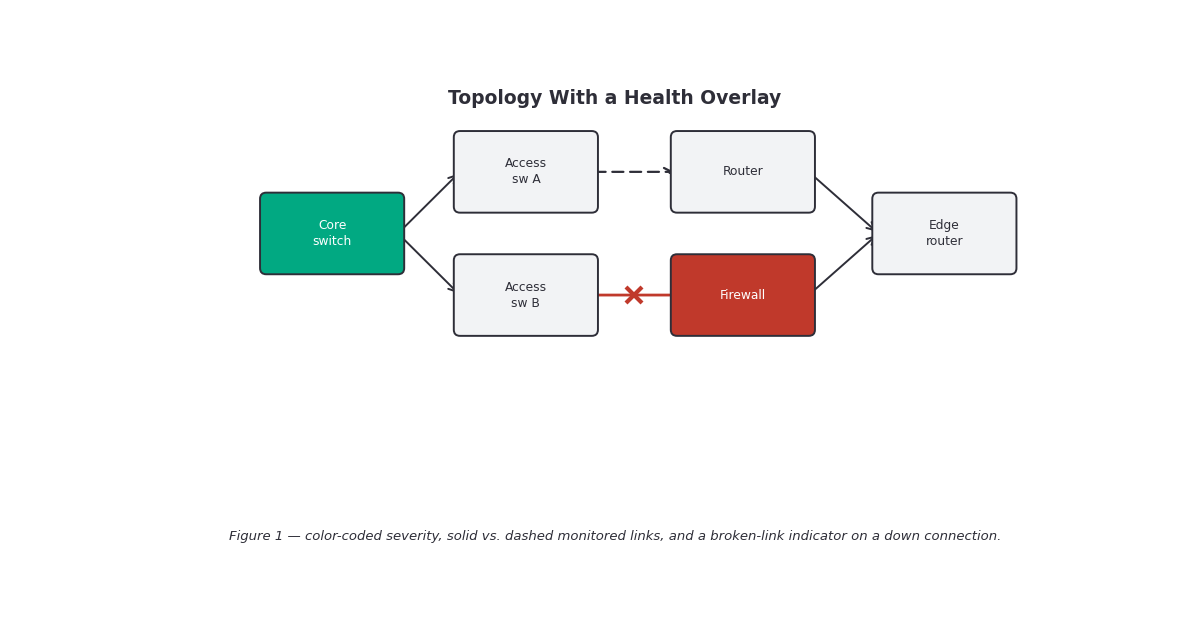
Layered on top of the static topology map is Network Health Monitoring, described as delivering real-time statistics about the health and performance of edges (links) and nodes (devices), driven by whatever templates are assigned. Practically, it’s a toggle on the topology dashboard that turns on: color-coded severity indicators per node and link, hover-triggered detail showing current condition and alert status, and per-node CPU/Memory/Disk metrics alongside equivalent resource metrics on links. The one hard number documented here matters operationally — metrics use a 7-minute lookback window, so a node or link with no data collected in the last seven minutes simply shows nothing rather than a stale last-known value. Non-monitored interfaces render as dashed lines on the map (visible but explicitly flagged as not being watched), and a genuinely down connection between two devices is shown as a broken link rather than just an absent one — a real, if small, design choice that distinguishes “not being monitored” from “monitored and currently failing.”
Gotchas and caveats
Community strings are still a first-class credential option. SNMPv1/v2c’s read-only community string has no encryption and no per-user accountability — anyone who has it can query the device. If your network gear supports v3, the AUTHPRIVACY security level (auth + encryption) is the meaningfully more defensible choice; documentation doesn’t push you toward it, but the credential fields make the tradeoff visible the moment you compare the two forms.
The 48-hour interface-visibility lag will outlast your patience during a rollout. If you’re onboarding a new switch stack or widening interface filters, budget two days before concluding a template change didn’t take — the documentation states this is expected behavior, not a delay to troubleshoot around.
Eight-hour polling on “low-priority” OIDs is a real gap, not just a label. An OID bucketed into the infrequent tier won’t reflect a change for up to eight hours. That’s fine for a firmware-version OID that rarely changes; it’s a genuine blind spot if a metric you care about operationally got classified that way by default.
Topology’s port-channel detail is named-vendor, not universal. Cisco, Aruba, and Arista are called out specifically for expandable port-channel views — a multi-vendor shop with other network hardware shouldn’t assume equivalent detail exists elsewhere in the map without checking.
A 7-minute-stale node isn’t the same as a healthy node. Health Monitoring’s lookback window means “showing nothing” and “showing green” are different states with a real gap between them — a node that’s stopped reporting for eight minutes won’t display red, it’ll just go quiet, which reads differently to someone scanning the map quickly.
Key takeaways
- OpsRamp’s network monitoring stands on SNMP discovery and polling, supporting v1/v2c (community string) and v3 (user-based auth/privacy), with multiple credential sets per discovery profile for mixed-version environments.
- Device recognition depends on submitted SNMP device type definitions (OIDs, make/model/type, interface mappings) that go through admin review before activation — new/obscure device support isn’t guaranteed to be immediate.
- Monitoring is both active (polling, scalar/tabular OIDs) and passive (SNMP traps ingested as alerts), with polling itself split into a fast, user-defined tier and an 8-hour low-priority tier.
- Interface-level monitoring has a documented ~48-hour visibility lag for newly filtered interfaces and template-assignment changes — plan rollouts accordingly.
- Network Topology Management renders Layer 2 (VLAN) and Layer 3 (subnet, with a BGP/OSPF toggle) connectivity, with named Cisco/Aruba/Arista port-channel support and NPM/NetFlow enrichment.
- Network Health Monitoring overlays live severity, CPU/Memory/Disk, and link status on the topology map using a 7-minute data lookback, with dashed lines for unmonitored interfaces and explicit broken-link indicators for down connections.
- No numeric limits on discovery scale, polling concurrency, or topology map size are documented publicly — treat scale ceilings against your own environment before committing to a design.
What’s next
This closes the OpsRamp track — O-1 through O-13 have now covered discovery, monitoring templates, alerting and noise reduction, AIOps correlation and prediction, the GenAI copilot, automation and incident remediation, and finally patching and network monitoring end to end. This wraps the OpsRamp coverage for this content batch alongside the VME/Virtualization, Morpheus Enterprise/Cloud Management, and Zerto/Data Protection tracks completed earlier in the batch.
Sources: OpsRamp Documentation · SNMP Discovery · SNMP Monitors · SNMP Monitors with Collector Type SNMP · Network Topology Management · Network Health Monitoring · Network Monitoring with OpsRamp.