Eighth post in the HPE OpsRamp track. O-7 covered the pull side of observability — dashboards someone chooses to look at. This post covers the push side: what turns a metric, log, or trace signal into something that reaches a person’s phone, and the policy layer OpsRamp gives you to keep that from turning into noise before you ever reach the machine-learning correlation this track covers next.
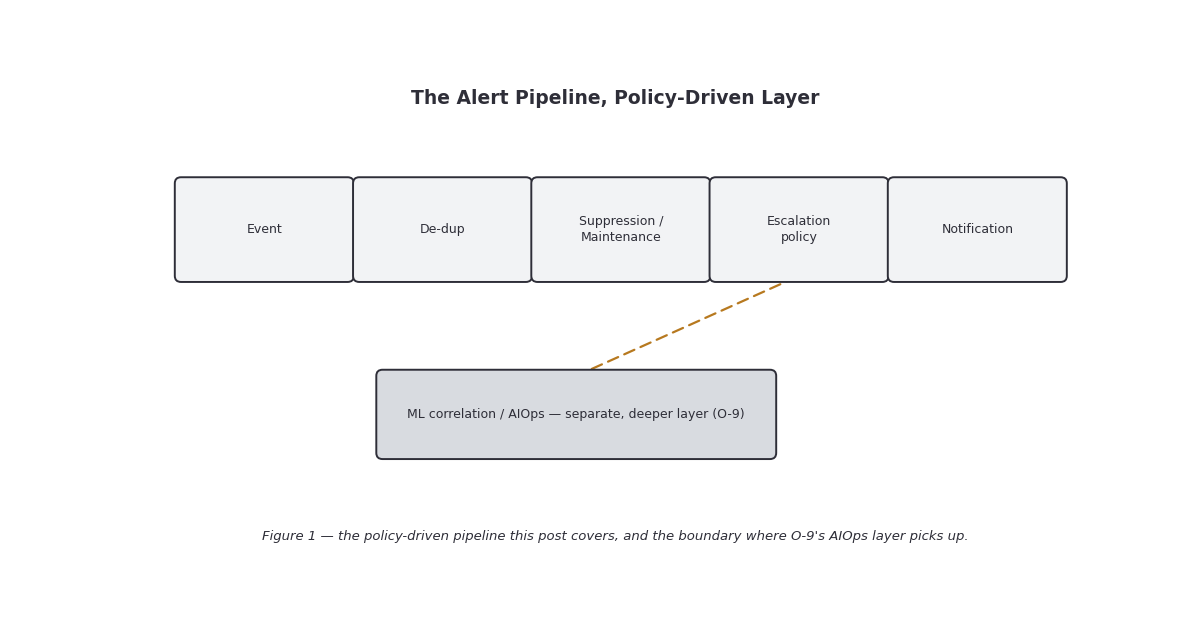
Where this post sits, and where it stops
O-4 introduced the four noise-reduction mechanisms in outline — severity, suppression, correlation, forecasting — while it was really a post about monitoring templates. O-6 and O-7 then spent two posts on what gets collected and how it gets displayed. This post goes back and actually opens up the alerting pipeline itself: the documented, human-configured layer that decides who gets told about a problem, when, and how many times.
Deliberately out of scope here: machine-learning-based correlation, root-cause clustering, seasonality detection, and predictive suppression. OpsRamp’s documentation describes these as real, shipped capabilities — but they’re substantial enough, and different enough in kind from a policy you configure by hand, that they get their own post. O-9 — AIOps and Event Correlation is where that material belongs. Where this post’s research surfaced an ML-flavored feature (a “Recommend” mode, or a training-file requirement, for instance), it’s named here only to mark the boundary, not explained in depth.
The alert lifecycle: states first
Before escalation or suppression make sense, it helps to have the state model in view. OpsRamp documents an alert progressing through states that include Open, Acknowledged, Ticketed, Suppressed, Correlated, and Closed — reachable through a documented set of actions: Acknowledge, Create/Attach Incident, Suppress/Unsuppress, Run Process, and Close. Every mechanism in this post is really just a different way of driving an alert through that state machine automatically, on a schedule or a rule, instead of waiting for a human to click a button.
One mechanism sits ahead of all of this and is easy to miss because it’s not a policy you build so much as a default behavior: alert de-duplication. OpsRamp documents that repeat alerts sharing the same resource, metric, component, and state within a short window (documentation gives roughly one minute) are treated as updates to a single evolving alert rather than as new alerts — the thing that stops a flapping metric from generating a fresh page every polling cycle. This is the first, cheapest noise-reduction layer, and it runs before severity, suppression, or escalation ever get involved.
Suppression and maintenance windows: two different tools with the same goal
O-4 already made the case that suppression is a design tool, not an admission of defeat. The documentation actually splits it into two distinct mechanisms that are worth telling apart, because they’re configured in different places and solve different problems.
Alert-level suppression is a manual or scripted action on a specific alert. Suppressing an alert stops it — and duplicate instances of it — from displaying; a genuinely new occurrence of the same alert type still shows up as a fresh alert rather than staying hidden. A documented Snooze variant suppresses an alert for a set interval and automatically resets that duration if a duplicate arrives while it’s snoozed — useful for “I know about this, stop telling me for the next two hours” without closing the alert outright. This is the tool for one alert, one engineer, right now.
Scheduled maintenance windows are the tool for planned work affecting a resource, a resource group, or (with the right permission) a whole site or client. A maintenance window can be:
- One-time — a single specific start/end.
- Custom duration — a start and end time you set directly.
- Recurring — daily (weekdays or every N days), weekly, or monthly (a specific date, or a weekday pattern like “first Monday”).
Alerts that arrive inside the window’s scope are classified as maintenance alerts rather than triggering normal notification handling; anything generated after the window closes is a normal monitoring alert again. By default, maintenance alerts get escalated once the window ends — a documented option lets you turn that off if you’d rather the maintenance-period noise just disappear instead of arriving all at once when the patch job finishes. Overlapping windows on the same scope merge into one extended window, with the first window’s conditions governing the overlap and the second window’s conditions taking over once the first would have ended.
The practical distinction: reach for alert-level suppression/snooze when a person is handling one specific problem right now, and reach for a scheduled maintenance window when you already know, in advance, that a patch job or a planned reboot is going to generate alerts nobody should be paged on.
Escalation policies: the chain of responsibility
An escalation policy is what OpsRamp uses to make sure a genuinely important, unacknowledged alert doesn’t just sit there because the first person notified missed it. The documented purpose is explicit: escalation exists “to notify users of critical alerts so that a user acknowledges the alert” — acknowledgment, not just delivery, is the goal the policy is built around.
A policy is built from a small number of documented pieces:
| Element | What it controls |
|---|---|
| Scope | Which resources or resource groups the policy applies to |
| Conditions | Alert severity, alert type, and resource attributes that must match for the policy to fire |
| Mode | ON (active), OFF (disabled, for review), or Recommend (suggests actions from historical patterns rather than enforcing them) |
| Escalation levels | Timed steps — e.g., notify level-1 staff immediately, notify shift managers if still unacknowledged after a set interval |
| Actions per level | Send a notification (email, SMS, or voice call) to a user, user group, or roster; optionally create an incident ticket automatically |
| Precedence | An optional integer that orders multiple matching policies; client-level policies take precedence over partner-level ones, and when several policies would create incidents, only one client-level incident-creation policy is honored |
Two details are worth calling out because they change how you should design one of these. First, escalation is explicitly built around on-call/shift schedules — the documentation’s own example routes alerts to whichever staff are on shift, then moves up a chain of responsibility (a level-1 team, then their shift manager) after a fixed delay if nobody has acknowledged. If your team already runs an on-call rotation, this is where that rotation actually gets wired into the alert path, rather than being a separate system alerting talks past. Second, “Recommend” mode is a genuine middle ground for rolling out a new policy: it surfaces what the policy would have done against real alert history without actually paging anyone, which is a reasonable way to sanity-check a new escalation chain before flipping it to ON.
Notification templates: separating “when/who” from “how it reads”
Escalation policies decide when a notification fires and who it goes to. A separate, documented layer — notification templates — decides what the message actually looks like once it’s triggered. Templates cover the same three channels escalation policies can dispatch to:
- Email — subject line and rich-text body.
- SMS — capped at 1600 characters, split into 160-character segments where the carrier requires it.
- Voice — a synthesized voice message built from template content.
Templates support token-based personalization — placeholders for alert properties, the escalation policy name, device-group information, and correlated-alert details, so one template can render correctly across many different alerts rather than requiring a template per alert type. The relationship to escalation policies is intentionally clean: the escalation policy is the routing table, the notification template is the rendering layer, and the same policy can point at different templates for different channels.
Gotchas and caveats
De-duplication happens before you configure anything. If a metric is flapping and you’re not seeing a flood of near-identical alerts, that’s the default one-minute dedup window doing its job quietly — don’t assume you’ve already built noise reduction because the flood didn’t happen.
Suppression and maintenance windows are not interchangeable. A snoozed alert can still reopen fresh the moment a genuinely new instance appears; a maintenance window reclassifies everything in scope for its duration and then optionally re-escalates the backlog when it closes. Using the wrong one for a planned change either leaves you unprotected mid-window or buries a real new problem under an “already known” label.
“Escalate maintenance alerts when the window ends” is a real design decision, not a default to leave unexamined. Leaving it on after a large patching run means a burst of escalations lands the moment the window closes; turning it off means anything that happened during the window needs a separate review pass, because it won’t re-surface on its own.
Escalation policy precedence is client-over-partner, and only one incident-creating policy wins per match. In an MSP context (see O-7’s SP/Partner/Client tiers), a client-defined escalation policy silently overrides a partner-level default covering the same scope — worth checking explicitly if a client says an alert “should have” paged someone and didn’t.
Notification channel limits are real, not theoretical. The 1600-character SMS cap with 160-character segmentation means a verbose token-heavy template can arrive as several disjointed texts; keep SMS templates terse and put detail in the email/ticket instead.
This post stops short of the ML layer on purpose. “First Response” policies, alert correlation, and forecasting are real, documented, currently-shipping features — but they belong to O-9’s AIOps discussion, not this one. If you’re evaluating OpsRamp’s noise-reduction story end to end, treat this post as half the picture.
Key takeaways
- The alert pipeline runs through documented states — Open, Acknowledged, Ticketed, Suppressed, Correlated, Closed — and a one-minute-scale de-duplication window is the first, automatic layer of noise reduction, ahead of anything you configure.
- Alert-level suppression/snooze (one alert, right now) and scheduled maintenance windows (planned work, resource/group/site scope, one-time or recurring) are two distinct mechanisms — pick based on whether the noise is expected in advance.
- Escalation policies are built from scope, conditions, mode (ON/OFF/Recommend), timed escalation levels, and per-level notification/ticket actions — explicitly designed around on-call shift schedules and a chain of responsibility.
- Notification templates separate message content (email/SMS/voice, token-personalized) from the escalation policy’s routing decision.
- Client-level escalation policies take precedence over partner-level ones, and only one incident-creating policy is honored per match — a real gotcha in MSP tenants.
- ML-based correlation, seasonality, and predictive suppression are deliberately out of scope here — they’re O-9’s subject.
What’s next
Next in this track: O-9 — AIOps and Event Correlation. The manual, policy-driven layer this post covered — dedup, suppression windows, escalation chains, templated notifications — is the floor. O-9 goes into what OpsRamp’s machine-learning layer adds on top: correlating many alerts into one probable root cause, learning seasonal noise patterns, and suppressing predictively instead of on a fixed schedule.
Sources: OpsRamp Documentation · Alert Management · Alert Escalation · Create an Alert Escalation Policy · Edit an Alert Escalation Policy · Alert and Resource Condition Examples · First Response · Schedule Periodic Maintenance · Specify Alert Action · Create an Alert Notification Template.