Sixth post in the HPE Morpheus VM Essentials track. Everything so far has been what the product is; this is the sheet you take into a build.
Minimum requirements are a compatibility statement, not a design. HPE Morpheus VM Essentials Software (VM Essentials, VME) will technically build a cluster on 4 GB hosts with a 250 GB disk — the documentation’s own example does exactly that — and that configuration will also disappoint you the moment real workloads land on it.
So this post separates the two clearly: what the documentation requires, and what I’d actually specify. Requirements are sourced from the HPE Morpheus VM Essentials Software Documentation v9.0.1; the recommendations are mine and labelled as such.
Host requirements
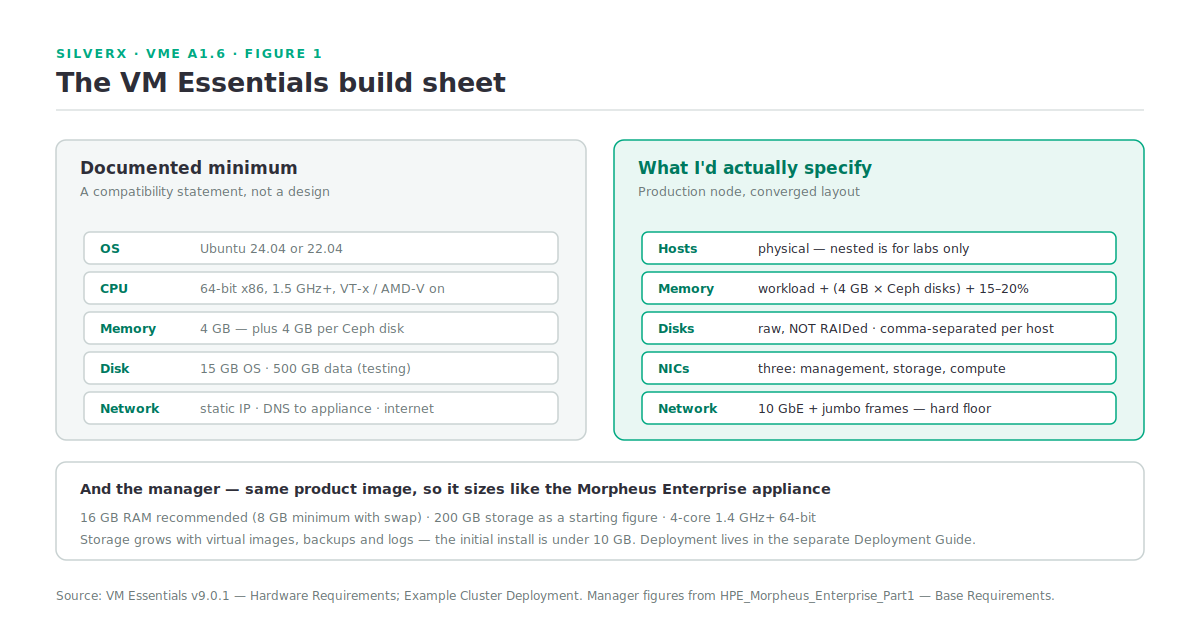
The documented floor for an HVM host:
| Documented requirement | |
|---|---|
| Operating system | Ubuntu 24.04 or Ubuntu 22.04 |
| CPU | One or more 64-bit x86 CPUs, 1.5 GHz minimum, with Intel VT or AMD-V enabled |
| Memory | 4 GB minimum — and for converged layouts, 4 GB per Ceph disk |
| Disk | 15 GB OS disk; converged storage needs a data disk of at least 500 GB for testing, more for production |
| Network | Static IPs, DNS resolution of the VME appliance, and internet access to download KVM, OVS and dependencies |
Three of those deserve unpacking.
“4 GB per Ceph disk” is the memory line that actually sizes your host. A host with four Ceph data disks needs 16 GB for Ceph before you have run a single workload. Count disks first, then add workload memory, then add headroom.
Build on 24.04. As covered in A1.2, cluster layout versions are tied to host OS: 24.04 gets the current layouts, 22.04 gets the older one, and stretched clusters need HVM 1.3. There is no reason to start a new build on 22.04.
Internet access is a requirement, not a convenience. The hosts download and install system packages during cluster creation. If your datacentre hosts don’t route outbound, solve that — proxy, local mirror, whatever fits — before your first cluster build, not during it.
What I’d actually specify
The documentation’s example cluster is 4 vCPU / 16 GB / 20 GB boot / 250 GB data / 3 NICs, and it explicitly notes the 250 GB figure is for demonstration only. For a production node I’d start from:
- Physical hosts. The docs say physical is recommended for full performance; nested VMs are for labs.
- Memory: workload requirement + (4 GB × Ceph disks) + 15–20% headroom, but it’s not production workloads
- Disks: raw, not RAIDed — Ceph wants the devices. Multiple disks are given as a comma-separated list per host.
- Three separate interfaces: management, storage, compute. The example maps these to eth0/eth1/eth2, and while you can run everything through management, see the network floor below.
- Boot disk: the 15 GB minimum is genuinely minimal. Give it room for logs.
The network floor
This is the requirement that changes hardware decisions, so I’ll quote it directly: clustered storage “needs as much network bandwidth as possible. Network interfaces of at least 10 Gbps with jumbo frames enabled are required for clustered storage and for situations when all traffic is running through the management interface… It’s highly likely that performance will be unacceptable with any lower configurations.”
Two readings of that sentence matter:
- HCI/Ceph on anything less than 10 GbE is not a supported design in practice, whatever the minimums table says.
- The 10 GbE floor also applies when you collapse traffic onto the management interface — so “we’ll use 1 GbE management and put storage on 10 GbE” is fine, but “we’ll just use the one 1 GbE interface for everything” is not.
If your existing hosts are 1 GbE, that’s a capital line in the TCO model from A1.5, not a detail.
Bonds and VLANs are yours to build, in netplan, before VME touches the host:
cd /etc/netplan
sudo cp 50-cloud-init.yaml 50-cloud-init.yaml.bak
sudo vi 50-cloud-init.yaml        # bonds, VLANs, MTU 9000, static addressing
sudo netplan try                  # validates and applies; auto-rolls back if invalid
netplan try rather than netplan apply is the habit worth building — it rolls back automatically on an invalid config rather than removing your access to the host.
The manager
The VME manager is a separate appliance and sizes like the Morpheus Enterprise appliance covered in E1.4 — the same product image, remember. The headline figures from that documentation: 16 GB RAM recommended (8 GB minimum with swap), 200 GB storage as a starting figure, and a 4-core 1.4 GHz+ 64-bit CPU for all-in-one.
The storage number is the one to watch. Initial installation is under 10 GB; the growth comes from virtual images, backups, logs and stats. An image library with a few Windows templates will move that number fast.
Deployment and initialisation of the manager live in the separate HPE Morpheus VM Essentials Deployment Guide — not in the v9.0.1 user manual. Don’t waste an afternoon looking for it there.
The full port map
A1.1 gave the short version. Here’s the complete documented table, including the entries most firewall requests miss.
| Description | Source | Destination | Port |
|---|---|---|---|
| Agent → manager | HVM host | VME manager | 443/TCP |
| Hypervisor console | VME manager | HVM host | 7443/TCP |
| Host configuration & management | VME manager | HVM host | 22/TCP |
| Inter-host cluster communication | HVM host | HVM host | 22/TCP |
| SSH to deployed VMs | VME manager | HVM-hosted VMs | 22/TCP |
| WinRM (HTTP) to deployed VMs | VME manager | HVM-hosted VMs | 5985/TCP |
| WinRM (HTTPS) to deployed VMs | VME manager | HVM-hosted VMs | 5986/TCP |
| Ceph | HVM host | HVM host | 3300, 6789/TCP |
| Ceph MDS/OSD | HVM host | HVM host | 6800–7300/TCP |
| Corosync | HVM host | HVM host | 5404–5406/UDP |
| pcsd | HVM host | HVM host | 2224/TCP |
| dlmd | HVM host | HVM host | 21064/TCP |
| (cluster) | HVM host | HVM host | 9929/TCP, 9929/UDP |
| (cluster) | HVM host | HVM host | 3121/TCP |
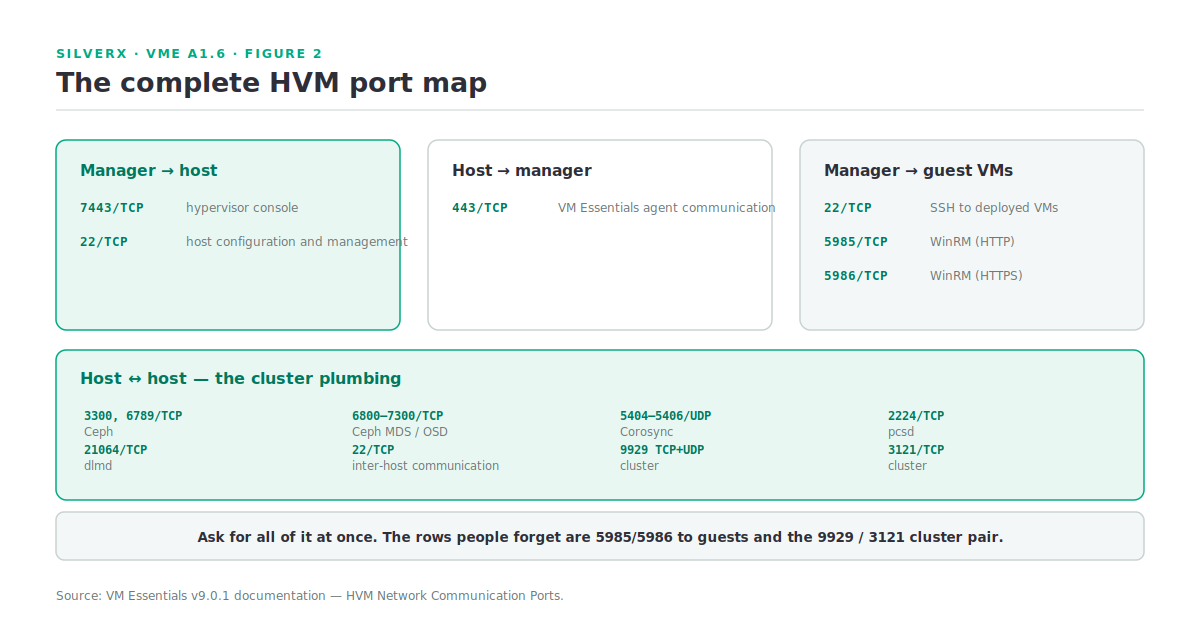
The rows people miss are 5985/5986 to the guests — needed for Windows agent installation and guest execution — and the cluster ports 9929 and 3121, which are the Pacemaker-family plumbing. Ask for the whole table at once; going back for two more ports is how a build slips a week.
Pre-flight checklist
What I run on every prospective host before adding a cluster:
# OS and layout compatibility
lsb_release -d

# Virtualisation enabled in BIOS/UEFI
grep -Eoc '(vmx|svm)' /proc/cpuinfo          # must be > 0

# Static addressing, and MTU on the storage path
ip -br a
ip link show | grep -i mtu

# The appliance resolves and is reachable
getent hosts vme-manager.example.com
curl -sk -o /dev/null -w '%{http_code}\n' https://vme-manager.example.com

# Package repos reachable (cluster build installs KVM and OVS)
sudo apt-get update -qq && echo "repos ok"

# Data disks raw and unmounted — do NOT raid them
lsblk -o NAME,SIZE,TYPE,MOUNTPOINT,FSTYPE

# Time in sync — cluster membership depends on it
timedatectl show -p NTPSynchronized
If all seven come back clean on every host, cluster creation is usually uneventful. If any one is wrong, fix it before you start — VME runs its scripts across all hosts, and a single non-compliant host makes the failure harder to read.
Gotchas and caveats
Check the qualification matrix and reference architecture first. The VM Essentials area of the HPE Support Center carries both — a validated design with specific SKUs, and a list of hardware certified compatible. This is A1.7’s subject, and it’s the difference between a supported deployment and a science project.
Do not RAID the data disks on physical servers.
Nested is for labs. Three nested VMs, a single physical host (non-HCI only), or a single nested VM (non-HCI only) all work — with reduced performance, and with one host you lose migration and automatic failover entirely.
**500 GB is the testing figure** for a converged data disk. Production needs more, and nobody will tell you how much except your own workload profile.
Cluster sync is every 60 seconds by default (A1.3), so freshly-changed host state takes a moment to appear. Don’t chase a problem that’s just a sync interval.
Key takeaways
- Size host memory as workload + (4 GB × Ceph disks) + headroom — the per-disk Ceph memory is the line people miss.
- 10 GbE with jumbo frames is the practical floor for clustered storage, and also whenever traffic collapses onto the management interface.
- Build on Ubuntu 24.04; 22.04 costs you the current cluster layouts.
- Hosts need static IPs, DNS to the appliance, and outbound internet for package installation.
- Ask for the whole port map at once, including 5985/5986 to guests and 9929/3121 between hosts.
- Use **
netplan try**, nevernetplan apply, on a remote host.
What’s next
Next in this track: A1.7 — Reference Architectures. How to read HPE’s validated design and qualification matrix, what the ProLiant, Synergy and Alletra options change about your build, and how to turn a reference architecture into a bill of materials that survives review.
Sources: HPE Morpheus VM Essentials Software Documentation v9.0.1