Seventh post in the HPE Morpheus VM Essentials track. A1.6 gave the requirements; this is how to turn them into hardware someone will actually support.
The v9.0.1 documentation makes an unusually direct statement about responsibility. Administrators are responsible for “selecting host servers, storage hardware, and networking hardware that have been certified as compatible with the platform” — and it names where to find that:
- a reference architecture document in the VM Essentials area of the HPE Support Center, containing a validated design with specific hardware SKUs
- a qualification matrix in the same place, listing hardware certified compatible
HPE also publishes an HPE Reference Architecture for HPE Morpheus VM Essentials Software through its PSNow document library (document a00155577enw), and the VM Essentials resources page collects the current set, these are avilable for everyone before they plan their installs.
What a reference architecture is for
Three things, and it’s worth being clear which you need:
Supportability. The qualification matrix is the binding document. “It’s just KVM, it’ll run on anything” is true and irrelevant — running is not the same as being supported, and the first serious incident is a poor time to discover which one you have.
A starting point. A validated design saves you the component-level guesswork: which NICs, which controllers, which firmware baseline, what’s actually been tested together.
A defensible position. When procurement asks why this configuration, “it’s HPE’s validated design for this product” is a better answer than “it met the minimums.”
What a reference architecture is not is your design. It’s a tested configuration for an assumed workload profile. Yours will differ, and the requirements from A1.6 are what let you adapt it sensibly.
The design decisions the hardware has to serve
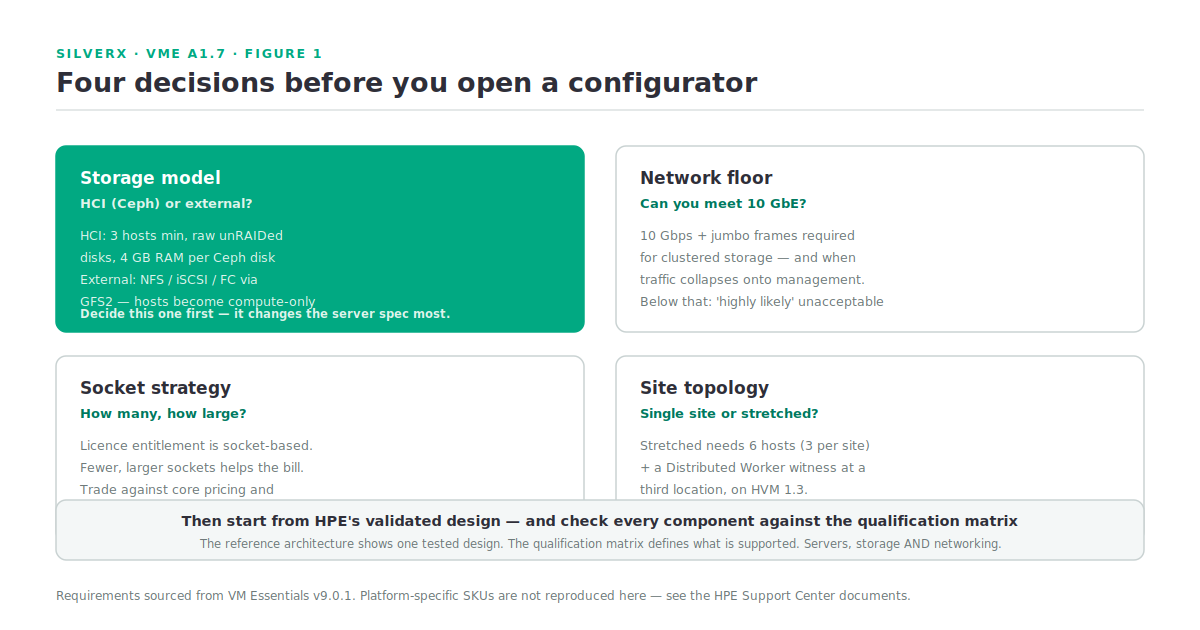
Before looking at any platform, four decisions from earlier posts determine what you’re buying.
HCI or not. Converged means Ceph, three hosts minimum, raw unRAIDed data disks, and 4 GB of host memory per Ceph disk. Non-HCI means external storage over NFS, iSCSI or Fibre Channel through GFS2, and the host becomes compute-only. This single choice changes the server spec more than anything else.
The network floor. 10 Gbps with jumbo frames for clustered storage — and also whenever traffic collapses onto the management interface. The documentation says performance below that is highly likely to be unacceptable. Three interfaces (management, storage, compute) is the documented example pattern.
Socket count. From A1.5: the Morpheus licence entitlement is socket-based. Fewer, larger sockets is the direction that helps. This is a genuine trade against core-count-per-socket pricing and NUMA behaviour, and it’s a conversation to have at refresh, not after.
Stretched or single site. A stretched cluster needs 6 hosts (3 per site) plus a Distributed Worker witness at a third location, on HVM 1.3. That’s a different bill of materials and a different network design.
The HPE platforms in play
The series brief scopes hardware context to HPE ProLiant Gen11,12, Synergy and Alletra, and the HPE documentation gives one concrete integration point: HPE Alletra MP Storage, supported at version 10.4.2 or higher, integrated through the HPE Alletra MP Plugin. The Zerto documentation independently confirms HPE Alletra B10000 as supported storage for the ZVM Appliance on HVM — via the Alletra MP Plugin, GFS2-based or other datastores.
That’s what I can state from the reference base. The rest of what follows is architectural reasoning about where each platform family fits, and should be checked against the qualification matrix before it reaches a quote.
Rack servers (ProLiant). The natural fit for HCI. Local drive bays give you the raw disks Ceph wants, scaling is per-node, and the model matches the documented three-host-minimum design directly, which Gen12 models and drive/NIC options appear in the qualification matrix.
Composable / blade (Synergy). Fits the non-HCI pattern better — compute nodes with external storage, where the fabric handles the storage path. Density and shared-fabric management are the draw. supported configurations, and pay particular attention to whether the interconnect satisfies the 10 GbE-plus-jumbo-frames requirement on the storage path.
External storage (Alletra). The supported path for non-HCI layouts, with the Alletra MP Plugin as the documented integration. If you already own Alletra, non-HCI stops being a compromise and becomes the obvious design — you keep the array’s data services and let HVM be compute.
Turning it into a bill of materials
The sequence I’d follow or suugest to follow
- Fix the four decisions above. Storage model first.
- Download the reference architecture and qualification matrix from the VM Essentials area of the HPE Support Center.
- Start from the validated design, don’t derive from minimums. Then adjust for your workload profile.
- Size memory as workload + (4 GB × Ceph disks) + 15–20% headroom.
- Size the storage network to the floor, not to what you have.
- Check every component against the qualification matrix — servers, storage, and networking. All three are named in the documentation’s responsibility statement.
- Add the manager: 16 GB RAM recommended, 200 GB storage as a starting figure, growing with images and backups.
- Add the witness if you’re building stretched — a Distributed Worker at a third site, 4 GB / 4 cores / 10 GB.
- Sanity-check socket count against the licence model before signing.
Step 6 is the one that gets skipped under time pressure, and it’s the one that determines whether you have a supported platform.
Gotchas and caveats
The qualification matrix is the binding document. A reference architecture shows one tested design; the matrix defines the supported set. Check components against the matrix, not against whether the RA happens to mention them.
Reference architectures are workload-assumed. The tested profile may not resemble yours. Use the design as a component and integration guide, adapt the sizing.
Firmware baselines matter and drift. A validated design implies a tested firmware combination, current baselines rather than assuming what shipped is what was tested.
Don’t let the RA override the requirements. If a configuration appears to satisfy the RA but breaks a documented requirement — under 10 GbE on the storage path, RAIDed data disks, insufficient Ceph memory — the requirement wins.
Storage sizing: 500 GB is the testing figure. Production needs more, and only your workload profile says how much.
Everything platform-specific in this post is I’ve deliberately not printed SKUs, tested configurations or performance figures I couldn’t source. Get those from the HPE documents.
Key takeaways
- Two documents govern the build: the reference architecture (validated design, specific SKUs) and the qualification matrix (what’s certified). Both live in the VM Essentials area of the HPE Support Center.
- The qualification matrix is the binding one. Running and being supported are different things.
- Four decisions shape the hardware: HCI or external storage, the 10 GbE floor, socket strategy, single or stretched site.
- HPE Alletra MP (10.4.2+) via the Alletra MP Plugin is the documented external-storage integration; Alletra B10000 is confirmed supported under Zerto on HVM.
- Size memory as workload + 4 GB per Ceph disk + headroom, and never let a reference design override a documented requirement.
- Check **servers, storage and networking** against the matrix — the documentation names all three.
What’s next
Next in this track: A1.8 — Building the Lab. Closing out the foundations module with a lab you can actually build: nested or physical, what the minimum viable HVM cluster looks like, what you lose at each level of compromise, and the shortcuts that are safe versus the ones that will teach you the wrong lessons.
Sources: HPE Morpheus VM Essentials Software Documentation v9.0.1