Seventh post in the HPE Morpheus Enterprise track. E1.5 explained how access resolves; this is how to build it without creating forty bespoke Roles.
RBAC fails slowly
Nobody’s access model is wrong on day one. It goes wrong over eighteen months, one exception at a time: a Role cloned for a person who needed almost the standard access, a permission granted to unblock a Friday deployment, a tenant that was meant to be temporary. By the time someone asks “who can delete a cloud?”, the honest answer takes an afternoon to work out.
HPE Morpheus Enterprise Software (Morpheus Enterprise) gives you the tools to avoid that, but it doesn’t impose them. This post is the pattern I’d build on day one and the permissions I’d restrict before anyone else logs in.
The two-axis model, built for real
From E1.5: a Role carries Group access and Feature access as independent axes. The documented pattern is to build them separately and compose.
Group-access Roles. One per meaningful slice of the estate. Set Group access as needed; leave feature access alone. Name them for where: Access — Production Clouds, Access — Dev/Test, Access — DR Site.
Feature-access Roles. One per job function. Set all Group access to None, and configure only the Feature Access tab. Name them for what: Function — Developer, Function — Operator, Function — Auditor, Function — Platform Admin.
A user gets one of each. A developer working in dev/test gets Access — Dev/Test plus Function — Developer. Promoting them to production access is adding one Role, not authoring a new one. Changing what every developer can do is one edit rather than forty.
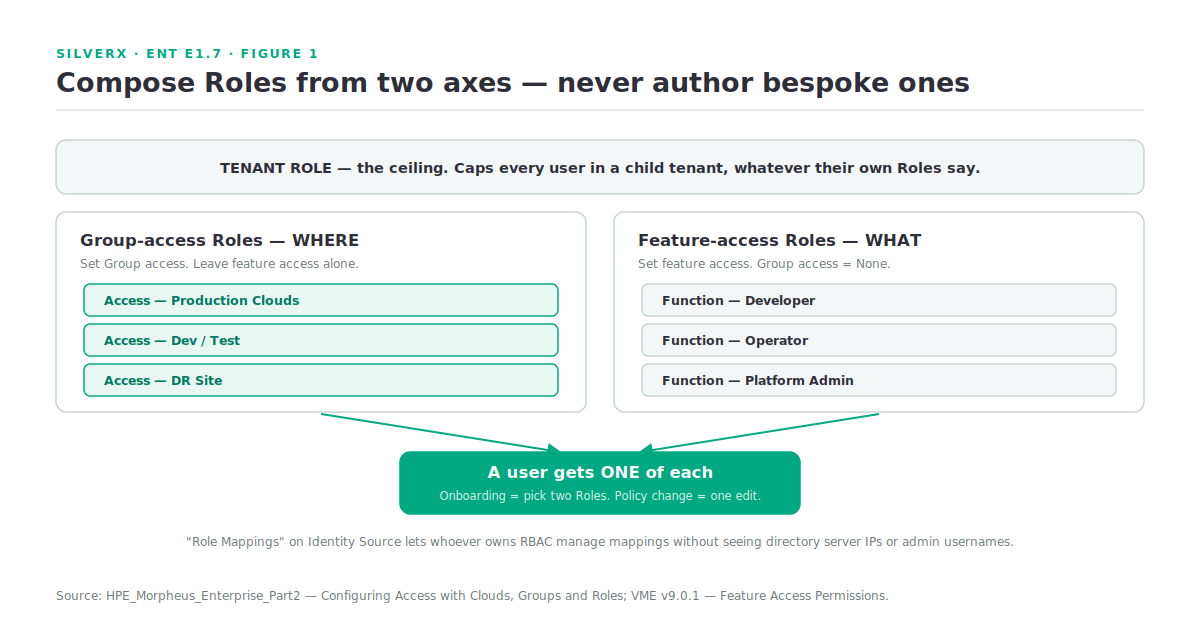
Above both sits the Tenant Role, which sets the maximum permission boundary for every user in a child tenant. A parent tenant defines the tenant roles that cap its children; a subtenant can create Roles inside that boundary but cannot exceed it. When a subtenant user can’t see something you granted them, check the ceiling before the Role.
The permissions worth deciding on day one
Morpheus’s permission model is unusually granular, and the documentation does something genuinely useful: for each permission it gives both a recommendation for who should hold it and a separate recommendation for the Tenant Role. These are the ones I’d settle before the platform has users.
| Permission | Options | Day-one position |
|---|---|---|
| Admin: Appliance Settings | None, Full | Master Tenant Roles only. Docs recommend None on the Tenant Role. Gates appliance URL, tenant/user management, email, proxy, currency, enabled cloud types — and the License tab |
| Admin: Identity Source | None, Role Mappings, Full | Give Role Mappings to whoever owns RBAC — it allows editing role mappings without seeing server IPs and admin usernames. Full only to the identity integration owner |
| Admin: Backup Settings | None, Full | The backup bucket, schedule and retention live here; Master Tenant users additionally get appliance backup |
| Admin: Health | None, Full | Health detail, integration notifications and the current UI log. Docs recommend None on the Tenant Role |
| Admin: Integrations | None, Read, Full | Chef, Puppet, Ansible, Ansible Tower, vRealize Orchestrator, Microsoft DNS, PowerDNS, Route 53, Git, GitHub, Docker, Jenkins, ServiceNow, Cherwell, Remedy, ACI |
| Admin: Plugins | None, Full | Extends platform functionality — treat as equivalent to code deployment |
| Admin: Log Settings | None, Full | Enables logging and configures syslog forwarding rules |
| Admin: Monitoring Settings | None, Full | Check on/off, availability time frame, check interval, availability precision |
| Admin: Message of the Day | None, Full | Low risk, and genuinely useful to delegate |
| Admin: License Settings | None, Full | Software (currently Windows) licence tracking — not your Morpheus entitlement |
The Role Mappings option on Identity Source deserves singling out. It is the least-privilege pattern done properly: the person who administers RBAC can manage which directory groups map to which Morpheus Roles, without ever seeing the directory server’s address or the service account that connects to it. If your organisation separates identity engineering from access administration — and most regulated ones do — this is the option that lets you honour that split without a workaround.
Identity sources
Morpheus integrates with the common identity providers — Active Directory, Okta and others — configured from the Identity Sources button on the Users list page, or per tenant under Administration > Tenants > (Tenant) > Identity Sources.
The integration maps roles in the identity provider to equivalent Morpheus Roles, so users land with the right Role at first sign-in rather than being provisioned by hand.
Three things to get right:
Map to composed Roles, not bespoke ones. The two-axis model pays off here: an AD group maps to Access — Production Clouds, another to Function — Developer, and membership does the composition for you.
Decide where local accounts are still allowed. A break-glass local admin is defensible; twenty local accounts that predate the integration are not. Audit them after cutover.
Identity sources are per tenant. In a multi-tenant build, each tenant maps its own directory. That’s a feature for service providers and a planning item for everyone else.
A build order
What I’d do on a fresh appliance, in sequence:
- Tenants — the isolation boundaries. Hardest to change later.
- Tenant Roles — the ceilings for each child tenant, with
Admin: Appliance Settings,Admin: HealthandAdmin: Identity Sourceset to None unless a subtenant genuinely administers itself. - Groups — by routable network domain, one Cloud per Group unless routing permits otherwise (E1.5).
- Group-access Roles — one per slice of the estate.
- Feature-access Roles — one per job function, Group access None.
- Identity source — mapped to those Roles.
- Policies on Groups — Max Resources quotas, naming, placement, approvals.
- A break-glass local admin, documented, with its password in the same vault as everything else.
Steps 4 and 5 are the ones people collapse into “just make a Role for the dev team”. Don’t. The separation is the entire point.
Gotchas and caveats
Tenant Roles cap everything beneath. Debug top-down. This is the single most common “but I granted them that” in the platform.
Resource-level access is a second gate. Networks, Datastores, Resource Pools and Folders carry their own Group access settings on top of the Cloud’s. A user can reach the Cloud and still be unable to provision because a datastore wasn’t scoped.
Service Plan availability is Role-driven too. Group Access permissions on a Service Plan determine which Groups it’s available in for provisioning and reconfigure. A missing plan is often a permissions question, not a library one.
Personas are a Role permission. Morpheus has four UI Personas — Standard, API, Service Catalog and Virtual Desktop — and access to them is controlled by Role permissions. If you’re building a self-service catalogue for a non-technical audience, the Service Catalog persona plus a tight feature-access Role is a much better answer than trying to hide the standard UI.
Windows Settings has a trap. If the Windows Settings password isn’t defined and “Create User” is enabled during provisioning — which is the default — a random password is generated but not exposed, and nobody can log into the provisioned machine. Set it before anyone provisions Windows.
Groups are not multi-tenant. Still true, still the expensive error.
Key takeaways
- Build Group-access Roles and Feature-access Roles separately and compose them. Users get one of each.
- Tenant Roles are the ceiling — set them before you create subtenant users, and debug from the top down.
- Role Mappings on Identity Source is real least privilege: manage RBAC without seeing directory credentials.
- Settle Appliance Settings, Identity Source, Backup, Health, Integrations and Plugins before the platform has users.
- Map directory groups to composed Roles, so membership does the work.
- Set the Windows Settings password before the first Windows provision, or you’ll build machines nobody can log into.
What’s next
Next in this track: E1.8 — The UI and CLI Tour. Where everything actually lives after the v8.0.7 navigation changes, how the CLI and API mirror the UI, the four token types and which one you should be using, and the Personas that change what a user sees entirely.
Pingback: Building the VM Essentials Lab – silverX.org
Pingback: The Morpheus UI and CLI Tour – silverX.org