Eighth and final post in the Morpheus Enterprise Foundations module. E1.7 built the access model; this is the tour of what those users are actually looking at.
Three interfaces, one data model
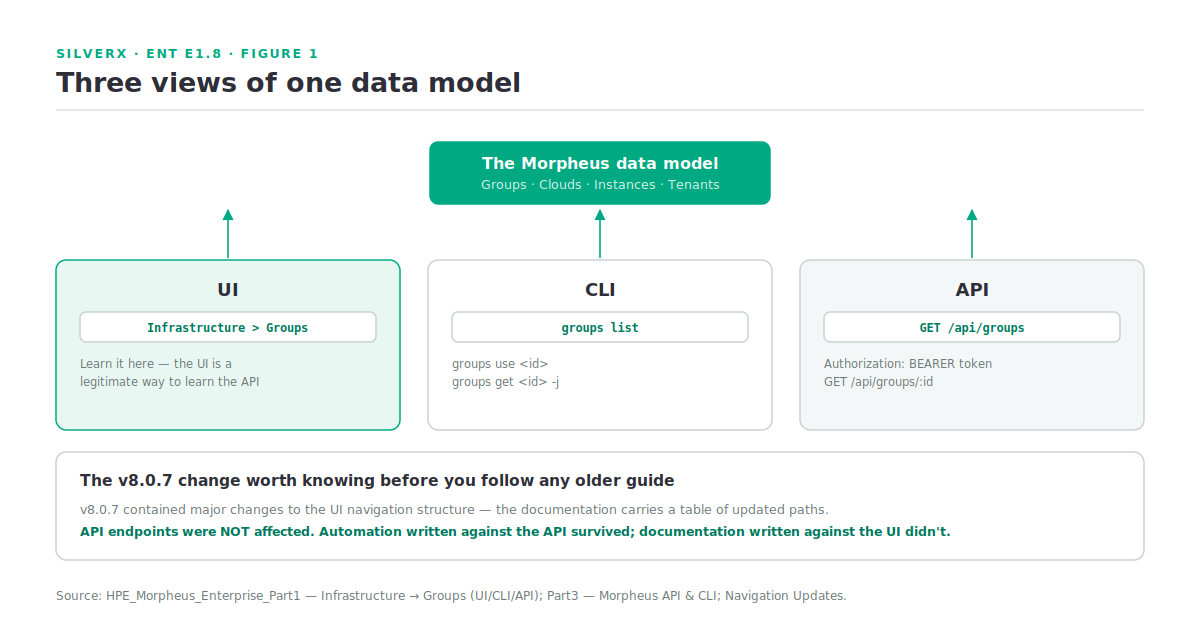
HPE Morpheus Enterprise Software (Morpheus Enterprise) gives you a UI, a CLI and a REST API, and the thing worth understanding on day one is that they are three views of the same objects, not three products with overlapping features.
The documentation makes this unusually explicit: most sections show the same operation three ways. Groups, for example:
# UI:  Infrastructure > Groups

# CLI
groups list
groups use <id>              # or: groups use "group name"
groups get <id> -j           # JSON output

# API
curl https://api.gomorpheus.com/api/groups \
  -H "Authorization: BEARER access_token"

curl https://api.gomorpheus.com/api/groups/:id \
  -H "Authorization: BEARER access_token"
That pattern holds across the platform. Once you know where something is in the UI, you know roughly what to call it in the CLI and what endpoint serves it. This matters more than it sounds: it means the UI is a legitimate way to learn the API, which is not true of every platform.
The navigation, and the change that moved it
The top-level structure follows the data model from E1.5:
| Section | What lives there |
|---|---|
| Operations | Dashboard, Wiki, Activity — the daily view |
| Provisioning | Instances, Apps, Catalog — the workloads |
| Library | Virtual Images, Blueprints, Automation, Plans |
| Infrastructure | Groups, Clouds, Clusters, Compute, Network, Load Balancers, Storage, Trust, Boot |
| Backups | Backup jobs and restores |
| Monitoring | Checks, Apps, Incidents, Alert Rules, Contacts, Logs |
| Tools | Cypher, Migrations, VDI |
| Administration | Tenants, Users, Roles, Plans, Integrations, Health, Settings |
One thing to know before you follow any older guide or video: v8.0.7 contained major changes to the UI navigation structure, and the documentation carries a table of updated paths for affected sections. If a walkthrough written against an earlier version sends you somewhere that doesn’t exist, that’s why.
The important detail in the same note: API endpoints were not affected by the UI navigation changes. Automation written against the API survived; documentation written against the UI didn’t. That’s a reasonable argument for scripting the things you’ll do repeatedly.
Access tokens: four types, and which one you want
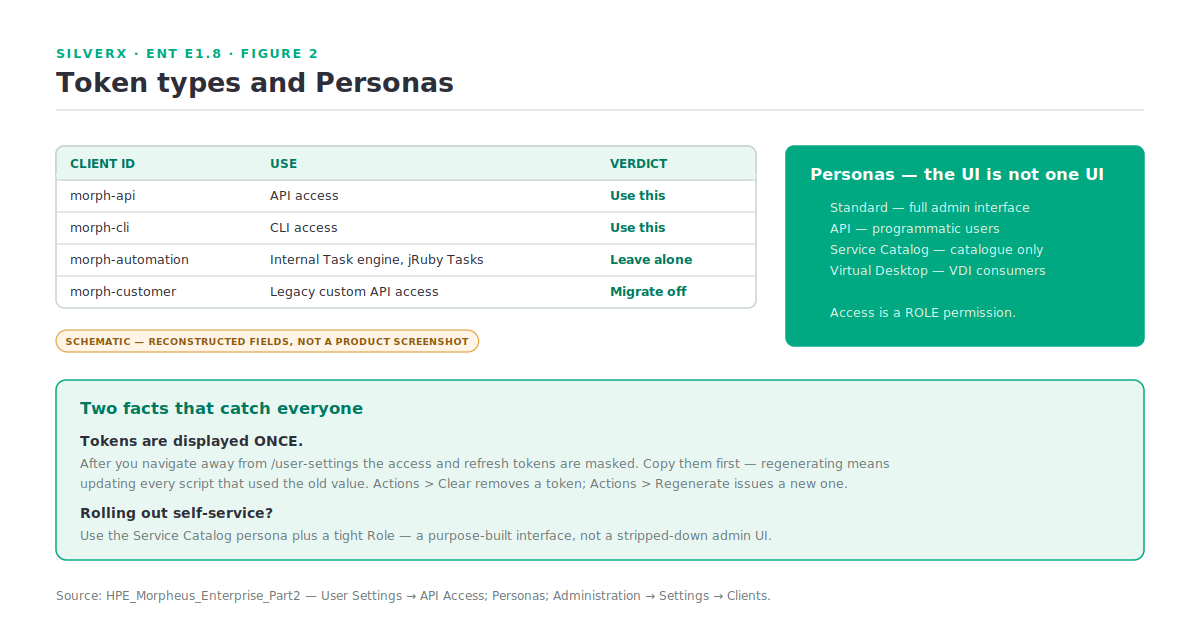
User Settings > API Access is where tokens are generated and refreshed. There are four client IDs, and picking the right one matters:
| Client ID | Use |
|---|---|
| morph-api | API access — the default you should be using |
| morph-cli | CLI access |
| morph-automation | Used by the internal Task engine and jRuby-type Tasks. Not for external use — it’s surfaced only so you can see it exists and clear it |
| morph-customer | Legacy. Previously recommended for custom API access; not recommended now, retained for existing automation |
Two operational facts that catch people:
Tokens are displayed once. After you navigate away from /user-settings, the complete access and refresh tokens are masked. Copy and store them immediately — regenerating is the only recovery, and regenerating means updating every script using the old value.
Expiration is configurable, but centrally. Primary Tenant administrators set expiration periods for existing clients, or create new clients, under Administration > Settings > Clients. Default clients can have their validity and refresh periods edited but cannot be deleted.
If a token is lost or compromised: Actions > Clear removes it entirely; Actions > Regenerate issues a new one for the same client ID.
Personas: the UI is not one UI
This is the feature most people don’t know exists, and it changes what a self-service rollout looks like.
Personas are alternate views of the Morpheus UI, and a user’s access to them is controlled by Role permissions. There are four:
- Standard — the full administrative interface
- API — for programmatic users
- Service Catalog — a catalogue-only view
- Virtual Desktop — for VDI consumers
The relevance to E1.7: if you’re rolling out self-service to an audience who should never see Infrastructure or Administration, the answer isn’t a feature-access Role that hides forty things one at a time. It’s the Service Catalog persona plus a tight Role. You get a purpose-built interface instead of a stripped-down one, and the difference in how it’s received is significant.
What I’d learn first
If you have an appliance and an afternoon, in this order:
- **Generate a
morph-apitoken** and store it properly. Everything else is easier with it. - Install the CLI and run
groups list,clouds list,instances list. Watching the CLI return the same objects you just clicked through is the moment the model clicks. - Find the same three in the API with curl. Compare the JSON to what the UI shows.
- Look at Administration > Health. Per E1.2, unassigned shards and error queues lead the “it feels slow” reports.
- Switch Personas if your Role allows, and see the Service Catalog view.
- Open Tools > Cypher. The secrets store is where credentials for automation belong, and finding it early prevents a lot of hardcoding.
Gotchas and caveats
**Don’t use morph-automation externally.** It exists for the internal Task engine. Using it for your own scripts couples your automation to internal behaviour.
**morph-customer is legacy.** If you inherit automation using it, plan a migration to morph-api.
Tokens are shown once. Worth stating twice.
UI paths changed at v8.0.7; API paths didn’t. Check the version any guide was written against.
The Wiki is per-Group and per-Instance. Both Groups and Instances have a Wiki tab taking Markdown. For platform runbooks that need to live next to the thing they describe, it’s better than a link to a wiki nobody opens.
Personas are a Role permission, not a user setting. If someone can’t reach the persona you intended, it’s the Role.
The CLI and API base URL is your appliance, not the vendor domain in the documentation’s examples. The docs show api.gomorpheus.com; you’ll be using your own Appliance URL — the same one from E1.2 that everything else depends on.
Key takeaways
- UI, CLI and API are three views of one data model — the UI is a legitimate way to learn the API.
- v8.0.7 moved the UI navigation; API endpoints were unaffected. Check what version a guide was written against.
- Use **
morph-apifor API access andmorph-cli** for the CLI. Leavemorph-automationalone; migrate offmorph-customer. - Tokens display once. Copy them before you navigate away.
- Personas give you a purpose-built Service Catalog view instead of a stripped-down admin UI — the right answer for self-service rollouts.
- Put automation credentials in Cypher, early.
What’s next
That closes the Foundations module. Next in this track: E2.1 — vSphere at Scale, opening the Multi-Cloud & Provisioning module — multiple vCenters on one appliance, the image constraint that surprises everyone, service plans across clouds, and scoping a large estate without drowning in discovered resources.