This opens the HPE Morpheus VM Essentials track of the SilverX — HPE Morpheus Enterprise Series. It assumes the ground covered in my KVM Fundamentals post; if the words libvirt, QEMU, and virtio don’t mean much yet, start there.
The question everyone actually asks
Every VMware-alternative conversation I’ve been in over the last eighteen months reaches the same point about ten minutes in: “So what is this thing, really? Is it a hypervisor, or is it a management tool?”
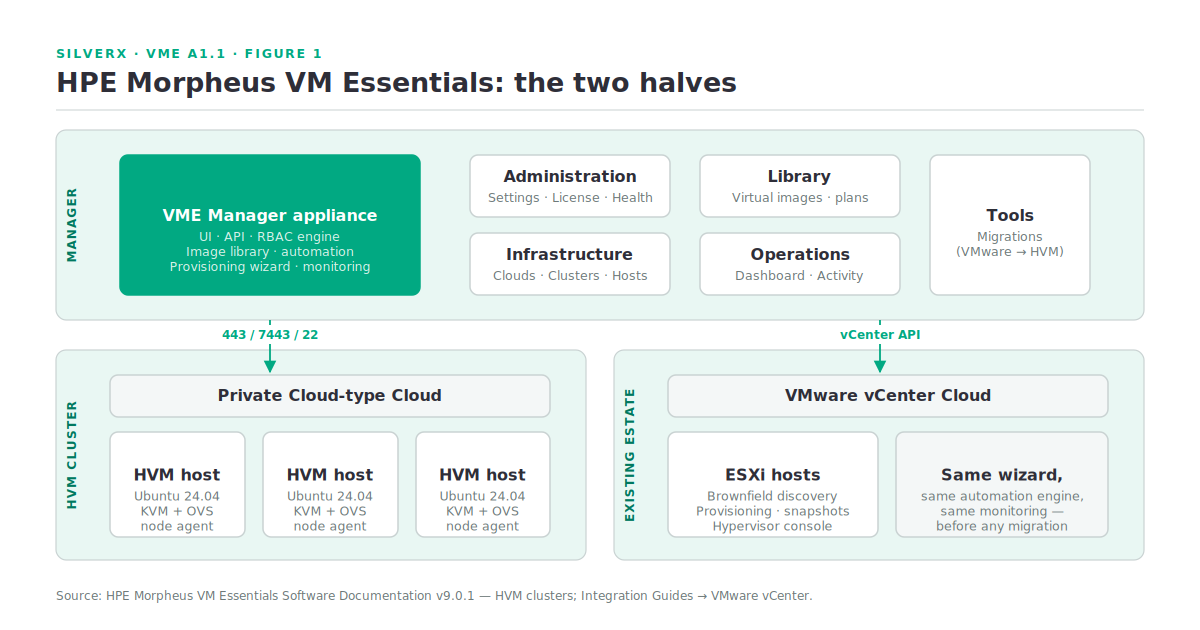
For HPE Morpheus VM Essentials Software (VM Essentials, or VME) the honest answer is: both, and the distinction matters more than the marketing suggests. There is a hypervisor — HVM — and there is a manager. They ship together, they’re licensed together, and if you evaluate one without the other you will draw the wrong conclusion about the product.
This post lays out what each piece is, what you get out of the box, and — the part vendors skip — what you’re expected to build yourself before any of it works.
HVM: KVM, clustered, with the boring parts done
HVM is HPE’s KVM-based hypervisor. Not a fork, not a re-implementation — the documentation is explicit that “an HVM cluster is a hypervisor clustering technology utilizing KVM,” built on “just a few basic Ubuntu boxes.” (Source: HPE Morpheus VM Essentials Software Documentation v9.0.1, HVM clusters.)
That sentence is the whole product thesis. KVM has been production-grade for a decade; what it never had was the clustering layer that made vSphere an operating model rather than a hypervisor. HVM is that layer. Concretely, VM Essentials builds and runs the cluster and gives you:
- Automated HVM cluster provisioning, with compatibility validation of network and storage devices at provisioning time
- Ceph storage configuration and a Ceph summary dashboard for multi-node clusters
- DRS — automatic rebalancing of clusters based on resource consumption
- Configuration and deployment of OVS networks (VLANs)
- Maintenance mode to gracefully take hosts out of service
- Workload migration across hosts, and configurable automatic failover when a host is lost
- Fibre Channel and iSCSI storage consumed through GFS2
- Passthrough and pooling of host-attached NVMe, USB, and GPU hardware
- A granular RBAC engine, image library, and automation stacks
On the VM side you get the expected set: provisioning and monitoring of Linux and Windows workloads, console access, affinity placement (pin a VM to a host), brownfield discovery of existing VMs, live reconfiguration of running workloads (resize plan, add/remove disks and NICs), disk migration across datastores, snapshots and revert, cloning, UEFI support, backup and restore with optional synthetic fulls, and per-VM failover configuration.
The layout choice that sets everything else
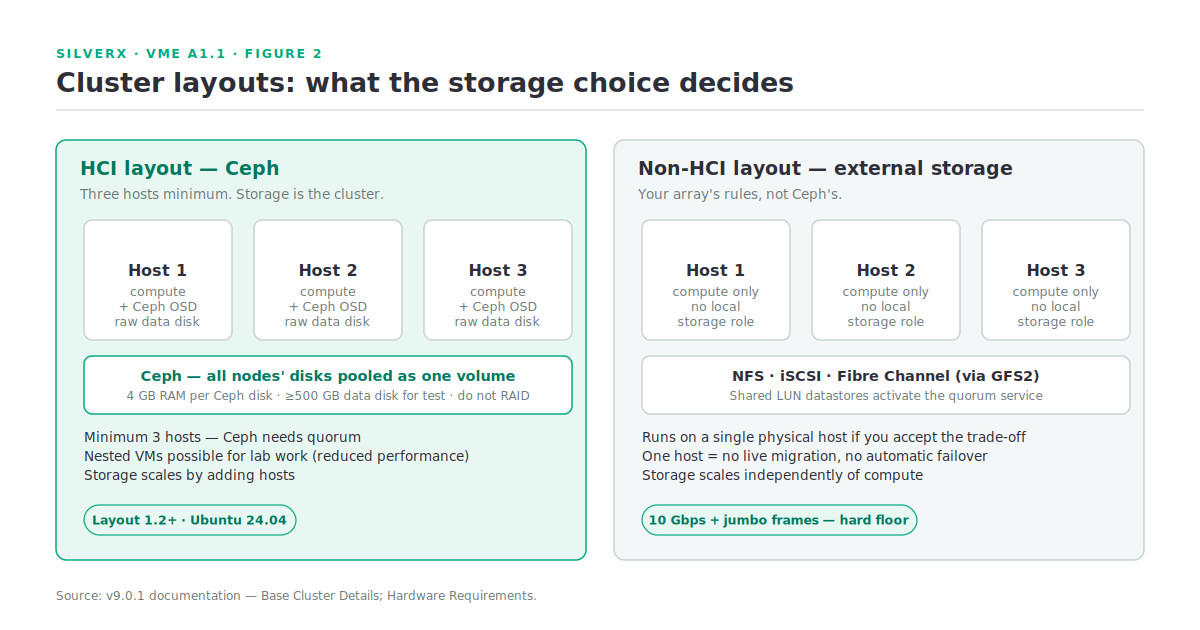
An HVM cluster in the hyperconverged (HCI) layout needs at least three hosts, because Ceph needs three. Non-HCI layouts — where storage comes from an external NFS share, iSCSI target, or Fibre Channel array — can run on a single physical host, and the docs even permit a single nested VM for lab work. With one host you obviously lose migration and automatic failover; the cluster still functions as a managed hypervisor. (Source: v9.0.1 docs, Base Cluster Details.)
The practical rule: HCI/Ceph ⇒ three hosts minimum. External storage ⇒ your array’s rules, not Ceph’s. I’ll take the storage decision apart properly in module A3.
The VME Manager: the other half
The manager is a separate appliance. It holds the UI, the RBAC engine, the image library, the provisioning wizard, the automation engine, and the monitoring. Hosts run an agent that talks back to it.
The traffic pattern is worth internalising early, because it drives your firewall conversation:
| Flow | Direction | Port |
|---|---|---|
| VME agent → manager | HVM host → manager | 443/TCP |
| Hypervisor console | Manager → HVM host | 7443/TCP |
| Host configuration & management | Manager → HVM host | 22/TCP |
| Inter-host cluster comms | HVM host ↔ HVM host | 22/TCP |
| Ceph | HVM host ↔ HVM host | 3300, 6789, 6800–7300/TCP |
| Corosync | HVM host ↔ HVM host | 5404–5406/UDP |
| pcsd / dlm | HVM host ↔ HVM host | 2224, 21064/TCP |
(Source: v9.0.1 docs, HVM Network Communication Ports.)
Corosync, pcsd, and DLM in that table tell you something useful: the cluster membership and fencing layer is standard Linux HA plumbing, not a proprietary black box. If you’ve debugged a Pacemaker cluster before, your instincts transfer.
The manager also speaks VMware vCenter natively — and this is the feature most people miss. VM Essentials isn’t only a greenfield KVM platform; it integrates deeply into vCenter, using the same provisioning wizard, automation engine, and monitoring against your existing ESXi estate: VM provisioning, brownfield discovery, snapshots, distributed switches, datastore and DRS cluster awareness, hypervisor remote console, VMDK/OVF conversion, Veeam backup integration. You can run VME over vCenter before you own a single HVM host.
What you build yourself
Here is the part that decides whether your first cluster comes up in an afternoon or a fortnight. The documentation is refreshingly blunt about it: administrators are responsible for preinstalling the host OS, configuring per-host networking, configuring access to external storage at the OS level, and establishing a network topology that performs.
# On each prospective HVM host, before VM Essentials touches it:
# 1. Ubuntu 24.04 LTS installed (22.04 works, but you lose the newest cluster layouts)
lsb_release -d

# 2. Hardware virtualisation actually enabled in BIOS
grep -Eoc '(vmx|svm)' /proc/cpuinfo

# 3. Bonds, VLANs and MTU declared in netplan — validate before you commit
sudo cp /etc/netplan/50-cloud-init.yaml /etc/netplan/50-cloud-init.yaml.bak
sudo netplan try          # applies only if valid, auto-rolls back if not

# 4. Data disks presented raw. Do NOT RAID them on physical servers.
lsblk -o NAME,SIZE,TYPE,MOUNTPOINT
Three details from the docs that are easy to skip and expensive to skip:
- 10 Gbps minimum with jumbo frames for clustered storage, or where all traffic shares the management interface. The docs say performance below that is “highly likely” to be unacceptable. Treat it as a hard floor.
- Do not RAID the data disks on physical servers — Ceph wants the raw devices. Multiple disks per host are given as a comma-separated list.
- Certified hardware matters. The VM Essentials area of the HPE Support Center carries both a reference architecture with specific SKUs and a qualification matrix of certified hardware. On ProLiant Gen12, Synergy, or Alletra, check the matrix before you quote.
Gotchas and caveats
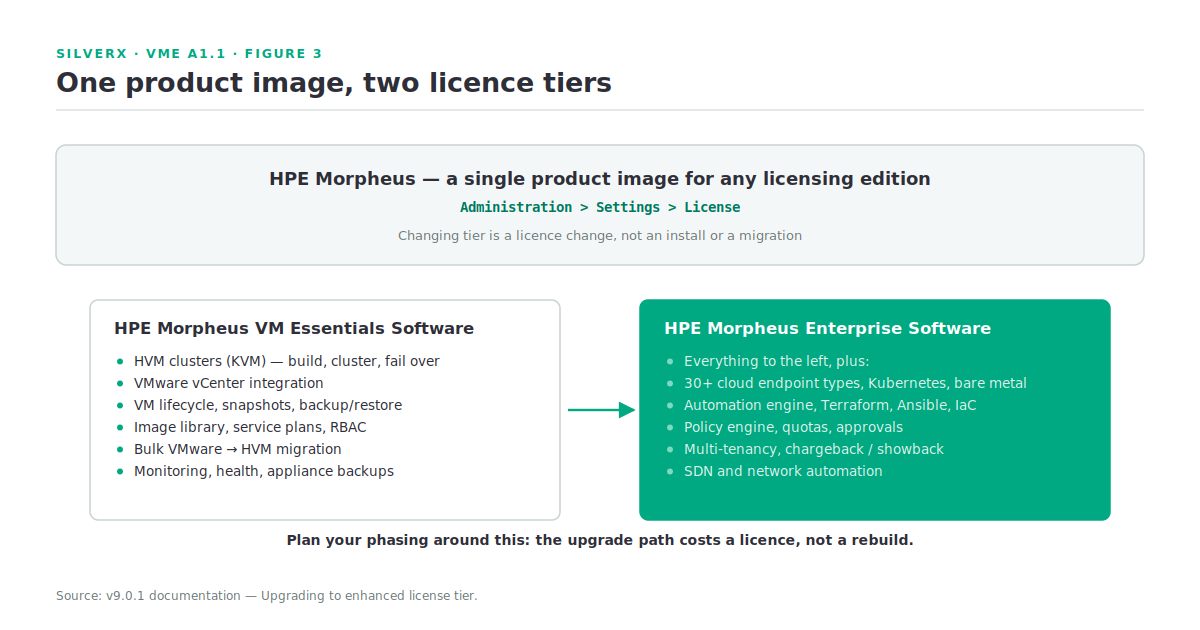
It’s one product image, two licences. HPE Morpheus ships as a single product image for any licensing edition; elevating from VM Essentials to HPE Morpheus Enterprise Software is a licence change under Administration > Settings > License — not a migration. That is genuinely unusual and it changes how you should phase a deployment. It also means feature lists blur between the two: always check which tier a feature belongs to before you promise it.
Deployment isn’t in the user manual. Installation and initialisation live in the separate HPE Morpheus VM Essentials Deployment Guide. Don’t go looking for it in the v9.0.1 documentation — it isn’t there.
AppArmor, not SELinux. On Ubuntu, guests are confined by AppArmor, and it shows up in real configuration work — the SR-IOV networking section has its own AppArmor steps. If your runbooks are RHEL-shaped, they’ll need translating.
Bulk VMware migration has a stated ceiling. The current guidance is to migrate no more than 20 VMs at a time, VMs power down for the transfer, RDMs aren’t supported, and attached ISOs will fail the migration. The docs flag these as first-release constraints likely to improve — [VERIFY] against the release notes for whatever build you’re deploying, since this is exactly the kind of limit that moves.
The daily sync is a day long. HVM clusters run a short sync every few minutes and a daily sync once nightly. If something you changed outside VME hasn’t appeared, check which sync owns that data before you open a case.
Key takeaways
- VM Essentials is HVM (KVM plus a real clustering layer) plus a manager appliance — evaluate them together or not at all.
- HCI layout needs three hosts (Ceph); external-storage layouts don’t.
- The cluster’s membership and fencing plumbing is standard Linux HA — Corosync, pcsd, DLM — which is good news for troubleshooting.
- You own the OS, networking, and external storage prep. 10 Gbps + jumbo frames is the floor for clustered storage.
- vCenter integration means VME can manage your existing estate before you migrate anything.
- VM Essentials and Morpheus Enterprise are the same image, different licence — a fact that should shape your phasing.
What’s next
Next in this track: A1.2 — Inside HVM: the Hypervisor Architecture. We go a layer down into what’s actually running on an HVM host — the KVM/QEMU/libvirt stack underneath, the agent, the OVS data path, and how a cluster’s state is held — so the install and cluster-build posts in module A2 have something solid to stand on.
And Yes, HPE has build single poupose Built ISO required to Install Hypervisor, so what you read away has been condensed to Single ISO, but it’s good Idea to know how it all works.
Pingback: It’s just KVM” is half an answer – silverX.org