Environment for the examples below: Ubuntu 24.04 LTS (Noble), which ships libvirt 10.0 and QEMU 8.2. Install the stack with sudo apt install qemu-kvm libvirt-daemon-system libvirt-clients bridge-utils virtinst, run sudo systemctl enable --now libvirtd, and add yourself to the libvirt and kvm groups so you’re not typing sudo for every action. Confirm versions with virsh version. One thing to file away now: Ubuntu confines guests with AppArmor, not SELinux — which matters in the gotchas below. Adjust paths and OS variants to your setup.
The reality of modern virtualization
If you’ve spent your career deploying infrastructure through polished, proprietary management GUIs, dropping into a bare Linux shell to troubleshoot a hypervisor can feel like flying blind. But as the industry shifts toward infrastructure-as-code and diversified hypervisor strategies, hiding behind the abstraction layer is no longer an option.
Strip away the orchestration overlays and a large share of the modern data center is running on KVM. Whether you’re building multi-cluster environments or trying to escape vendor lock-in, understanding how the underlying stack schedules compute and handles storage is what separates operators from people who just click “Deploy.” This post looks under the hood — no marketing fluff, just the mechanics of how KVM builds, runs, and manages virtual machines on a Linux host.
By the end, you should be able to explain the KVM/QEMU/libvirt split, reason about how vCPU and memory map onto the host, pick the right disk format, understand why clustered storage needs a lock manager, and provision and manage a VM entirely from the CLI.
The holy trinity: KVM, QEMU, and libvirt
When people say “we run KVM,” they usually mean a stack of three distinct components. KVM on its own doesn’t emulate a full machine — it needs partners.
- KVM (Kernel-based Virtual Machine) — a Linux kernel module (
kvm.ko) that exposes the CPU’s hardware virtualization extensions (Intel VT-x or AMD-V) to user space. It effectively turns the Linux kernel itself into a bare-metal hypervisor. - QEMU — KVM provides the engine; QEMU builds the car. It’s a user-space emulator that presents virtual hardware to the guest: disk controllers, NICs, USB hubs. Accelerated by KVM, QEMU runs guest code at near-native speed.
- Libvirt — driving QEMU directly via command-line arguments is punishing at scale. Libvirt provides a unified API, a daemon (
libvirtd), and tooling (virsh) to manage VMs, storage, and networking consistently.
Anatomy of a KVM guest: vCPU and memory
The most useful mental model for anyone new to KVM is this: a virtual machine is just a Linux process.
Boot a VM, run top or ps aux on the host, and you’ll see a qemu-kvm (or qemu-system-x86_64) process. The guest OS and everything in it runs inside that single process.
vCPU scheduling
Because the VM is a process, a virtual CPU is just a thread scheduled by the host. Provision a VM with 4 vCPUs and QEMU spawns 4 threads; the Linux Completely Fair Scheduler (CFS) then places those threads on physical cores.
This is where host-level control matters. On high-core-count silicon — the Intel Xeon 6 (6500/6700-series) parts that ship in the current HPE ProLiant Gen12 line, for instance — you can use standard Linux cgroups, CPU affinity, and NUMA pinning to control exactly where those vCPU threads execute, keeping a guest’s compute and memory on the same NUMA node and cutting cross-node latency. There’s no proprietary scheduler to fight; it’s the same tooling you’d use to tune any Linux workload.
Guest memory
Guest RAM is just anonymous memory allocated to the QEMU process, so it inherits the host kernel’s memory management: swapping, transparent/huge pages, and Kernel Same-page Merging (KSM) are all handled by Linux, not a bespoke hypervisor memory manager. For dense consolidation, huge pages in particular are worth configuring deliberately rather than leaving to defaults.
Storage: formats and the clustered-filesystem problem
Storage is usually where KVM deployments get complicated. Two virtual disk formats cover most cases:
| Feature | raw | qcow2 |
|---|---|---|
| Performance | Highest (near bare-metal) | Excellent; slight metadata overhead |
| Allocation | Thick by default | Thin by default |
| Snapshots | Not native | Internal and external supported |
| Best fit | High-I/O databases, clustered filesystems | General purpose, templates, backup chains |
Why shared storage needs a lock manager
Local qcow2 files are great for standalone hosts. But the moment you want HA — say, a cluster of HPE ProLiant DL380 Gen12 nodes sharing block storage so a VM can restart elsewhere when a host dies — you have a coordination problem.
If two hosts write to the same disk image at once with no coordination, you will corrupt it. That’s why HA KVM deployments layer on a clustered filesystem (GFS2 or OCFS2) or cluster-aware LVM (lvmlockd). These use a distributed lock manager (DLM) so only one host holds a write lock on a given image at a time. And if a node crashes, the cluster must fence it — isolate and power it off — before releasing its locks, so another node can safely take over. Fencing isn’t optional; skip it and a split-brain will eat your data.
Provisioning from the CLI
Here’s how it comes together. Assuming a prepped host with your NVIDIA (Mellanox) fabric trunked to a Linux bridge (br0), the cleanest way to stand up an Ubuntu guest is to import the official cloud image rather than sit through an interactive ISO install:
# Grab the official Ubuntu 24.04 (Noble) cloud image as a base
wget https://cloud-images.ubuntu.com/releases/24.04/release/ubuntu-24.04-server-cloudimg-amd64.img \
  -O /var/lib/libvirt/images/noble-base.img

# Make a per-VM copy and grow it to 40G
cp /var/lib/libvirt/images/noble-base.img /var/lib/libvirt/images/web-app-01.qcow2
qemu-img resize /var/lib/libvirt/images/web-app-01.qcow2 40G

# Import it as a running VM; --cloud-init seeds the default login
virt-install \
  --name web-app-01 \
  --ram 4096 \
  --vcpus 2 \
  --os-variant ubuntu24.04 \
  --disk /var/lib/libvirt/images/web-app-01.qcow2,format=qcow2 \
  --import \
  --network bridge=br0,model=virtio \
  --cloud-init \
  --graphics none \
  --console pty,target_type=serial
Once it’s up, you manage it with virsh:
# List running VMs
virsh list

# Dump the domain XML — this is your source of truth
virsh dumpxml web-app-01 > web-app-01-backup.xml

# Graceful ACPI shutdown
virsh shutdown web-app-01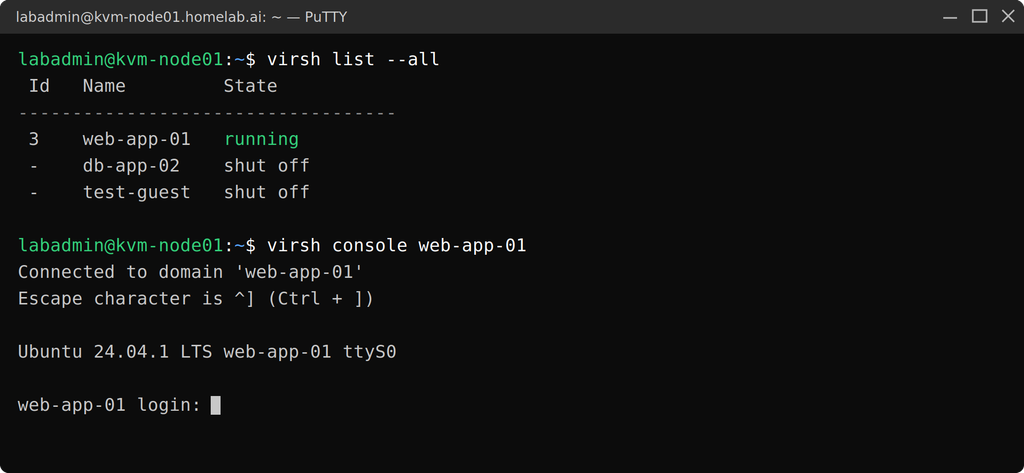
Gotchas from the trenches
You don’t run infrastructure without collecting a few scars. Two traps catch people repeatedly.
1. AppArmor blocks your storage
The single most common KVM support call on Ubuntu: someone moves disk images to a non-default directory (say /mnt/san_storage/) and the VM refuses to start with “Permission denied” — even with wide-open chmod 777. The culprit is AppArmor. On Ubuntu, libvirt auto-generates a per-VM AppArmor profile (via virt-aa-helper) every time a guest starts, and that profile only permits the disk paths it can resolve from the domain XML. A raw image sitting in an unexpected location isn’t in the profile, so QEMU gets denied regardless of Unix permissions.
The clean fix is to make the location something libvirt understands — define it as a proper storage pool, so virt-aa-helper adds it to the profile automatically:
virsh pool-define-as san_storage dir --target /mnt/san_storage
virsh pool-build san_storage
virsh pool-start san_storage
virsh pool-autostart san_storage
If you genuinely need a raw custom path allowed for every guest, add it to the QEMU-wide abstraction /etc/apparmor.d/abstractions/libvirt-qemu and reload AppArmor — editing an individual VM’s profile won’t survive, because virt-aa-helper regenerates it on each start. Reaching for apparmor=0, or setting security_driver = "none" in qemu.conf, is the wrong instinct: you’re switching off a security control to paper over what is really a path-resolution problem.
2. Stale locks on shared storage
With the default lock manager, virtlockd, libvirt takes POSIX fcntl advisory locks on the image; those are tied to the process and released when it dies, so they rarely go stale. The harder case is sanlock, used for shared-storage HA, which takes timed disk leases. If a host loses access to the lockspace — a fabric blip, a fencing failure — the VM can show as powered off while its lease is still held, and a restart elsewhere fails until the lease times out (and sanlock’s watchdog may reset the stuck host first). Sanlock’s default io_timeout is 10 seconds, and by its internal math it will move to kill a QEMU process stuck on I/O after roughly 80 seconds by default — both configurable, and worth tuning up if your lockspace lives on a clustered filesystem like GFS2, where fencing and journal recovery can legitimately block I/O for a while. The rule regardless of the numbers: never force-clear a lock until you’ve positively confirmed the VM is dead on every other node. Clearing a live lease is how you turn a blip into corruption.
Key takeaways
- It’s just Linux. KVM leverages standard processes, the CFS scheduler, and native memory management rather than reinventing them — so your existing Linux tuning skills transfer directly.
- The stack has three parts. KVM is the kernel engine, QEMU provides the virtual hardware, libvirt gives you the management layer.
- Storage dictates architecture. Your choice between local, shared block, and clustered storage determines your HA model and your locking complexity — plan fencing from day one.
What’s next
Raw KVM is powerful, but you rarely run enterprise infrastructure by typing virsh by hand. This open-source stack is the foundation under platforms like Red Hat OpenShift Virtualization, Nutanix AHV (a heavily customized KVM), and Proxmox VE.
In the next post I’ll move up the stack to HPE Morpheus VM Essentials — HPE’s KVM-based virtualization platform, whose HVM hypervisor is built on the exact foundation covered here. We’ll look at how it layers enterprise cluster management, high availability, and live migration on top of raw KVM, and where it lands against VMware and the other KVM-based platforms.
Pingback: What Is HPE Morpheus VM Essentials Software? – silverX.org