Fifth post in the HPE Zerto Software track. Z-4 got a single VM booting on the other platform. This one is about what happens when “recover the environment” means dozens of VPGs that have to come up in the right order, and someone has to decide, minutes into an incident, whether to keep what just failed over or throw it away.
A VPG is not a DR plan
Every previous post in this track has talked about the Virtual Protection Group as the unit of recovery — the thing with a journal, a boot order, a set of checkpoints. That’s true, and it’s also incomplete. A real environment isn’t one VPG. It’s a database tier, an app tier, a web tier, each its own VPG for the sensible reason that they have different RPO requirements and different owners — and a disaster doesn’t care about that boundary. When the protected site goes down, it takes all of them at once, and someone has to bring all of them back in an order that makes sense, ideally without SSH-ing into the Zerto UI and clicking Failover on each VPG in turn while everyone waits.
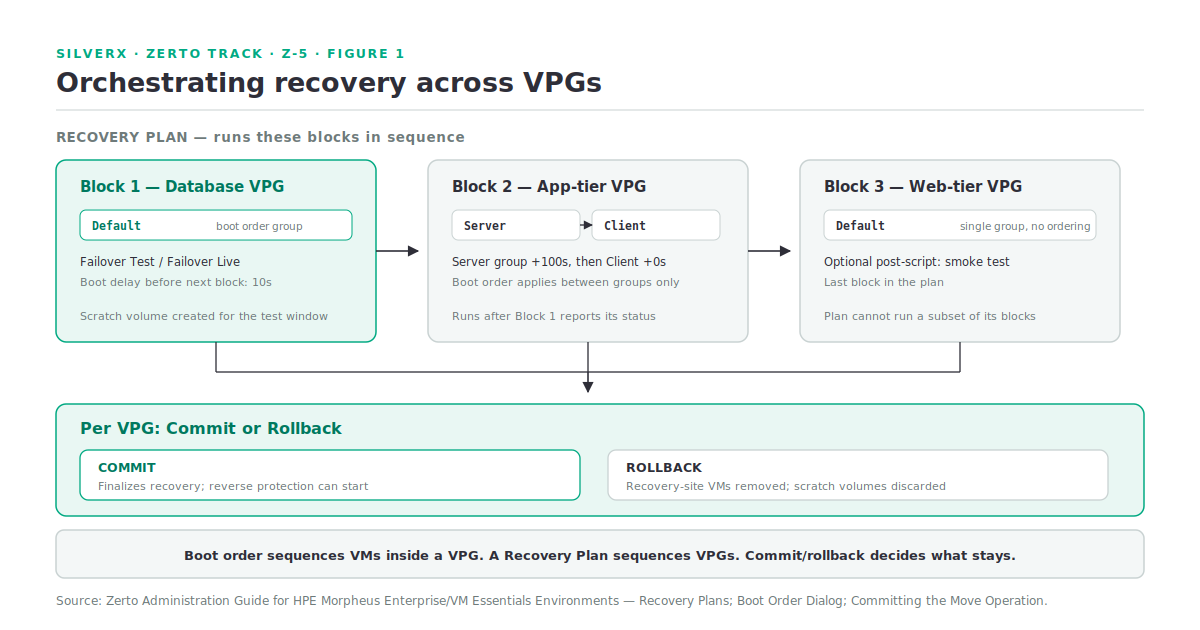
HPE Zerto Software (Zerto) has two mechanisms for this, at two different scopes. Boot order decides start-up sequencing inside a single VPG. Recovery Plans decide execution order across multiple VPGs. Neither is optional infrastructure — they’re the difference between a demo and a runbook.
Boot order: sequencing inside a VPG
Within one VPG, VMs don’t start in any particular order by default. If a VPG holds a database VM and two application VMs, and the application VMs come up before the database is listening, you get an application that’s technically running and functionally broken — which, in the middle of a failover, is a worse debugging problem than the outage itself.
The mechanism is groups, not individual VMs:
- Every VM starts in the Default group.
- You create additional groups and move specific VMs into them.
- Boot order applies between groups, not within a group — VMs in the same group start together, with no ordering guarantee among them.
- Each group carries a boot delay: the wait, in seconds, before the next group starts.
The documented example is exactly this shape: Default, Server, and Client groups, with delays of 10, 100, and 0 seconds respectively. The Default group’s VMs start together; 10 seconds later, Server starts; 100 seconds after that, Client starts. If your database needs two minutes to finish crash recovery before the application tier should even try to connect, that’s the Server-group delay, not a script someone remembers to run by hand.
This applies “when machines are started up on recovery, for example, after a move operation” — so it’s live during Failover Live, Failover Test, and Move alike, not just one of them.
Recovery Plans: orchestrating across VPGs
A Recovery Plan is a predefined, automated workflow for orchestrating the recovery of multiple VPGs through a single action. This is the layer above boot order — where boot order sequences VMs inside one VPG, a Recovery Plan sequences VPGs (and, optionally, scripts) against each other.
The ZVM Appliance for HVM’s own supported/not-supported feature table (covered in Z-4) doesn’t list Recovery Plans either way, and Recovery Plans are documented as manageable via REST API — which HVM in 10.9 doesn’t support. Confirm Recovery Plan availability and its UI-only status on HVM against current documentation before you build a runbook around it.
What a Recovery Plan actually contains:
| Element | What it does |
|---|---|
| VPG blocks | One or more VPGs, added to the plan, run according to plan order |
| Script blocks | Pre-scripts or post-scripts, positioned between VPG blocks |
| Plan type | Standard (recovers to the latest checkpoint) or Cyber (recovers to the latest clean checkpoint the system detects — the ARE-licensed ransomware use case) |
The plan type can’t be changed after creation — a Standard plan and a Cyber plan are built separately, which is worth knowing before you commit to one on a workload that might need both postures.
What a Recovery Plan can and can’t do
It runs Failover Test or Failover Live across every VPG in the plan, in the order the blocks define, with pre- and post-scripts slotted in where you place them. Progress shows per block and per VPG, and the detailed log lands under Tasks as “Recovery Plan Execution.”
It has real limitations, and they matter for how you design plans:
- No abort once it’s running. There’s Pause and Resume, but nothing that stops a plan mid-execution and walks it back.
- A plan runs all its VPGs — always. You cannot run a subset. If you need a smaller-scope drill, build a smaller plan.
- No native wait step. Want a timed pause between blocks that isn’t a VPG operation? That’s a script acting as a timer, not a plan feature.
Pause behavior is specific and worth internalizing before you rely on it under pressure: pausing doesn’t interrupt the step in progress. The current VPG operation or script finishes, then the plan goes to Paused. Nothing partial gets rolled back by pausing — it’s a stop-between-steps control, not an abort.
The best-practice guidance in the documentation is blunt and correct: group VPGs by logical criteria — application, business unit, or RTO tier — not by whatever happened to be convenient when the VPGs were created. A plan is only as useful as the grouping decision behind it, and that decision is much cheaper to make once, upfront, than to redo after your first real drill exposes a wrong grouping.
Commit or rollback: the decision that actually matters
Boot order and Recovery Plans get everything running. Commit and rollback decide whether what’s running stays. This is true for both Failover Live and Move, and it’s the single most consequential click in the whole recovery workflow.
The mechanics are the same shape for both operations:
- The operation starts. VMs come up at the recovery site, using scratch volumes — thin-provisioned disks, one per VM, created automatically for the duration of the test/pre-commit period, and not editable once the operation has started.
- During this window, you have a Commit Policy — set per operation, in one of three modes: None (fully manual — nothing happens automatically), Commit (auto-commits after a configured timeout, up to 1440 minutes / 24 hours), or Rollback (auto-rolls-back after the same kind of timeout).
- You commit or roll back either from the Tasks popup, from Monitoring, or from the specific VPG’s commit/rollback icon.
Commit finalizes the recovery. The powered-off source VMs get cleaned up, and — if reverse protection was configured — the newly-live VMs at the recovery site start being protected back toward the original site.
Rollback removes the VMs created at the recovery site and, per the documentation, if the source VM was powered on before the operation started, it stays powered on. Nothing is retained from the pre-commit period; the scratch volumes exist specifically so this can be undone cleanly.
One rule that changes the calculus if things go partly wrong: if some VMs in a VPG fail to recover properly and Auto-Commit was selected, the commit policy silently changes to None. Zerto won’t auto-commit a partial success. You get a manual decision instead — which is the safer default, but it means “I set Auto-Commit and walked away” is not a strategy for a VPG where individual VM failure is plausible.
Non-disruptive failover testing
This is the payoff of everything above, and it’s worth being precise about what “non-disruptive” means here, because Zerto gives you two distinct ways to test recovery, with different tradeoffs:
Failover Test. Runs entirely against a separate test network. Production VMs are untouched and keep replicating throughout — new checkpoints keep being written during the test. Nothing from the test period is kept; at the end, test VMs are powered off and removed. This is the recommended default for routine validation, precisely because it’s genuinely non-disruptive to production.
Uncommitted Move, rolled back. A different technique for a different question. Where a Failover Test proves replication and boot integrity in isolation, an uncommitted Move — commit policy set to None or Rollback — actually cuts the workload over to the recovery site’s production network, lets you validate against real traffic, and then rolls back to the original site. This is disruptive in the sense that the workload actually moves and actually stops running at the source for the duration — but it’s the only one of the two that tests the thing people actually mean when they say “can we really run this in the DR site,” because a Failover Test’s isolated network never proves the production network path works.
The documentation is direct about why these are different tools: a Move operation shuts down the protected VMs as its first step (to guarantee data integrity), while a Failover operation assumes the protected site is already gone and doesn’t attempt to shut anything down — which is also why running a live test using a Failover operation (rather than the dedicated Failover Test) requires you to manually shut down the VMs being tested first, to avoid a split-brain where two copies of the same application are live at once.
Put simply: use Failover Test for the DR drill you run every quarter. Use an uncommitted Move for the one time a year you need to actually prove the recovery site under real load, and are prepared to shut the source down to do it.
Gotchas and caveats
Boot order is between groups only. There’s no ordering guarantee for VMs inside the same group — if two VMs in Default genuinely need a strict start order, they need to be in different groups.
A Recovery Plan runs all-or-nothing. No partial execution, no abort mid-run. Design plans at the granularity you’d actually want to execute, not the granularity that was convenient to build.
Auto-Commit silently downgrades to None on partial failure. Don’t assume unattended commit is safe for a VPG where any individual VM could plausibly fail to recover.
Recovery Plans’ status on HVM in 10.9 is unconfirmed here. against current documentation of HPE — the feature depends on REST API-adjacent tooling that the HVM appliance doesn’t support in this release, per Z-4.
Failover Test and uncommitted Move answer different questions. A green Failover Test does not prove your production network path or your real load profile — only an uncommitted Move against the live recovery network does that.
Scratch volumes are locked once the operation starts. You cannot change the datastore mid-test. Get storage sizing right for the test window before you kick it off, not during.
Everything here is version-specific, same as every post in this track. Recovery Plan behavior, commit policy limits, and boot order semantics against the Zerto version actually deployed — this is an area with active development.
Key takeaways
- Boot order sequences VMs within a VPG, by group, with a configurable delay between groups — no ordering within a group.
- Recovery Plans sequence multiple VPGs through one action, with Standard or Cyber plan types, script blocks, and per-block progress — but no abort and no partial-plan execution.
- Commit and rollback are the real decision point: Commit finalizes and (optionally) reverse-protects; Rollback discards everything from the test/pre-commit window using disposable scratch volumes.
- Auto-Commit silently becomes manual (None) if any VM in the VPG fails to recover properly — Zerto won’t auto-commit a partial result.
- Failover Test is the genuinely non-disruptive drill; an uncommitted Move is the disruptive-but-real test that actually proves the recovery site under production network conditions.
- Group VPGs into Recovery Plans by application, business unit, or RTO tier — the grouping decision is the plan’s whole value.
What’s next
Next in this track: Z-6 — Ransomware Resilience and Anomaly Detection. What Zerto’s Cyber Recovery Plan type and clean-checkpoint detection actually do, why Ransomware Detection specifically isn’t available on HVM yet (Z-1), and what that gap means for a ransomware runbook built on this platform today.
Sources: Zerto Administration Guide for HPE Morpheus Enterprise/VM Essentials Environments